3-Newcomer
August 11, 2025
Solved

Why does it make me "Browse for image" to copy and paste images within the same worksheet

  • August 11, 2025
  • 1 reply
  • 1032 views

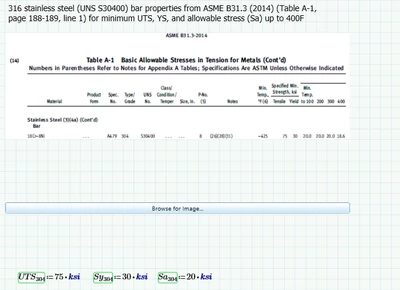
When I am working I screensnip and paste sources I am using for my calculations on the side of the document for easy reference. If I try to copy them further down the same worksheet or into a different worksheet often the image doesn't paste and instead I get a "Browse for Image' button. THE IMAGE IS BEING COPIED FROM THE SAME WORKSHEET!! WHAT DO YOU MEAN???


It doesn't always happen, which makes it even more frustrating!!


The problem is that the image is a screensnip and may have been taken by someone else using the document or not saved to my computer, so there is no file for which to browse. 


I am kind of new to mathcad, so maybe there is something I am doing wrong, but this is a very aggravating problem to have. 


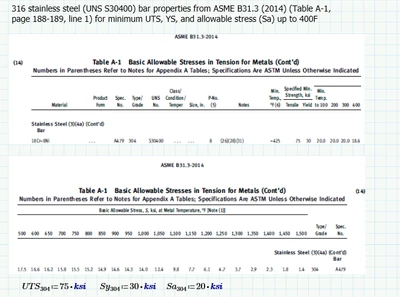
Attached is an example of what I am talking about. Some of the images pasted, but not all of them.

Also some screensnips.


AP_12141614_0-1754940940224.pngAP_12141614_1-1754940959405.png


Any help is appreciated!!

Best answer by Werner_E

I can understand that this is very annoying and a waste/steal of time.
Not sure if opening a case at official PTC support would help as they sure will ask for a way so that they could reproduce the problem. On the other hand, it can't hurt to contact support.

If copy and paste from Prime to another program works you could save the pictures in an image editing software as a backup so that you at least don't have to make them all over again from scratch. 

1 reply

25-Diamond I
August 11, 2025

Sure copy & paste is severely broken (or implemented in a very undesirable way) in Prime, but I had no problem to copy & paste the image you seem to have experienced a problem

Werner_E_0-1754941648295.png

So I fear I can't help with the problem.

I simply cut the pic from its first occurrence via Ctrl-C and pasted it via Ctrl-V at the position you see in the screenshot and it worked as it should.

I also tried to cut and paste all regions in "This is what I copied" and it worked well, too.

Is there a worksheet and procedure to follow which fails reproducibly?

3-Newcomer
August 11, 2025

Thanks for the quick reply!

No, there isn't anything that always fails. Sometimes If I wait like 30 minutes, or close a document, or open a new document it works again. Sometimes not. I can usually make it work eventually, but it slows my workflow considerably and is really annoying. 

Sometimes the only solution is to re-locate those references and take new screensnips which takes the longest and should be unnecessary.

Werner_E25-Diamond IAnswer
25-Diamond I
August 11, 2025

I can understand that this is very annoying and a waste/steal of time.
Not sure if opening a case at official PTC support would help as they sure will ask for a way so that they could reproduce the problem. On the other hand, it can't hurt to contact support.

If copy and paste from Prime to another program works you could save the pictures in an image editing software as a backup so that you at least don't have to make them all over again from scratch.