
1-Visitor
March 5, 2011
Solved

WRITECSV not working

  • March 5, 2011
  • 3 replies
  • 6728 views

I have MathCAD version 15.0 and the new WRITECSV function does not appear to work. I made a simple matrix (M) and tried to write the file using WRITECSV("data.csv",M) and I get the error "this value must be a string" on the M. I tried changing M to "M" and then I get the error "The seond parameter must be a matrix", which I expect since, yes, M is supposed to be a matrix but WRITECSV doesn't accept a matrix! What's wrong? Has anyone else had this problem?
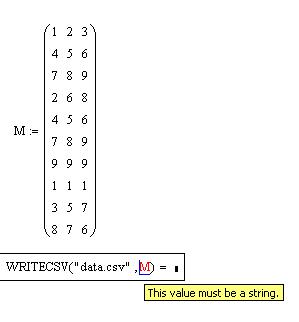
writecsv1.JPG

Best answer by MagnusEklund

Just switch the two arguments and it works.

Regards,

Magnus

3 replies

23-Emerald V
March 5, 2011

Todd Umstot wrote:

I have MathCAD version 15.0 and the new WRITECSV function does not appear to work. I made a simple matrix (M) and tried to write the file using WRITECSV("data.csv",M) and I get the error "this value must be a string" on the M. I tried changing M to "M" and then I get the error "The seond parameter must be a matrix", which I expect since, yes, M is supposed to be a matrix but WRITECSV doesn't accept a matrix! What's wrong? Has anyone else had this problem?

Yes. I see the problem as well.

Stuart

1-Visitor
March 5, 2011

This seems to be a bug.

In the help pages it says M is a matrix of values to write to the specified file for a WRITECSV function, but it says M is a matrix of scalars for the WRITEEXCEL function, does anyone know the difference?

Mike

23-Emerald V
March 5, 2011

Mike Armstrong wrote:

This seems to be a bug.

In the help pages it says M is a matrix of values to write to the specified file for a WRITECSV function, but it says M is a matrix of scalars for the WRITEEXCEL function, does anyone know the difference?

Mike

Seeing as the CSV doesn't appear to work, Mike, there is no way of telling by experimentation!

However, I'm guessing that (for some strange reason), the csv should allow strings in M but the xlsx doesn't permit anything but a number (scalar in Mathcad terms) ... except that 'scalar' in Mathcad should include complex numbers and WRITEEXCEL doesn't seem to allow that, so just reals.

Stuart

1-Visitor
March 5, 2011
Seeing as the CSV doesn't appear to work, Mike, there is no way of telling by experimentation!

However, I'm guessing that (for some strange reason), the csv should allow strings in M but the xlsx doesn't permit anything but a number (scalar in Mathcad terms) ... except that 'scalar' in Mathcad should include complex numbers and WRITEEXCEL doesn't seem to allow that, so just reals.

Before spending a little time on this forum I struggled to come to terms with Mathcad terminology.

I have just searched through the help files and there doesn't seem to be anything in there to help. How is a new user meant to know the difference between scalars, values ect?

Mike

12-Amethyst
March 5, 2011

Just switch the two arguments and it works.

Regards,

Magnus

23-Emerald V
March 5, 2011

Magnus Eklund wrote:

Just switch the two arguments and it works.

Regards,

Magnus

Ah. Documentation error and it should have been in line with the WRITEEXCEL arg list.

And another doc error ... WRITEEXCEL will write strings.

Stuart