

1-Visitor
November 17, 2022
Solved

XMCD Conversion/Converter - No License Error

  • November 17, 2022
  • 1 reply
  • 3831 views
I am attempting to convert .xmcd files, using PTC Mathcad Prime 8.0.0.0 XMCD, MCD Converter. When I attempt to make the conversion, I receive a "No License" error in the MCDX Status dialog. I just downloaded Mathcad Prime 8.0.0.0. The files are Mathcad 15, and I do not have Mathcad 15 on my computer.
Best answer by VladimirN

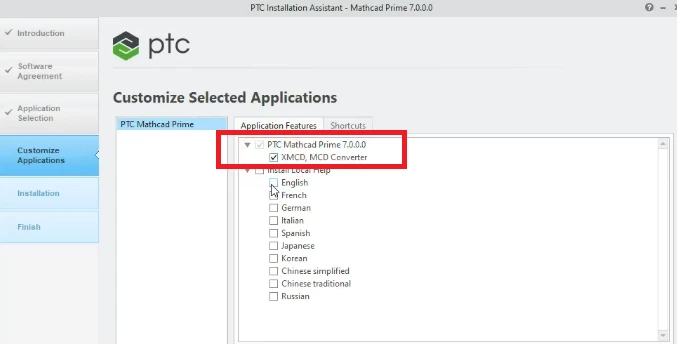
Starting from the 7th version of Mathcad Prime you can use the built-in converter (before the installation process, it is necessary to select it among the installation components).


Pic_1.png


1 reply

VladimirN24-Ruby IIIAnswer
24-Ruby III
November 17, 2022

Starting from the 7th version of Mathcad Prime you can use the built-in converter (before the installation process, it is necessary to select it among the installation components).


Pic_1.png


1-Visitor
November 17, 2022

I selected that option during my installation, and the Resources -> References -> Migration Guide within Mathcad Prime 8.0.0.0 directs me to use the XMCD, MCD Converter to convert the files. Is there some other way to access them in Prime 8.0.0.0?

23-Emerald IV
November 17, 2022

You are (most) probably using Prime 8 in Express mode. Quick check...Does the mean function work?

If you type

          mean(2,3=

does it show:

LucMeekes_1-1668721788245.png

or does it show:

LucMeekes_0-1668721763448.png

In the first case you have a licensed Prime,

In the second case you have Prime Express. Prime Express is the free incarnation of the software. It allows much, but not everything: No programming, no symbolics, no solve-blocks, no conversions and also premium features such as mean() and stdev() are not supported.

You can obtain a free license to use Prime to its full functionality for a duration of 30 days. See here: https://community.ptc.com/t5/Mathcad-Installation/How-to-Acquire-30-days-License-for-Mathcad-Prime-7-0/m-p/721613#M413  (The process for Prime 8 should be virtually the same as for Prime 7).

If you do have a licensed Prime, and the converter (still) isn't working, you should contact PTC product support.


Success!

Luc