

1-Visitor
July 8, 2021
Question

G3 surface condition for a nose cone - help

  • July 8, 2021
  • 3 replies
  • 1716 views

Hi there,

I am trying to model a nose cone/end surface with G3 surface conditions (as shown in the image below/ZIP file of model attached). I am using PTC Creo 7.0.
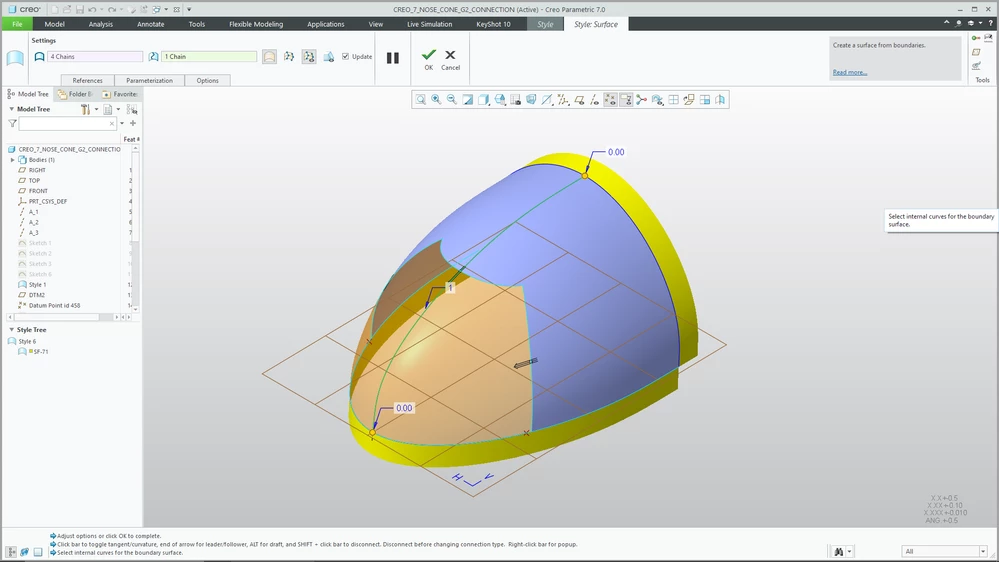
 

Nose Cone 2.png

I have sketched a number of reference lines to control the length/width/depth of my surfaces, as well as adding ribbon surfaces. All of the spines in style have G3 end conditions (including the internal influencing spline). I am seeing the error reference a lot:


"The cross curves are not connected with the same continuity as the connection"

I am not sure what this error message is referring to or how I should be modelling this feature to achieve a G3 surface? If you can help me out, I would really appreciate it!

3 replies

78finn1-VisitorAuthor
1-Visitor
July 9, 2021

Attached is the equivalent G2 nose cone. So simple...I'm not sure why the G3 version is so much more difficult to achieve?

78finn1-VisitorAuthor
1-Visitor
July 12, 2021

Has anyone on here been able to create a G3 nose cone using style? I'm beginning to think that it is a limitation of Creo, as this is an easy thing to achieve in both SolidWorks and NX. Creo seems to make every operation about 3 times as much work lol 🙂

16-Pearl
July 12, 2021

You are actually in the wrong group. This is Creo Elements/Direct Modeling.  Direct modeling can create surfaces, and then connect them to create a solid.  It can use parametric and formulas, you can also do it free with just sketches.