

1-Visitor
November 5, 2025
Solved

Warning popup when editing text

  • November 5, 2025
  • 2 replies
  • 396 views

Using Creo Elements Direct Modeling Express 9.0


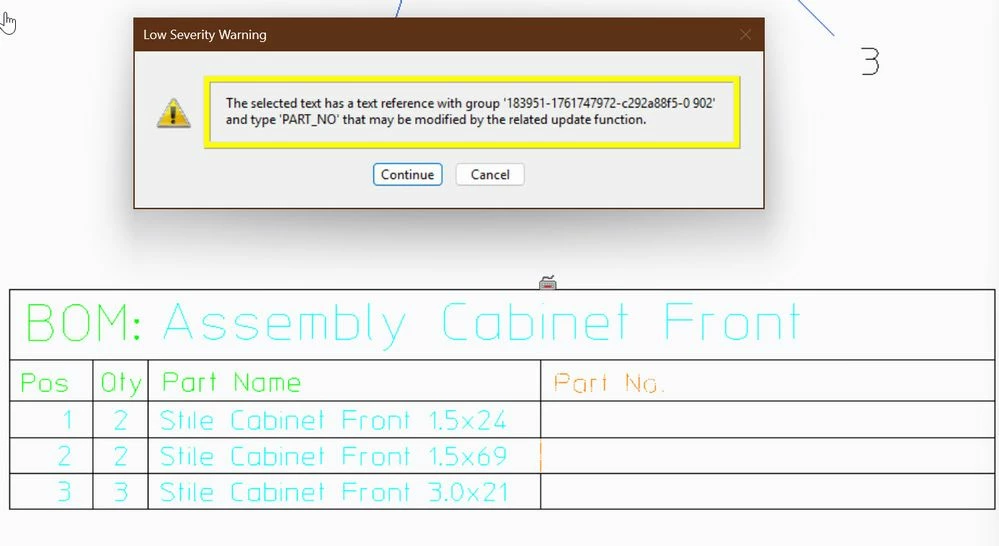
New to Creo Direct Express and creating first drawings of parts and assemblies. Each time I edit the text on a drawing (title blocks, BOM's etc) a msg is displayed similar to the the one attached.

What does this mean? Is there another way I should be editing these items?

A second question is when creating the BOM's using the scan, table, draw method, why doesn't the part number populate?


Thanks for any feedbackSeverity Warning.jpg
Best answer by der_Wolfgang

> What does this mean?

In general:  you see those warnings when editing texts in Annotation when then text's content is calculated automatically.


In this case the Part Name of one item which is part of the BOM. The Name is inquired from the 3D Object which is part of you assembly.. If you think about the column 'Quantity' it s more obvious that this value is calculated.  

You can customize your BOM e.g. by adding a new columns / write your own functions to get information of the item listed in your BOM (e.g. an order Number). But that's not for beginner.

You see the same/similar message when you edit some texts of the title block.  example : the sheet number . This is filled in automatically. 

All those texts are handled as 'text references' in Annotation.  Those are texts getting their contents automatically by calling some functions.

> Is there another way I should be editing these items?
you should not edit those texts manually. 

More information can be found in the Modeling help:

2 replies

16-Pearl
November 6, 2025

I'm not sure but if this can help.


The BOM has been filled automatically by Modeling Express. If you want to change the part name, then rename the part and update the BOM.


The part number comes from Model Manager or Windchill. Modeling Express cannot work with these two systems.

13-Aquamarine
November 8, 2025

> What does this mean?

In general:  you see those warnings when editing texts in Annotation when then text's content is calculated automatically.


In this case the Part Name of one item which is part of the BOM. The Name is inquired from the 3D Object which is part of you assembly.. If you think about the column 'Quantity' it s more obvious that this value is calculated.  

You can customize your BOM e.g. by adding a new columns / write your own functions to get information of the item listed in your BOM (e.g. an order Number). But that's not for beginner.

You see the same/similar message when you edit some texts of the title block.  example : the sheet number . This is filled in automatically. 

All those texts are handled as 'text references' in Annotation.  Those are texts getting their contents automatically by calling some functions.

> Is there another way I should be editing these items?
you should not edit those texts manually. 

More information can be found in the Modeling help:

Community Manager
November 12, 2025

Hello @BM_14348853,


It looks like you have some responses from some community members. If any of these replies helped you solve your question please mark the appropriate reply as the Accepted Solution. 
Of course, if you have more to share on your issue, please let the Community know so other community members can continue to help you.

Thanks,
Vivek N.
Community Moderation Team.