13-Aquamarine
February 17, 2022
Solved

Creo View Markup incremental save?

  • February 17, 2022
  • 1 reply
  • 2084 views

One of our checkers had a question that I don't know the answer to.  

"I do NOT know the technique to “Save” my work in CREO View on an incremental basis;  my (now retired) instructor didn’t know either  -  so, I have to check an entire drawing in one session, no matter how complex the drawing is … Not a problem for smaller drawings, but larger ones, it becomes a tense race."


So is there a way for the checker to save his markup work locally and pick up the checking again the next day and then submit it to windchill after he as finished. We would kind of hate to have multiple markups in Windchill that the user would have to look though to fix the drawing. 
Best answer by lhoogeveen

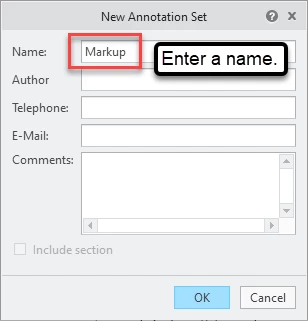
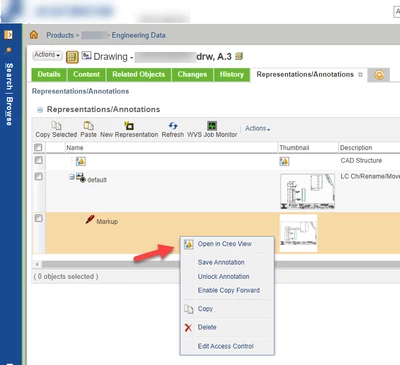
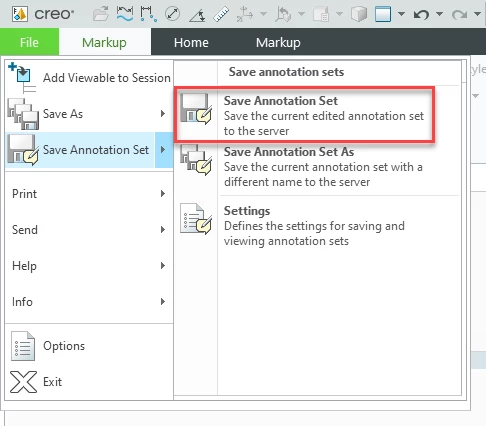
I don't know about doing it locally... but you can save Creo View 'Save Annotation Sets' (aka markups) to Windchill. You can close Creo View and reopen the markup from Windchill's Representations/Annotations tab before submitting the markup to someone else. The only downside is that the user has to remember which object (DRW, PRT, ASM) they were working on and find that object again in Windchill. PTC could make tracking down saved annotations easier.


lhoogeveen_0-1645199084426.png

lhoogeveen_1-1645199167470.png

lhoogeveen_2-1645199391177.png


1 reply

17-Peridot
February 18, 2022

I don't know about doing it locally... but you can save Creo View 'Save Annotation Sets' (aka markups) to Windchill. You can close Creo View and reopen the markup from Windchill's Representations/Annotations tab before submitting the markup to someone else. The only downside is that the user has to remember which object (DRW, PRT, ASM) they were working on and find that object again in Windchill. PTC could make tracking down saved annotations easier.


lhoogeveen_0-1645199084426.png

lhoogeveen_1-1645199167470.png

lhoogeveen_2-1645199391177.png


davehaigh13-AquamarineAuthor
13-Aquamarine
February 24, 2022

Thanks I receive the following message from our checker today:


Dave  -     SUCCESS!  


How To “Incrementally Save A Redline(s)” In a CREO View, to the PDMLink Database.


  • Select The Existing Redline ICON
    • (as you previously indicated, or simply “Double Click” it)
  • (After updates/changes are made)
  • Select “Save Annotation Set As” – note, name is Greyed Out  [this is what confused me the first time I attempted this, “OK” button is active and available
  • Select OK
  • Select “Save All As PVZ” 
    • (I’m still not sure what this does, but I gave it a different name than the first one, just in case – I believe you cannot enter the same name as the previous saved version  -  this also could have been the error I got first time around)


I checked the new redline and it contained all the mark ups …..