
12-Amethyst
March 27, 2015
Question

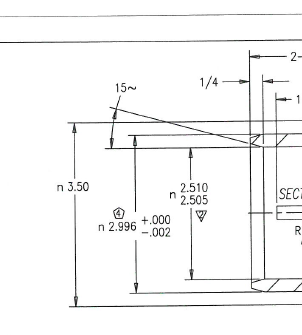
Creoview 2 or 3 changes degree and diameter symbols to tilde and "n"

  • March 27, 2015
  • 2 replies
  • 3249 views

On several of our workstations, whenever a dxf/dwg thumbnail drawing is created and viewed in Windchill 10.1, using Creoview Lite 2 or 3 (tried all revisions) the degree and diameter symbols on the screen (and in print) turn into the wrong font mapped symbol and become a tilde and a lowercase "n" -- this only happens with specific machines. Windows 7, 64bit. Others display the same symbols on the same drawings just fine. Different video cards in these PCs/laptops. Tried latest video drivers. Any ideas would be greatly appreciated. See graphic.
2 replies

1-Visitor
April 7, 2015

Looks as if the font used in the DXF is not available on the computer and a replacement font is used, which does not align with all characters.

Maybe you should start comparing, which fonts are available on the machines where it works and where it doesn't.

Here is a link to Microsoft help about how to see the available fonts: Change Windows fonts - Windows Help

1-Visitor
February 10, 2016

Tim,

Were you able to find a solution to your problem? I am having the same issue...

-Kurt

24-Ruby III
February 11, 2016

Hi,

Creo always displays diameter symbol using special font. Dimension value is displayed using default drawing font (isocpeur.ttf in my case). This "schizofrenia" can be a cause of your problem.

Suggestion: Experiment with Stroke Special Characters and UNICODE encoding options during DXF export.

MH