
1-Visitor
November 14, 2016
Question

Extrude problem in Creo Academic

  • November 14, 2016
  • 2 replies
  • 2292 views

I'm a beginner.  I trying to learn Creo so I can teach it to 5-11 Grade students in Russia.


I'm trying to make a 3D model to illustrate xyz plane concept as top, front, right concept.
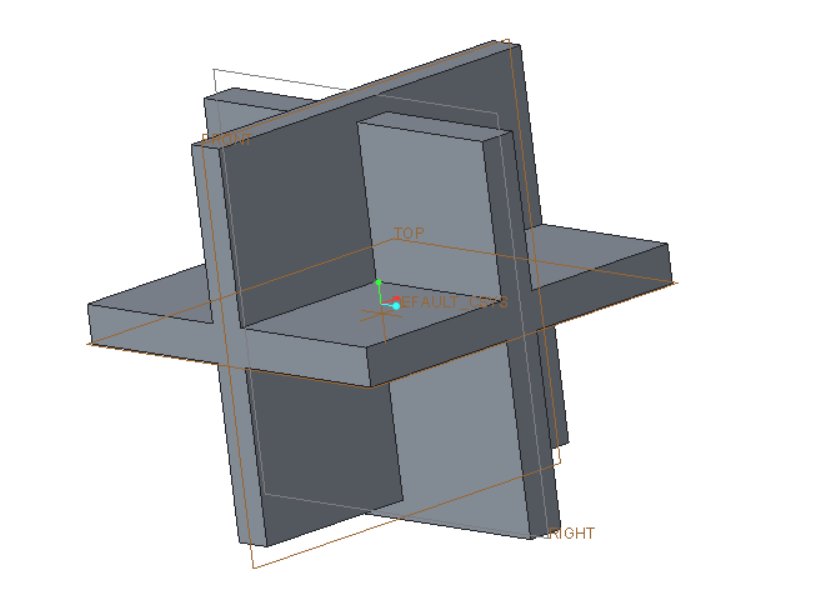
 

xyz planes.png

As you can see, the front plane is not flush with right plane.  Once I've gotten an all gray OK'ed model I can't seem to get it back into a modify mode so I can correct this mistake.

2 replies

kdirth
21-Topaz I
21-Topaz I
November 14, 2016

Not being able to open an academic version or see the model tree.  It is hard to tell how you made it.  However, as you are fairly new to CREO, have you tried selecting the feature in the tree, right clicking, and select Edit Definition.  The only other thing I can think of that would prevent editing is if the features have been locked, which is something I would not expect a beginner to know how to do.

There is always more to learn.
1-Visitor
November 14, 2016

Simply un-shade the model, & your feature dimensions will become visible again when you try to modify them. Alternatively, if you shade/render your model with edges displayed, dimensions appear when selected. I tried opening your model, it has been created using an educational version of Creo, i doubt anyone on these forum will be able to open your file.

John

torme1-VisitorAuthor
1-Visitor
November 14, 2016

That's bad news that users of commercial version of Creo can't open Academic version files.  This raises the question "Will the Academic version be able to create stl files that drive a 3D printer?"  I intend to buy an inexpensive 3D printer.  I'm looking at the Monoprice Mini which sells for about $200.  Remember I'm looking for something 5th graders can use.  They will have a computer, Creo Academic software and access to a 3D printer.

If this is an impossible idea, I'd like to know.

Monoprice.jpg

I've got my model back in the sketch mode, but I haven't figured out how to get rid of the gray color and see some dimentions.

xyz plane 2.jpg

1-Visitor
November 14, 2016

If I am understanding you problem correctly, change the display style of your model to hidden or no hidden display, & your dimensions should be visible when trying to modify.