
1-Visitor
May 20, 2015
Solved

Trying to start rcpedit.exe but just get an error

  • May 20, 2015
  • 1 reply
  • 1914 views

Hi all


Just having my first look at the recipe files for exporting to Creo View Express but I cannot start the rcpedit.exe tool.


I get the DOS prompt error as attached.


I am running Creo 2.0 m150 on a Windows 7 64-bit laptop.


Anybody have any suggestions?


I have tried copying and running the rcpedit.exe from the location listed in the error but to no avail.


Regards,


Neal
Best answer by MartinHanak

Neal,

it looks like that it is a bug Creo 2.0 M150 64-bit installation (and also Creo 2.0 M160, Creo 3.0 M030).

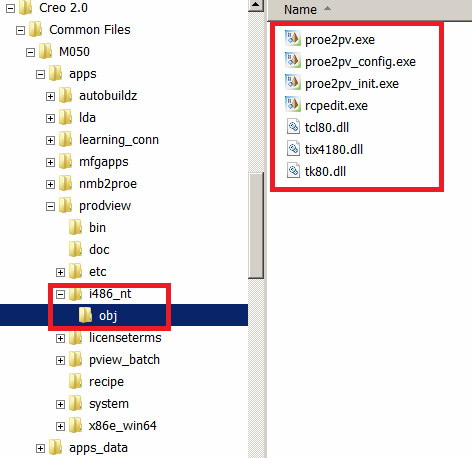
In Creo 2.0 M050 64-bit installation rcpedit.exe works, because the following directories/files exists.

missing_dir.png

You can try to install Creo 2.0 M150 32+64-bit and hope that this kind of installation will solve the problem. You can try to copy missing directories/files from M050 into M150. Also you can open Case at PTC Support and ask PTC to correct the problem.

Martin Hanak

1 reply

24-Ruby III
May 21, 2015

Neal,

it looks like that it is a bug Creo 2.0 M150 64-bit installation (and also Creo 2.0 M160, Creo 3.0 M030).

In Creo 2.0 M050 64-bit installation rcpedit.exe works, because the following directories/files exists.

missing_dir.png

You can try to install Creo 2.0 M150 32+64-bit and hope that this kind of installation will solve the problem. You can try to copy missing directories/files from M050 into M150. Also you can open Case at PTC Support and ask PTC to correct the problem.

Martin Hanak

nhanratty1-VisitorAuthor
1-Visitor
May 21, 2015

Hi Martin

Thanks for the reply...I checked my install and yes that folder and those files are missing. I also checked an m120 installation and they are missing on it also.

Separate to this I downloaded the specific msi for the recipe editor from the PTC Software Updates page and then copied the i486_nt folder into the location as shown in your image. That fixed the problem.

Thanks for your help.

Regards,

Neal