3-Newcomer
November 10, 2023
Solved

Cannot see all fonts from windows fonts folder when creating sketch

  • November 10, 2023
  • 3 replies
  • 4218 views

I would like to write the text HONDA with the Honda font on a part. I found the font online in ttf format, installed it on my computer (word sees it). I added pro_font_dir paramater to the config and pointed it to the default windows font directory. I restarted Creo and I can see now a lot of the windows font in the list when I create the text sketch, but the Honda font is missing. 


Best answer by MartinHanak

@Lecso11 wrote:

The issue was the font itself. While Microsoft Word could use it, Adobe Illustrator and Creo couldn't. These seem to be more sensitive for the quality of the fonts.
My solution was to create a vector from a logo in Adobe Illustrator, save as dwg, convert that to iges and import it as a Creo sketch, and then I could extrude it.


Hi,

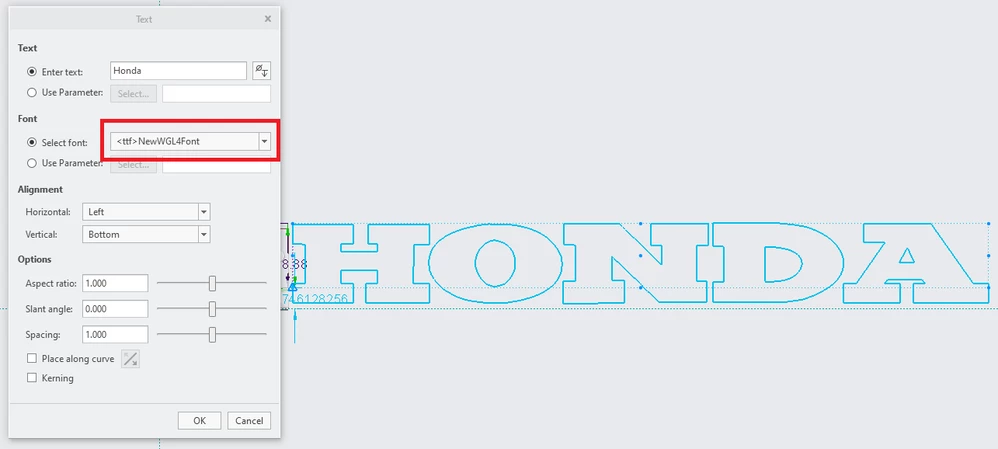
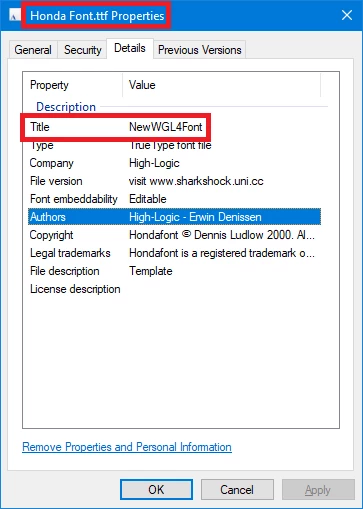
  • I copied Honda Font.ttf to E:\PTC\Creo9_020\Creo 9.0.2.0\Common Files\text\fonts directory

MartinHanak_2-1699888878114.png

In Creo Parametric 9.0.2.0 I am able to create a sketch feature.

MartinHanak_1-1699888825491.png


3 replies

24-Ruby III
November 11, 2023

Articles:

24-Ruby III
November 11, 2023

Hi,

  • I downloaded font file from https://fontsgeek.com/fonts/Honda-Regular page
  • I unzipped downloaded honda-regular_CikgX.zip file
  • I copied Honda Regular.ttf to E:\PTC\Creo9_020\Creo 9.0.2.0\Common Files\text\fonts directory

In Creo Parametric 9.0.2.0 I am able to create a sketch feature.

MartinHanak_0-1699725369580.png


Note: You do not have to install the font into Windows to use it in Creo.

Lecso113-NewcomerAuthor
3-Newcomer
November 13, 2023

This is not the font I used.
Try this one please and report back: https://www.dafontfree.io/honda-logo-font/

Lecso113-NewcomerAuthor
3-Newcomer
November 13, 2023

The issue was the font itself. While Microsoft Word could use it, Adobe Illustrator and Creo couldn't. These seem to be more sensitive for the quality of the fonts.
My solution was to create a vector from a logo in Adobe Illustrator, save as dwg, convert that to iges and import it as a Creo sketch, and then I could extrude it.

24-Ruby III
November 13, 2023

@Lecso11 wrote:

The issue was the font itself. While Microsoft Word could use it, Adobe Illustrator and Creo couldn't. These seem to be more sensitive for the quality of the fonts.
My solution was to create a vector from a logo in Adobe Illustrator, save as dwg, convert that to iges and import it as a Creo sketch, and then I could extrude it.


Hi,

  • I copied Honda Font.ttf to E:\PTC\Creo9_020\Creo 9.0.2.0\Common Files\text\fonts directory

MartinHanak_2-1699888878114.png

In Creo Parametric 9.0.2.0 I am able to create a sketch feature.

MartinHanak_1-1699888825491.png


Lecso113-NewcomerAuthor
3-Newcomer
November 13, 2023

You are absolutely right. I was looking for Honda font, not NewWGL4Font in the list. This is the solution.