1-Visitor
March 21, 2013
Solved

Creo2.0 - how to use measurement results in relations

  • March 21, 2013
  • 6 replies
  • 9660 views

Hi there

I want to set up a relation between one dimension and a result of one measurement. I created a feature measurement but still I could not find out the way to reference it in relations editor... can you help me out?

btw the dimension belongs to one part and the measurement result is from another part in an assembly

Thanks

Sergio
    Best answer by vmráz

    Process of creating relations with measurement:

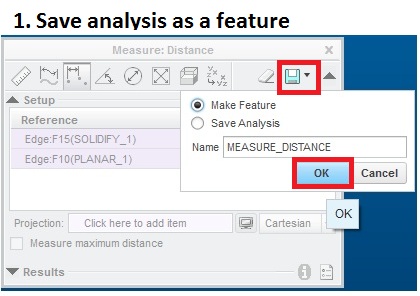
    Step1

    04.jpg

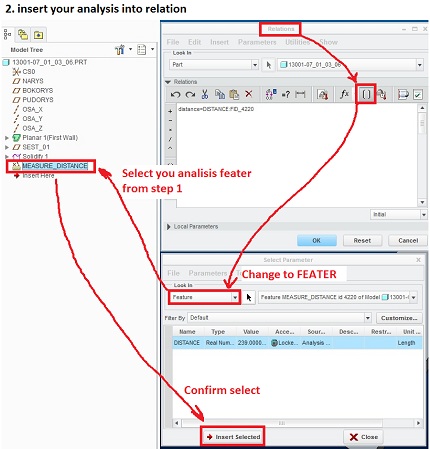
    Step2

    041.jpg

    If the relation is on assembly level, than you need to specify from which part it´s comming from. See Kate Leipold post.

    I hope it will be helpfull

    6 replies

    1-Visitor
    March 23, 2013

    Hello

    Please try edit design options

    Regards

    Vijay

    17-Peridot
    March 23, 2013

    When you are in the relations IU, use the bracket icon to open the parameter window. From there you can work your way to the measurement parameters. When you highlight the parameter (measurement) you want to use, click the prompt in the lower left. This adds the parameter to the relation window.

    10-Marble
    July 3, 2013

    if the measurement is a distance, than you will reference by

    DISTANCE:FID_NAME:0

    NAME is the feature id. 0 is the part number.

    you can also reference measurements such as angle, length, etc.

    These do show up by expanding your local parameters to include current and all sublevels.

    vmráz12-AmethystAnswer
    12-Amethyst
    July 4, 2013

    Process of creating relations with measurement:

    Step1

    04.jpg

    Step2

    041.jpg

    If the relation is on assembly level, than you need to specify from which part it´s comming from. See Kate Leipold post.

    I hope it will be helpfull

    12-Amethyst
    July 4, 2013
    sirjoem1-VisitorAuthor
    1-Visitor
    July 19, 2013

    thanks for your feedback everyone!!