1-Visitor
November 1, 2015
Solved

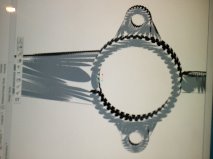
I am having some real bad graphic issues when I zoom in and out of Creo Parametric 2.0

  • November 1, 2015
  • 1 reply
  • 5302 views

I am having some bad issues with Creo parametric when i zoom in and out. I will post an attachment below of the problem. I hope someone can help and post specific instructions as i am very new to Creo. Thanks in advance.

GetAttachment.jpg

    Best answer by dschenken

    Without more info, here's something to start with to diagnose the problem:

    1) Update display drivers

    Make a Restore Point, or full backup before updating graphics drivers
    Make sure you understand how to use the Restore Point or backup to restore your operating system and data
    Look for drivers from the makers of the computer first, then the maker of the card, finally from the maker of the operating system
    Note: sometimes the most compatible graphics driver version is not the latest version. Be prepared to look for and try older versions.

    For AMD/ATI cards try http://support.amd.com/us/gpudownload/Pages/index.aspx (external link)

    2) Avoid using hardware acceleration
    Mostly avoided by setting the config option "graphics win32_gdi"
    Alternatively try "graphics d3d" for Creo 1, Creo 2, Creo 3

    Also possible to add startup command option
    1. Right Click on software (Creo) shortcut icon > Properties
    2. Click in Target path and move cursor to extreme right (at the end of .....exe")
    3. Add a space after .exe"
    4. Type -g:win32_gdi > Apply > Ok

    3) Use hardware acceleration, but disable some features (try one at a time)
    May also benefit from the following config options, Creo Parametric 2.0 M090 and higher:
    enable_opengl_fbo no
    enable_opengl_vbo no
    enable_opengl_shader no
    ref http://communities.ptc.com/message/244856#244856 (external link)
    Note: fbo = frame buffer object; vbo = vertex buffer object; shader is shader object.
    These are part of later versions of OpenGL.

    4) For better performance with win32_gdi, try setting the display to 16 bit in the OS system manager.

    Other links in PTC Community:

    Creo may not support Display Link see http://www.displaylink.com/support/ticket.php?id=199

    Creo may not support AMD Radeon X1300, esp Win 7

    Creo may not support ATI Radeon X1950Pro http://communities.ptc.com/thread/37833

    Creo may not support ATI Mobility FireGL V5200 see creo parametric 2.0 won't load | PTC Community

    Creo may not support ATI Radeon 9600 Pro http://communities.ptc.com/thread/52085

    Creo may not support ATI Radeon HD 5650 http://communities.ptc.com/thread/53983

    Creo may not support ATI Radeon Xpress 1100 see creo parametric 2.0 won't load | PTC Community

    Creo may not support Nvidia geforce GTX550 http://communities.ptc.com/thread/58258

    Creo may not support Nvidia geforce GTX 285M http://communities.ptc.com/thread/41068

    Creo may not support Nvidia geforce gtx 660m http://communities.ptc.com/thread/42192

    Creo may not support Nvidia Quadro K1100M http://communities.ptc.com/thread/56289

    Creo may not support Intel 4400 below Creo 3 M010 see http://communities.ptc.com/thread/49896

    Creo may not support Intel Embedded Graphics http://communities.ptc.com/thread/56357

    Creo may not support Intel HD 4000 see http://communities.ptc.com/thread/52279

    Creo may not support Intel HD Graphics 3000 see http://communities.ptc.com/thread/39759

    Creo may not support Lenovo T60 http://communities.ptc.com/thread/40334

    Creo may not support MacBook Pro (Retina http://communities.ptc.com/thread/59187

    Creo may not support Netmeeting on OpenGL, does on win32_gdi http://communities.ptc.com/thread/1984

    Creo may not support Nvidia nView Desktop Manager http://communities.ptc.com/thread/33357

    Creo may not support Sapphire ATI HD 5970 OC see http://communities.ptc.com/thread/37682

    Creo may not support Windows 7 Home Premium http://communities.ptc.com/thread/50468

    Creo 2 M080 may not support Quadro/OpenGL - unusual instance - http://communities.ptc.com/thread/41485


    1 reply

    dschenken1-VisitorAnswer
    1-Visitor
    November 1, 2015

    Without more info, here's something to start with to diagnose the problem:

    1) Update display drivers

    Make a Restore Point, or full backup before updating graphics drivers
    Make sure you understand how to use the Restore Point or backup to restore your operating system and data
    Look for drivers from the makers of the computer first, then the maker of the card, finally from the maker of the operating system
    Note: sometimes the most compatible graphics driver version is not the latest version. Be prepared to look for and try older versions.

    For AMD/ATI cards try http://support.amd.com/us/gpudownload/Pages/index.aspx (external link)

    2) Avoid using hardware acceleration
    Mostly avoided by setting the config option "graphics win32_gdi"
    Alternatively try "graphics d3d" for Creo 1, Creo 2, Creo 3

    Also possible to add startup command option
    1. Right Click on software (Creo) shortcut icon > Properties
    2. Click in Target path and move cursor to extreme right (at the end of .....exe")
    3. Add a space after .exe"
    4. Type -g:win32_gdi > Apply > Ok

    3) Use hardware acceleration, but disable some features (try one at a time)
    May also benefit from the following config options, Creo Parametric 2.0 M090 and higher:
    enable_opengl_fbo no
    enable_opengl_vbo no
    enable_opengl_shader no
    ref http://communities.ptc.com/message/244856#244856 (external link)
    Note: fbo = frame buffer object; vbo = vertex buffer object; shader is shader object.
    These are part of later versions of OpenGL.

    4) For better performance with win32_gdi, try setting the display to 16 bit in the OS system manager.

    Other links in PTC Community:

    Creo may not support Display Link see http://www.displaylink.com/support/ticket.php?id=199

    Creo may not support AMD Radeon X1300, esp Win 7

    Creo may not support ATI Radeon X1950Pro http://communities.ptc.com/thread/37833

    Creo may not support ATI Mobility FireGL V5200 see creo parametric 2.0 won't load | PTC Community

    Creo may not support ATI Radeon 9600 Pro http://communities.ptc.com/thread/52085

    Creo may not support ATI Radeon HD 5650 http://communities.ptc.com/thread/53983

    Creo may not support ATI Radeon Xpress 1100 see creo parametric 2.0 won't load | PTC Community

    Creo may not support Nvidia geforce GTX550 http://communities.ptc.com/thread/58258

    Creo may not support Nvidia geforce GTX 285M http://communities.ptc.com/thread/41068

    Creo may not support Nvidia geforce gtx 660m http://communities.ptc.com/thread/42192

    Creo may not support Nvidia Quadro K1100M http://communities.ptc.com/thread/56289

    Creo may not support Intel 4400 below Creo 3 M010 see http://communities.ptc.com/thread/49896

    Creo may not support Intel Embedded Graphics http://communities.ptc.com/thread/56357

    Creo may not support Intel HD 4000 see http://communities.ptc.com/thread/52279

    Creo may not support Intel HD Graphics 3000 see http://communities.ptc.com/thread/39759

    Creo may not support Lenovo T60 http://communities.ptc.com/thread/40334

    Creo may not support MacBook Pro (Retina http://communities.ptc.com/thread/59187

    Creo may not support Netmeeting on OpenGL, does on win32_gdi http://communities.ptc.com/thread/1984

    Creo may not support Nvidia nView Desktop Manager http://communities.ptc.com/thread/33357

    Creo may not support Sapphire ATI HD 5970 OC see http://communities.ptc.com/thread/37682

    Creo may not support Windows 7 Home Premium http://communities.ptc.com/thread/50468

    Creo 2 M080 may not support Quadro/OpenGL - unusual instance - http://communities.ptc.com/thread/41485


    fpecout1-VisitorAuthor
    1-Visitor
    November 1, 2015

    Hi, Thank you so much i simply followed this step:

    1. Right Click on software (Creo) shortcut icon > Properties

    2. Click in Target path and move cursor to extreme right (at the end of .....exe")

    3. Add a space after .exe"

    4. Type -g:win32_gdi > Apply > Ok


    And it worked immediately. Does that mean i don't have to do anything else and if so is it possible that you could do it for me using team viewer i'm really bad at creo things to do with graphics

    1-Visitor
    November 2, 2015

    win32_gdi bypasses the hardware acceleration for graphics.

    Further options are:

    1) to use as-is, it won't hurt, but may be slower than with the hardware acceleration.

    2) change the graphics driver for the hardware you do have; sometimes the latest version works, sometimes an earlier one is more compatible.

    3) if those aren't OK, then get a compatible graphics accelerator

    For more help you'll need to be more specific about the OS version and the graphics card, Not that I know which work together, but I have seen certain ones, particularly laptops with Intel accelerators, have more reported problems.