

Community Manager
July 19, 2016
Question

A New Dimension to Knowledge Articles: Start of an Interactive Experience

  • July 19, 2016
  • 22 replies
  • 6489 views

A valuable feature of many successful websites is the ability to serve up some "other stuff" associated to the product / service / literature you're interested in.

For commercial sites, the motivation is clear: "Other customers also bought.." draws attention at the right moment (when interest is high), reduces search effort and leads to further (hopefully mutually beneficial) transactions.


When it comes to our articles, the currency is different (Knowledge), but the circumstances and outcomes are similar. If we expose related content at the right time, we can reduce your search effort, and guide you to other sources of knowledge to improve your experience with PTC's products.


So what's new and how do I use it ?

The changes use our existing Search functionality to detect relevant content such as product documentation, help center topics, community threads, videos, and other articles.

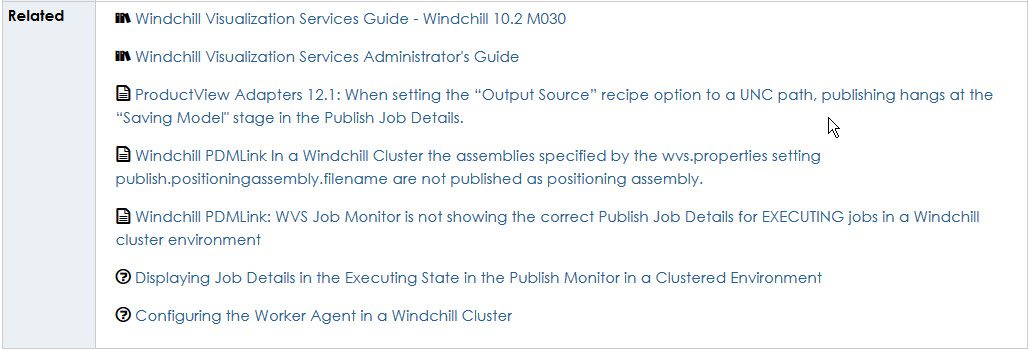
When this happens, a box like this will appear below the article Resolution field, with familiar icons and links. You can load more content if there are more than 10 items, and the links always open up in a new tab, preserving the original article you were viewing:
K-Ntwk_1.jpg


What's next ?

We'll monitor how related content is used over the coming months, and stay alert to the feedback on you leave us on articles, and the comments on this blog.

Based on what you tells us, we'll continue to evolve the "Related" functionality.

Ultimately we're aiming to predict your next need based on the patterns we regularly see in Support, then expose the right content to take you through the next steps in your journey with our products.


Just another box ?

We'd like you to tell us. Please share your feedback with us, and others below. We look forward to hearing from you.

22 replies

23-Emerald IV
July 19, 2016

How are you building this list?  Is it dynamic based on the way the user reached the article, or it simply based on the contents of the article regardless of how they got there?  I only ask because the vast majority of articles I'm viewing don't list anything.

Marco Tosin
21-Topaz I
21-Topaz I
July 19, 2016

I think it is build by TS engineers.

If you look at one of your case you will see a Related Documents section.

Marco
23-Emerald IV
July 19, 2016

I highly doubt the TS engineers are manually adding this data.  The whole point is to leverage the existing knowledge base and the search engine to dynamically present related information.  If the tech had to manually add the data the older articles would never link to newer ones.  I guess we'll have to wait and see what Peter Case‌ says.

PeterCaseCommunity ManagerAuthor
Community Manager
July 19, 2016

Tom Uminn‌‌, Marco Tosin‌,

Thanks for your interest in what's happening under the covers.

For this initial implementation we're leveraging our index search to find any other content which has a cross-reference to the article you are reading.

So, let's say someone shares an article URL in a Community thread, it will be picked up and shown in the related section. Ditto if a Product Help topic, document or other article contains the article's URL.

Coming back to Tom's point about there being few articles with related content, we're already working on the next algorithm we'll use to serve up related content, and in the next web release (September, and forward-looking / subject to change), we're aiming to show items based on affinity ("customers who liked this article also liked these articles").

We're conscious of the potential downsides of super-charging the article viewer, and we don't want related items to become a distraction. Relevance is key.

We'd appreciate further feedback to guide these changes. Are we getting things right for you, or is it "just another box" ?

23-Emerald IV
July 19, 2016

We'd appreciate further feedback to guide these changes. Are we getting things right for you, or is it "just another box" ?

I will monitor the results and let you know.  One possible suggestion.  I would prefer you minimize the number of reference documents you link to (installation guides, administration guides, etc.)  When I'm looking for information, I have zero interest in digging through thousand page PDFs.  If you do want to link to them, don't link to every possible version but only the exact version under consideration or maybe just the latest version.

I've made the suggestion to the UX team that they allow the users to configure what filters they want active when searching, and then remember those filters for future searches (after closing the webpage.)  I would love to be able to filter out reference documents and maybe even the help centers.  99% of the time, I'm way past the information in these places, but the keywords I'm searching for often flood the results with these.

PeterCaseCommunity ManagerAuthor
Community Manager
July 21, 2016

Thank you Tom,

This is just the kind of feedback we need and we'll be taking this into account for inclusion in our upcoming web releases. There are things we can do to decrease the prevalance of reference documents in the Related section, and these ideas will help guide that.

Regarding the possibility to remember search filters between sessions, there is an Idea for this (which I presume was opened after your contact with the UX team).

For the Q4 search updates, this Idea was considered but not tabled right now.

This is something we want to offer customers, but as a configurable option. Reason is, we want to minimise and "missing results" issues for customers who have multiple products and forget that a filter was configured in the previous session.

23-Emerald IV
July 21, 2016

... we want to minimise and "missing results" issues for customers who have multiple products and forget that a filter was configured in the previous session.

Understood, It would just be nice to have it remembered every time I return to the support site.

To make the filtering more obvious, maybe you should change the color of the "Clear" button when no criteria is active.  (Deactivate it.)  For example:

Marco Tosin
21-Topaz I
21-Topaz I
July 21, 2016

Hi Peter,

I just read this article https://support.ptc.com/appserver/cs/view/solution.jsp?source=subscription&n=CS242375

In the related documents section there is a link to the same article.

Is this correct?

Marco
23-Emerald IV
July 21, 2016

I just tried to look and all I see is this:

Maybe someone pulled it to fix it.

Marco Tosin
21-Topaz I
21-Topaz I
July 21, 2016

I just tried after your comment.

This is what I can see.

Capture.PNG

Marco