

Annoyances with Creo 4.0
We recently deployed Creo 4.0 M020 to our organization, and we have a couple things that our users are finding very annoying and we are wondering if there is a Config.pro option that we can toggle or tweak to fix them.
The first deals with the model tree and the new selection paradigm with the "Geometry" Selection filter in Assembly and Part Modes. I think, in general, the functionality of the new selection option is great being able to select the edge or surface, and having it bring up the Mini-Toolbar. What we find annoying in this is that when we are looking at one of our larger assemblies with thousands of parts and many sub assemblies in it, we find that the model tree gets blown apart whenever ANY part is selected. After a few parts are selected and evaluated, you spend more time scrolling through the model tree than anything. Is there a way so that if you select the part that it shows you where in the model tree that part is, but once you click off of that part that the model tree collapses back to where it was before the selection?? It is one thing to manually open those, but having all of them open by selecting on a few screws or pieces of hardware and blowing open that model tree is causing us to waste a lot of time collapsing the tree back down. I know there is a collapse all button that can be hit, but our users dont particularly like that for an answer as they sometimes manually have the tree opened up to certain levels.
The second revolves around the Edit Relations window. We do a LOT of relations writing manually, and utilize the TAB button to help us format (indent) our relations to be a bit easier to read our way through. I think this started back in Creo 3.0, but it seems like the space that a TAB takes up is closer to 35 spaces in the Relation screen compared to the typical 5-10 character spaces in ANY other program. Is there a reason PTC has chosen for it to take up this much space? Is anyone aware of a way to format this to not take up as much space?? It seems like this gets more and more exaggerated every time we do a new update to the tool. 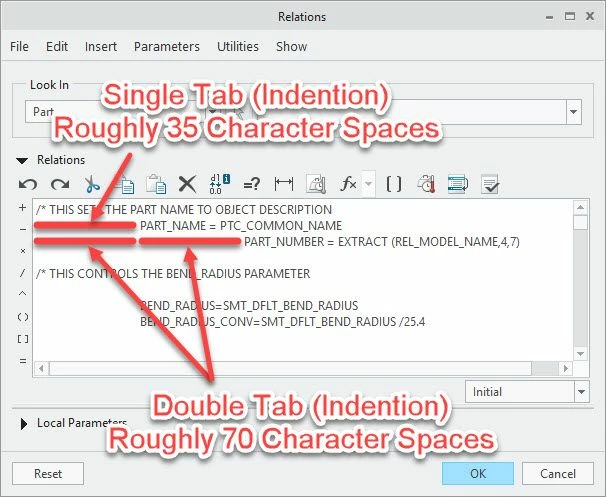
If anyone has any advice or suggestions on these please let me know.
Thanks,
Randy Soukup