

9-Granite
May 29, 2024
Solved

Cannot connect to license server after change of network

  • May 29, 2024
  • 3 replies
  • 5017 views

Hello,


We recently changed the network in our organisation. The server holding licences for creo didn't change, it just change network.


Although the server is up and we can ping it, people can't access their licenses. Here is the creo error message and the result of ptcstatus.bat on the user side.
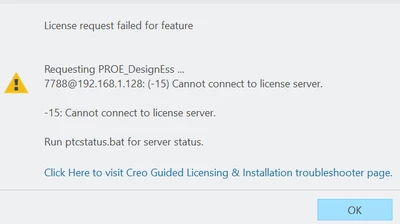
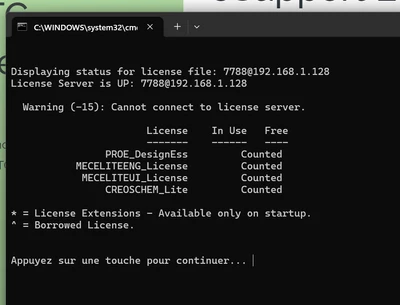
image (1).png

image.png

And here is the result of ptcstatus.bat on the server side :
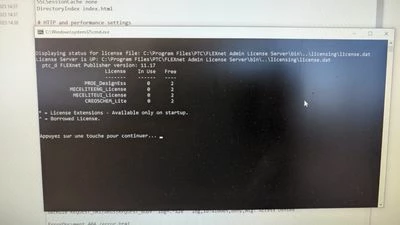
WhatsApp Image 2024-05-29 à 08.51.52_944a47c1.jpg

Best answer by VladimirN

Article - "Flexnet licensing errors observed when checking license server status (LMADMIN) using ptcstatus.bat for PTC Flex-enabled applications": https://www.ptc.com/en/support/article/CS402152 

3 replies

VladimirN24-Ruby IIIAnswer
24-Ruby III
May 29, 2024

Article - "Flexnet licensing errors observed when checking license server status (LMADMIN) using ptcstatus.bat for PTC Flex-enabled applications": https://www.ptc.com/en/support/article/CS402152 

MatthewV9-GraniteAuthor
9-Granite
June 11, 2024

Turns out it was because my network was classified as public and not private so the exception rules for port 7788 didn't apply. The troubleshooting tool solved it.

23-Emerald III
May 29, 2024

Did the host IP address change? You may need a new license file.


MatthewV9-GraniteAuthor
9-Granite
May 29, 2024

Yes the IP changed but not the mac address (physical). I have run the Guided Licensing & Installation Troubleshooter from PTC referred by @VladimirN without success (I haven't done the uninstall reinstall process yet thow).


We managed to borrow licences running parametric_borrow.bat but we can't return them when running inside repertory "C:\Program Files\PTC\Creo 7.0.7.0\Common Files\x86e_win64\obj"

lmutil lmborrow -return -c "7788@192.168.1.128" PROE_DesignEss

 the error returned is :

MatthewV_0-1716997036712.png

We will work with those borrowed license until our deadline and try reinstalling License management application on the server.

23-Emerald III
May 29, 2024

You will need to get a new license as the one you show is tied to an IP address of 192.168.1.128.

Community Moderator
June 5, 2024

Hello @MatthewV


It looks like you have some responses from some community members. If any of these replies helped you solve your question please mark the appropriate reply as the Accepted Solution. 

Of course, if you have more to share on your issue, please let the Community know so other community members can continue to help you.

Thanks,
Community Moderation Team.