

6-Contributor
July 1, 2025
Question

Cannot connect to license server after change of network

  • July 1, 2025
  • 3 replies
  • 1267 views

@MatthewV 


What did you exactly do to solve this issue? Reference topic: https://community.ptc.com/t5/System-Administration/Cannot-connect-to-license-server-after-change-of-network/m-p/952844#M31019 


How did you check if the network is classified as public or private?

I have the same issue here but with a difference: I can pull the license but a colleague cannot. 
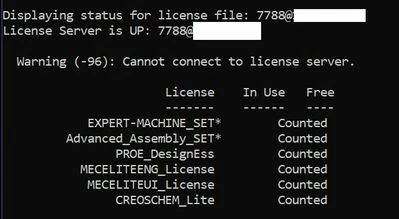
Screenshot 2025-07-01 074446.jpg


Thanks,

Sjoerd

3 replies

24-Ruby III
July 1, 2025

Hi,

check Windows Firewall rules on server. There must be rules allowing inbound communication to the license manager for Creo.


If you can, do simple test ... turn Windows Firewall on server off temporarily a try to launch Creo.

6-Contributor
July 2, 2025

Hi Martin,


The Firewall on the server is off, we had issues with that in the past.

As the server is only used for the CREO license, so internal use, the Firewall can be off permanently.


Would deinstalling and reinstalling the server software be an option?


Thanks.

24-Ruby III
July 2, 2025

@Sjoerd_Repping wrote:

Hi Martin,


The Firewall on the server is off, we had issues with that in the past.

As the server is only used for the CREO license, so internal use, the Firewall can be off permanently.


Would deinstalling and reinstalling the server software be an option?


Thanks.


Hi,

from my point of view reinstalling license manager does not make any sense.

It's strange that PC1 can get the license and PC2 can't.


1.] look into license.dat on server

What identification is used on SERVER line?

Please publish complete SERVER line


2.] look into parametric.psf on PC1

What identification is used on ENV=PTC_D_LICENSE_FILE-=... line?

Please publish complete ENV=PTC_D_LICENSE_FILE line


3.] look into parametric.psf on PC2

What identification is used on ENV=PTC_D_LICENSE_FILE-=... line?

Please publish complete ENV=PTC_D_LICENSE_FILE line


Identification in all mentioned files must be the same.

16-Pearl
July 2, 2025

Sjoerd,

Since you can access the license but your colleague cannot, I would assume either your colleague's PC or the license server cannot resolve the other's name correctly on the new network.  I'm also assuming your colleague's PC Creo Parametric installation is configured to point to the correct license server.


You can test simple port access via PowerShell (you may need admin rights to run it).  Use the PowerShell command shown below from both the license server and your colleague's PC.


Test-NetConnection -ComputerName <name> -Port 7788


This will test the TCP connection on the specific port used by the PTC licenses. FlexLM uses 2 different ports. The LMGRD process is using the 7788 port number. The PTC_D.exe process is using a different port number. If you don't specify a specific port number for the PTC_D vendor daemon in the license file, a random port is used. Since you said no firewalls are in place, this shouldn't matter.  If you want to test the PTC_D port, you either need to specifiy a specific port number to use in the license file, or look at the log files to see what random port it is currently using.
The test can fail to resolve the name or fail to communicate on the specific port. If the name resolution fails, you'll need to configure either machine or both to resolve the name correctly.  If the port fails, there is likely some firewall setting in place.

You can also change <name> above to the IP address or the fully qualified domain name to help diagnose the issue.

Regards,

Dan N.

6-Contributor
July 10, 2025

To all,


There is a small misunderstanding.

The original post, see link above (one of the mods created a new topic), states there is a new network.


We haven't changed anything, all the workstations and license server are the same and it used to work in the past.

All users are using a psf file with exactly the same content.  We saved a standard psf file on our file server.


A month or so ago, I noticed this issue.


Our company has 2 license servers, one is here at my location, the other one is in the US.

All CREO users here can pull the license on the US server.


As @KenFarley already mentioned, most probably this is a network issue by company policy.


Thanks for your replies.