
1-Visitor
November 16, 2013
Solved

creo 1.0 crashing while trying to render an animation

  • November 16, 2013
  • 1 reply
  • 8664 views

Creo 1.0 M040 build. My system is a Lenovo W510 workstation laptop with a Nvidia Quadro FX 880M running driver 9.18.13.3165. I just upgraded to 8Gb of ram because the first time I attempted this I received a message that there was not enough system memory, I was previously running on 4 gb.

The model can be rendered as a still photo and the animation can be created but when I attempt to render the animation as an MPEG it fails. Creo just closes like it wasnt even there. When I go to file manager and open the "rendered animation" I get a frame or two that look great but that is it. Any ideas as to what is going on.


This thread is inactive and closed by the PTC Community Management Team. If you would like to provide a reply and re-open this thread, please notify the moderator and reference the thread. You may also use "Start a topic" button to ask a new question. Please be sure to include what version of the PTC product you are using so another community member knowledgeable about your version may be able to assist.
Best answer by ptc-4326108

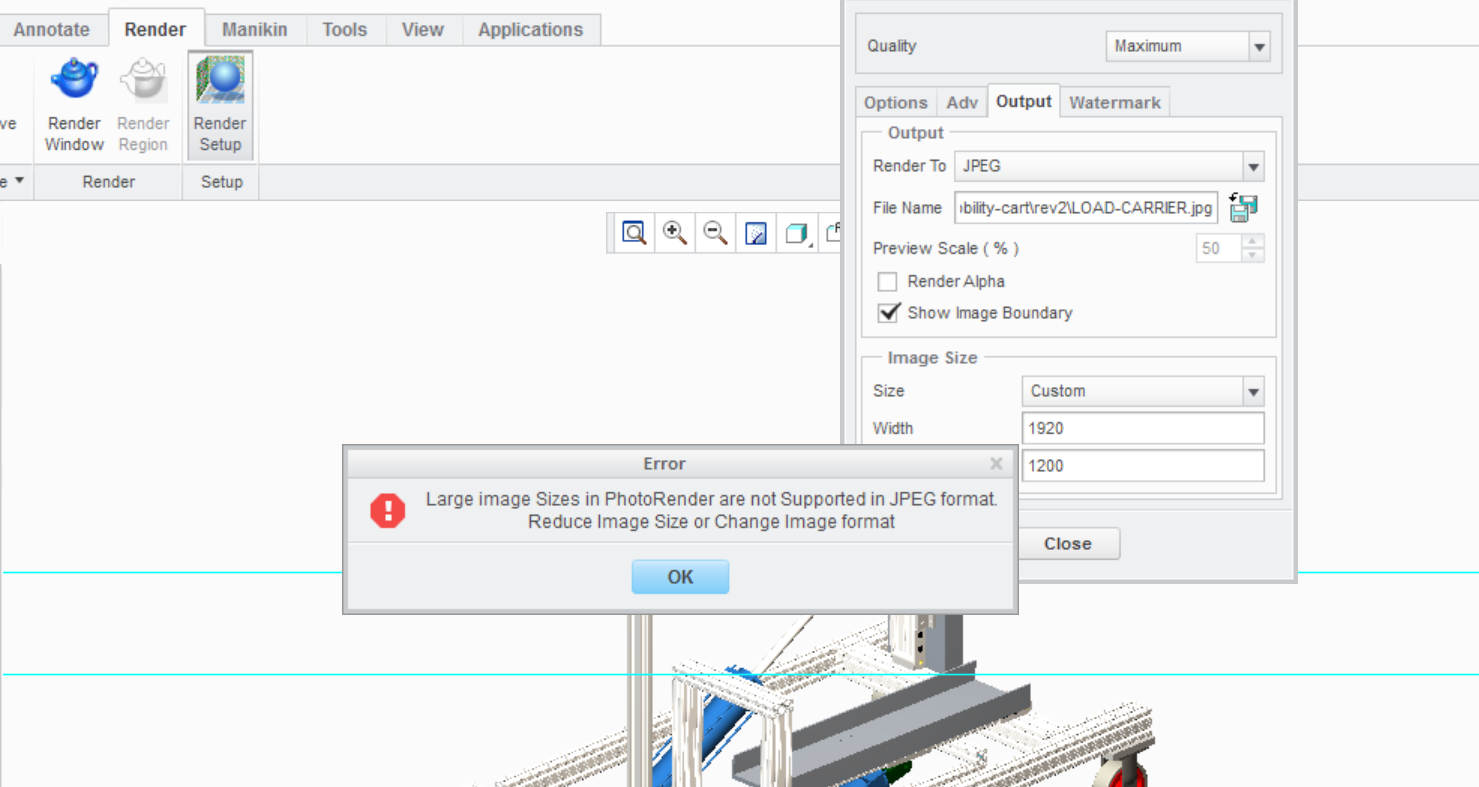
finally complete. It made it through the low quality rendering so I increased the pixel count.... 16 hours later it made it completed without a crash. I think I may have uncovered the problem by accident. While attempting to output a JPEG or BMP rendering to a custom image size I received an error message when trying to make a very high pixel count. With this successful rendered video I set the size equal to what creo calls "HDTV" (1920x1035). It was crashing when I would try to set the video to 1920 x 1200. It seems that with "rendered animations" it is wise to use a default size available from the render setup sub menu..... or this was just a coincidence and it happened to work. Who knows with CREO, lolerror.png

1 reply

17-Peridot
November 16, 2013

Hello Chris and welcome to the forum.

Hard crashes are a serious issue with PTC. I would ask you create a support case and submit your files to see if they can duplicate your issue. As a bonus, you will quickly learn if this is a hardware issue on your end or not.

I have a PTC qualified platform and I am running the Dell graphics drivers rather than the NVidia drivers. If I set the quality of rendered animations high enough, it takes forever but it doesn't crash.

Do you have an option to try this same set of files and config settings on another computer?

I am also going to assume the mechanism analysis is running smoothly without the capture process(?)

1-Visitor
November 16, 2013

Thanks for the reply. I no longer have a maintenance contract with PTC so I can not submit for a case. I can deal with the long time but not the crashing. The mechanism analysis works fine and as I said before I can create the animation without render. It is something with the render that is causing the failure. I will check with Lenovo to see if they list a different driver. Attached to this post is the completed animation without render Video Link : 4458

17-Peridot
November 16, 2013

Nice animation. I wish I knew more on how to move the scene and manipulate parts. Is that core Creo 1.0 or do you have an extension module for the flythrough approach?

If this is all in one set of files and it runs on core Creo, I'd be happy to see if it runs on Creo 2.0 without crashing. I just need the scene files and a full backup of the assembly.