14-Alexandrite
March 18, 2022
Solved

Creo 7 and 8 Windows 11 support

  • March 18, 2022
  • 4 replies
  • 15525 views

I am considering when to upgrade to Windows 11.

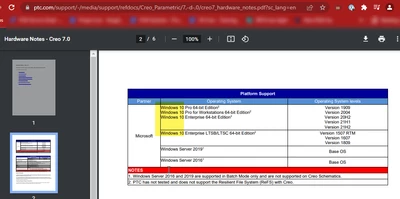
Creo 7.0.7.0 is supposed to support Windows 11 (CS348041) but the Hardware Notes and Creo Parametric 7.0.7.0 Release Matrix do not state this.

Is this a missed update to documentation, or is Windows 11 not supported yet?

Future Support Article: https://www.ptc.com/en/support/article/CS348041
Release Matrix: https://release-advisor.ptc.com/releaseMatrix?releaseId=749
Hardware Notes: https://www.ptc.com/support/-/media/support/refdocs/Creo_Parametric/7,-d-,0/creo7_hardware_notes.pdf?sc_lang=en

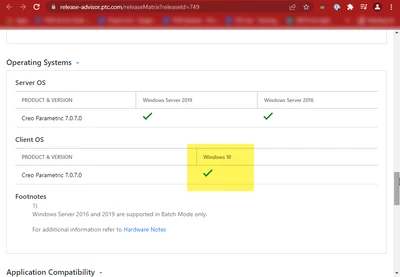
VMcD_1-1647615856238.png

VMcD_2-1647615863631.png


VMcD_0-1647615846162.png


Best answer by VMcD

After working through case 16304968 the PTC documentation is updated to reflect that Windows 11 is now supported with 7.0.7.0 and 8.0.3.0

4 replies

23-Emerald IV
March 18, 2022

I don't think PTC is doing a very good job of keeping their articles and matrices up to date.


CS348041 is confusing. It says it applies to Creo Parametric 7.0.0.0 - 7.0.7.0 and 8.0.0.0 - 8.0.3.0, and that existing versions are not supported on Windows 11. Then it turns around and says that 7.0.7.0 and 8.0.3.0 will be supported. This makes no sense since 7.0.7.0 and 8.0.3.0 are the current versions. 7.0.7.0 was released last January and 8.0.3.0 was released last December. Either the 'applies to' section needs to change or the versions that will be supported on Windows 11 need to change.


Of course none of this is mentioned anywhere in the product matrices or the hardware notes.


It's not like new operating systems suddenly appear with no warning.  PTC is a Microsoft partner and they most certainly have access to pre-release builds.  They should be testing and documenting their current and future planned support paths for new operating systems way before the new operating system becomes broadly available and is included by default with every new computer purchase.

23-Emerald IV
March 23, 2022

PTC just released CS361373 (which disagrees with CS348041).  CS361373 currently states the following:


TomU_0-1648065965312.png


VMcD14-AlexandriteAuthor
14-Alexandrite
March 23, 2022

That is very terrible

24-Ruby III
March 19, 2022

Hi,

please ask PTC Support and let us know.

VMcD14-AlexandriteAuthor
14-Alexandrite
March 21, 2022

I thought PTC was supposed to be monitoring the Community? Should they not be responding to this on this forum?

VMcD14-AlexandriteAuthor
14-Alexandrite
March 21, 2022

FYI, making a support case recommends using the Community.

I selected the Open a case link: Case 16304968 has been opened.


VMcD_0-1647877539130.png


10-Marble
March 20, 2022

As of 3/19/2022 and the new Windows update, Creo 6+ will now function on Windows 11.

Creo.png

23-Emerald IV
March 21, 2022

Yes, I've had it running too, but there is a difference between "will it run" and "is it supported" (approved by PTC).

10-Marble
March 21, 2022

In that case, no. Starting with Creo 9.0 will be where Windows 11 is approved by PTC. Currently, the issues people would run into of either not being able to install or not being able to run on Windows 11 has been solved after a framework update. Nothing before Creo 9.0 will be approved by PTC.

1-Visitor
May 28, 2022

Referring to Article - CS348041 - Is Creo Parametric supported on Windows 11 (ptc.com)

Creo 7.0.7.0 and Creo 8.0.3.0 is the minimum supported  on Windows 11, IPv6 support is pending.

Which version will full support on Windows 11???

Also referring to Article - CS359796 - Does current flexnet or lmadmin support windows 11 in Creo Parametric (ptc.com),  until now Creo license server doesn't support on Windows 11.


Still a big known issue on Windows 11, Article - CS366080 - Some Paintbrush Picture OLE images from existing drawings are not displayed upon retrieval on Windows 11 in Creo Parametric (ptc.com)