
1-Visitor
September 17, 2013
Question

Creo memory usage

  • September 17, 2013
  • 7 replies
  • 12345 views

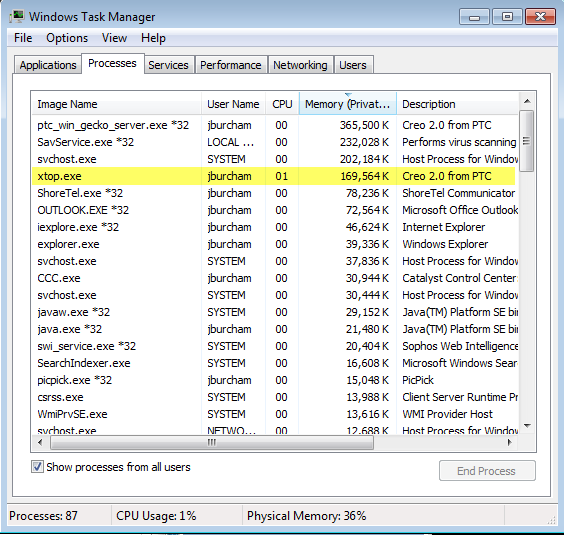
I am have a weird issue with my Creo memory usage. I am using Creo 2.0 M040 with Windchill 10.1. When I start Creo my typical memory ussage is around 160,000k, as shown in the task manager(see image). As I continue to use Creo the memory usage continues to grow. Even after I complete and end tasks this memory never decreases. It will grow to over 6 million, as it grows Creo and Windchill continue to get slower and slower before eventually just stalling.

Has anyone seen this before, and do you know how to fix it?
memory.png

7 replies

1-Visitor
September 17, 2013

Are you performing an Erase Not Displayed after you close all your windows?Remember, Creo retains all opened files in session (memory) until explicitly told to get rid of them.

16-Pearl
September 17, 2013

Managing memory can be done by using "erase not displayed" assuming you are loading a different model or simplified rep in your Creo Parametric session. Another alternative approach to this problem, if you need the models retained in session is to add more RAM.

14-Alexandrite
September 17, 2013

Generally that's a memory leak. I have it where I have to close/open Creo every day or 2. And if I use a really large amount of memory (I'm only running 8 gig at the moment). then I have to reboot to "fix" it.

1-Visitor
September 18, 2013

Yes I am "erasing not displayed", every time I finish working with a model.

Matt, I am also running 8 gigs or RAM, and I have to restart Creo everyday, and my computer every couple of days. It sounds like you might be having the same issue I am.

14-Alexandrite
September 18, 2013

Yes I even have erase not displayed on a one click macro, because I don't care to see what's being erased. I just hit it and move on to the next working directory.

Mine doesn't keep building the way you described though. Or at least not what I think you are describing. When I "erase" it still has about 1 gig of memory and then closing Creo releases it. But I have never seen it retain 4-6 gig.

17-Peridot
January 23, 2017

Hi,

I was wondering the same thing.

It seems that the only manner is to shut down proE/creo and restart.

I don't know how proE uses this amount of RAM.

Maybe are there some external tools to clear the memory?

17-Peridot
January 25, 2017

Talking about a windchill linked system;  it could be that the cause of the issue shall be the manner you load the parts?

I explain better: are there any differences between loading in RAM parts that are already in the workspace and parts that are only in common space and you load directly from "Open"  without passing between "add in workspace"?

23-Emerald III
January 25, 2017

Loading from common space on the server will put the file in the local workspace as it loads into Creo.

17-Peridot
January 26, 2017

The mine was an ipotesi.

Anyway the real doubt is not which is the cause, but if is there a method to clear "that" memory without shut down the program like the "erase not displayed".

17-Peridot
February 2, 2017

Our CAD Department just said me that the problem is due to Windchill, non proE/Creo.

The only one method is to shut down proE.