10-Marble
October 18, 2023
Solved

Difficulty identifying preview of merged quilts

  • October 18, 2023
  • 1 reply
  • 1332 views
I am using Creo Parametric Release 9.0 and Datecode9.0.3.0

When I merge two quilts together it is difficult to distinguish the surfaces and which parts will be cut and which parts will be left.
There used to be a config option in proengineer that helped with the preview of the merged surfaces in that it showed exactly what was going to be cut away and what was left.
Does any body know how to do this in version 9.0?
    Best answer by MartinHanak

    @Michael_ wrote:

    This is how Creo shows a merge of two intersecting surfaces now
    MH_Clark_0-1697693368172.png

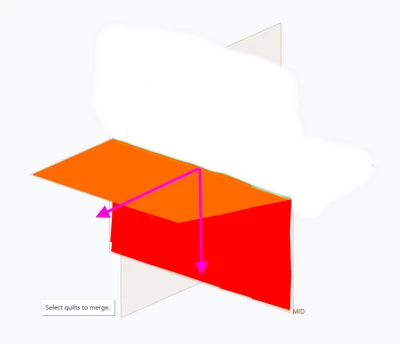
    This is how it used to be which is a lot easier to identify what surfaces are being cut and what you're going to end up with.
    There was a config option you had to set to get this.

    MH_Clark_1-1697693390682.png


    Hi,

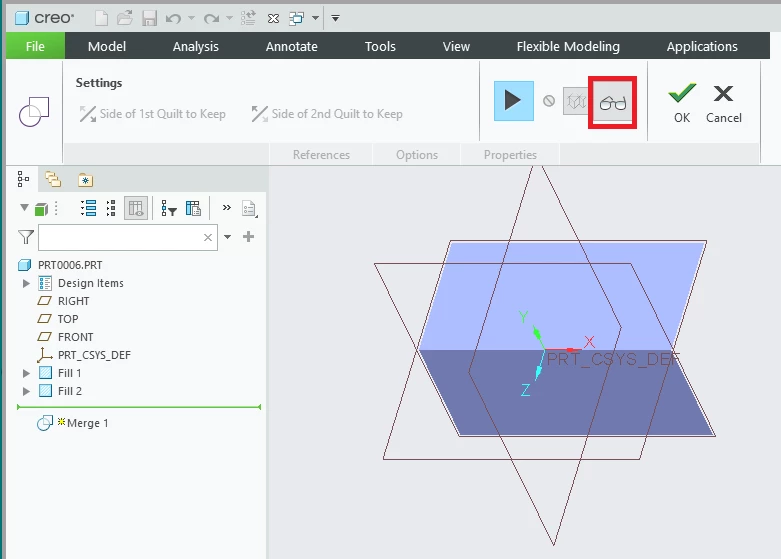
    I hope preview button will help you.

    MartinHanak_0-1697700354030.png


    1 reply

    tbraxton
    22-Sapphire II
    22-Sapphire II
    October 18, 2023

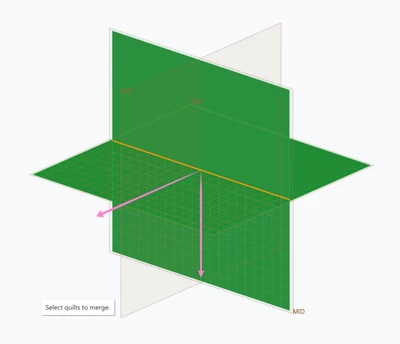
    In the merge tool UI you should see arrows indicating which side of the quilt will be retained along with the mesh grid. If you are merging more than two quilts simultaneously then they are joined, and you have no choice what is retained assuming the feature regenerates.


    You should see something like this with the arrows indicating which side will be retained. You can flip these arrows in the merge tool UI and the graphics window should update in real time presenting the preview of merged geometry.


    If this does not address the scenario you are dealing with, post more details/example model.


    tbraxton_0-1697670277578.png


    Michael_10-MarbleAuthor
    10-Marble
    October 19, 2023

    This is how Creo shows a merge of two intersecting surfaces now
    MH_Clark_0-1697693368172.png

    This is how it used to be which is a lot easier to identify what surfaces are being cut and what you're going to end up with.
    There was a config option you had to set to get this.

    MH_Clark_1-1697693390682.png


    24-Ruby III
    October 19, 2023

    @Michael_ wrote:

    This is how Creo shows a merge of two intersecting surfaces now
    MH_Clark_0-1697693368172.png

    This is how it used to be which is a lot easier to identify what surfaces are being cut and what you're going to end up with.
    There was a config option you had to set to get this.

    MH_Clark_1-1697693390682.png


    Hi,

    I hope preview button will help you.

    MartinHanak_0-1697700354030.png