

Dale_Rosema
23-Emerald III
23-Emerald III
October 6, 2015
Solved

File Format Association Error

  • October 6, 2015
  • 3 replies
  • 3777 views

Recently I have this popping up when ever I start WF5/Creo. Any suggestion as to what it is asking me to install?
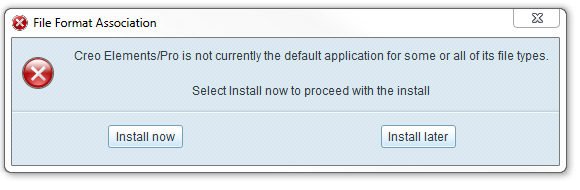
Thanks, Dale


This thread is inactive and closed by the PTC Community Management Team. If you would like to provide a reply and re-open this thread, please notify the moderator and reference the thread. You may also use "Start a topic" button to ask a new question. Please be sure to include what version of the PTC product you are using so another community member knowledgeable about your version may be able to assist.
Best answer by Dale_Rosema

From my VAR - we set the config.pro:

startup_check_for_visualization - no

This is a work around that solve the window popping up.

Thanks, Dale

3 replies

24-Ruby III
October 6, 2015

Dale,

I think the best way how to solve the problem is to deinstall/install WF5...

MH

Dale_Rosema
23-Emerald III
23-Emerald III
October 6, 2015

Martin,

WF5/Creo is the main software we use. I had Creo3 loaded in a different directory..... so I could do some trial evals.

Thanks

24-Ruby III
October 6, 2015

Dale,

if you use different ProE/Creo version, then it is necessary to set PTC_WF_ROOT variable for every version. I do it in psf file in bin directory using the following line:

ENV=PTC_WF_ROOT=path_to_directory_related_to_specific_version

MH

Mahesh_Sharma
22-Sapphire I
October 6, 2015

Dale,

You may wanna try repairing the Productview by executing ProductView_Express_32_64.msi from Creo Elements Load Point\install\addon.

Dale_Rosema
23-Emerald III
23-Emerald III
October 6, 2015

Forgive my ignorance, but for what is productview_express_32_54.msi used?

Thanks, Dale

Mahesh_Sharma
22-Sapphire I
October 6, 2015

It is for ProductView Express installation/reconfiguration.

Dale_Rosema
23-Emerald III
Dale_Rosema23-Emerald IIIAuthorAnswer
23-Emerald III
October 15, 2015

From my VAR - we set the config.pro:

startup_check_for_visualization - no

This is a work around that solve the window popping up.

Thanks, Dale