
12-Amethyst
October 4, 2016
Question

How to add chamfer/round drw notes instances within the same feature set

  • October 4, 2016
  • 3 replies
  • 7559 views

Hi,

in a part, if I do a chamfer (or round) feature containing just one Set (let's say 10x10) with some edges inside, and If I then go to draft it in a drawing, I find that the note 10x10 is available only once in the Show Model Annotations window. For example, in this case two edges in one set of 10x10, with note on the left chamfer only:
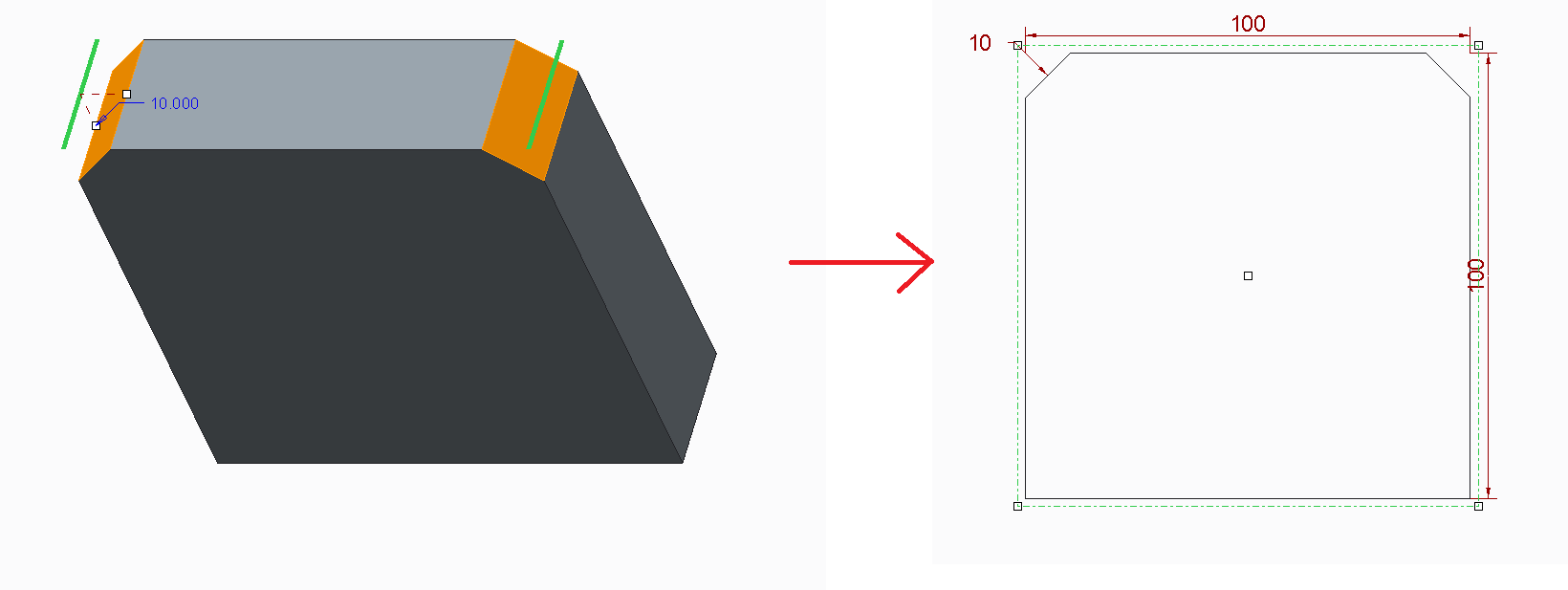
1.png

Since it is good practice to make rounds and chamfers with as few sets as possible in the 3D part, but at the same time I would need to have the relative note on all the edges of the Set in the drawing Show Model Annotations, is there an option to set this? (Maybe a config or dtl option?).

(I have searched a thread on this but found nothing, readdressing links would be welcomed of course).

Thanks

Bye


This thread is inactive and closed by the PTC Community Management Team. If you would like to provide a reply and re-open this thread, please notify the moderator and reference the thread. You may also use "Start a topic" button to ask a new question. Please be sure to include what version of the PTC product you are using so another community member knowledgeable about your version may be able to assist.

3 replies

1-Visitor
October 6, 2016

The usual practice would be to just add "#X" to the dimension. For instance, in your drawing you would write "2X 10x10 CHAMFER".

If you want to move it, simply left click and edit the attachment in the drawing.

Hope that helps!

tleati12-AmethystAuthor
12-Amethyst
October 7, 2016

Hi David,

thanks for your reply. Yes it could be done this way in some cases, in some others instead, for example when there are 4 chamfers of which 2 are 10x10 and 2 9x9, I need to label all of them cause by unaided eye they are not distinguishable.

Bye

1-Visitor
October 8, 2016

In rounds you can create separate sets; each set has it's own radius dimension. I don't recall this to be true for chamfers, but look to see anyway.

It would be valuable, and is unlikely, for Creo to automatically prefix any dimension that drives multiple features through equality or as part of a set with the number of driven items. There are some special cases to deal with, but it would certainly save some trouble if this was true.

2-Explorer
October 12, 2016

Hello Tommaso Leati

if l understand correct you key features are following:

1. In 3D models are chamfers driving with 1 dimmensions

2. In drawing are dimmension 5x45° in each chamfer separetly.

-----------------------

Idea:

Create 1 driving chamfer and rest same chmafers creat with COPY and PASTE SPECIAL operations.

See following:

1. Create 1st chamfer als you wish

2. Copy 1st chamfer

copy_01.jpg

3. Use Paste Special --- Operatin - Paste drop down menu

paste_special_01.jpg

4. Choose "Fully Dependt with options to vary" --- need your investigation --- how does it work exactly

paste_special_02.jpg

5. You will create full depend feater

model_tree_01.JPG

6. Show dimmensions on drawing

drawing.JPG

----------------------------------------------------------

Model tree is longer, but your problem can be solved with this method.

Don´t have better idea...

Note:

The same method works with hole feature and maybe some other type of features....

Regards

Milan Bonka

tleati12-AmethystAuthor
12-Amethyst
October 21, 2016

Hi Milan,

thanks for your reply, could be a way. It creates though many features in the model tree, so it would be heavier for regeneration, at this point maybe it's worth to create separate sets. But it has just one driving dimension and they are all linked together, so for small pieces and assemblies could be done without problems.

Thanks

Bye

16-Pearl
October 12, 2016

Personally, I would make as many sets (in the same function) as you need to show dimensions. Then constraint equality with relations.

2-Explorer
October 13, 2016

Have to agree with Raphaël MORIN. It´s other way and also good solution.

What to choose? ---> depends on situation, company habbits/standards etc. ... many ways to go

1-Visitor
October 14, 2016

Multiple selections within a single feature will allow much easier access to changes than parent-child copies. If the parent needs to be eliminated the children all require work.

For the truly particular, create a parameter for each size of chamfer and type that name in for the size of the chamfer. It will automatically create a relation and they won't have parent-child relations to worry about.