

10-Marble
July 8, 2015
Question

How to make scroll wheel zoom work in Windows 10 with Creo Parametric

  • July 8, 2015
  • 34 replies
  • 149346 views

I had a very difficult time finding a solution for this. I opened a call and PTC said Windows 10 wasn't a supported configuration. Fortunately a curious co-worker discovered the fix. Not having zoom with the scroll wheel was a show stopper for me. Here's how to make it work as before:
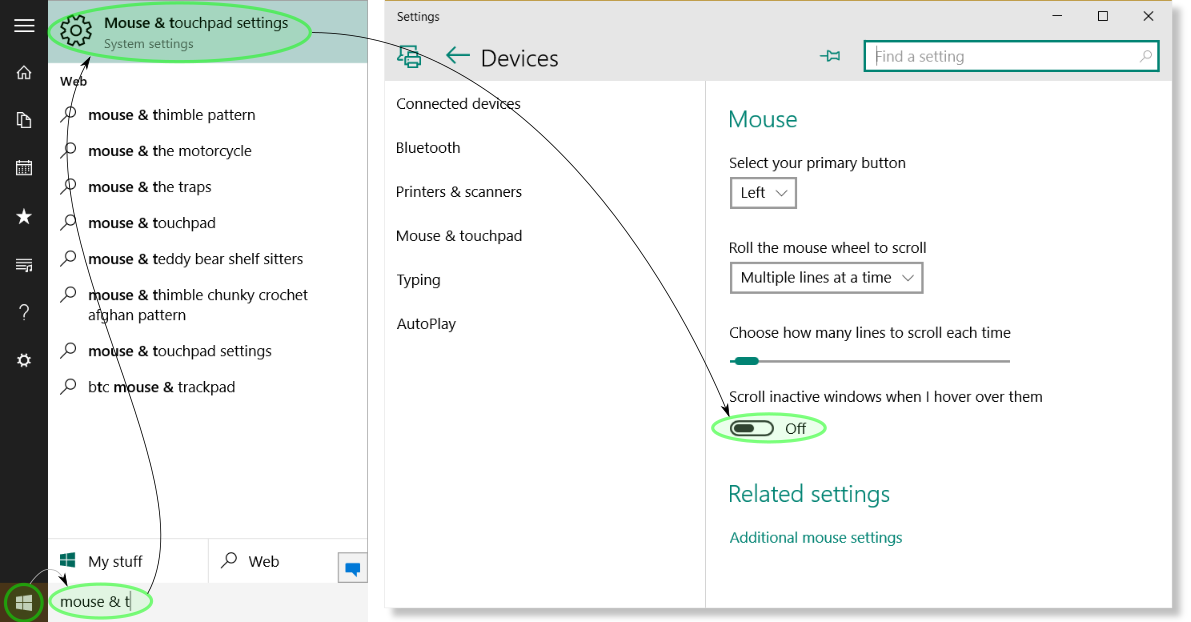
win10-scroll_wheel.png

1. Select the Start button


2. Type "mouse & t" in the search area and press Enter


3. In the Mouse & touchpad settings dialog select the toggle for Scroll inactive windows when I hover over them until it displays Off.


4. Launch Creo Parametric and marvel at mouse wheel zooming

34 replies

1-Visitor
August 13, 2016

Thanks! So right and so random. Also...WTH?

1-Visitor
September 24, 2016

Thanks, Robert! It does the trick!!

Mark

4-Participant
February 3, 2017

Thank you very much!

______________________________

www.marciosiviero.com

1-Visitor
February 3, 2017

Thank you very much

4-Participant
January 8, 2018

Perfect, THANK YOU!!!!

1-Visitor
January 10, 2018

Many thanks!

1-Visitor
January 22, 2018

I was about to go nuts.... Thanks!

10-Marble
May 3, 2018

Thanks, looked in there and thought "on" was good!


1-Visitor
May 25, 2018

rmyers!  Thank you so much for taking the time to write this.  I just updated to Windows 10 finally and my mouse stopped scrolling in Creo!  This very old post saved my bacon.  Thank you for the pictures and great description.

1-Visitor
June 4, 2018

I have found solutions for Windows 10 in this post, but how do I get Windows 7 with Creo4.0 to work with my mouse? I have no functionality for panning, zooming or rotating.