1-Visitor
November 13, 2022
Solved

Main window missing

  • November 13, 2022
  • 2 replies
  • 5140 views

I've installed multiple versions of Creo 3, 6, 9 and on all of them, there is no active part window when opening the program. I'm able to create a new part file but nothing opens on the screen and the only windows that remain open are the startup ones which I can't seem to turn off. Since it's happened on numerous versions, can you recommend some fixes as it's obviously something wrong with my computer? 


It has a NVIDIA 940mx 2GB graphics card running Windows 10 on a Intel i7 chip with 16 GB or ram. Didn't know if I need to install a driver or something? 


Thank you for your thoughts! 

Best answer by MartinHanak

@MC_10443629 wrote:

Hi Martin,


Thank you for your suggestions above. 


For the first thought, noted that integrated browser can be closed and I can close it but everything else in that window is blank and cannot be accessed. This is why we tried to create a new part just to see what happens but nothing is in that window. 


For the second thought, noted that our graphic driver may not be compatible and I'm trying to follow your suggestion. Are you recommending to try to create a temporary config.pro file and then add in the "graphics  win32_gdi" line somewhere in the file via notepad? Are you suggesting I delete the entire PTC folder in the local PTC folder? 


Thank you again for your continued thoughts and will try any and all of the above. Just want to make sure we're following your thoughts correctly. Thanks again! 


And for the last suggestion, I can find the PTC folder in my Appdata/Local/PTC but the only two folders are Creo and Quality Agent. 


Hi,


1.] config.pro

I suggest you to edit "main" config.pro.

In my Creo 9.0 it is located in E:\PTC\Creo9_020\Creo 9.0.2.0\Common Files\text directory.


2.] PTC subdirectory

You have to copy %APPDATA%\PTC into input field of File Explorer, see picture.
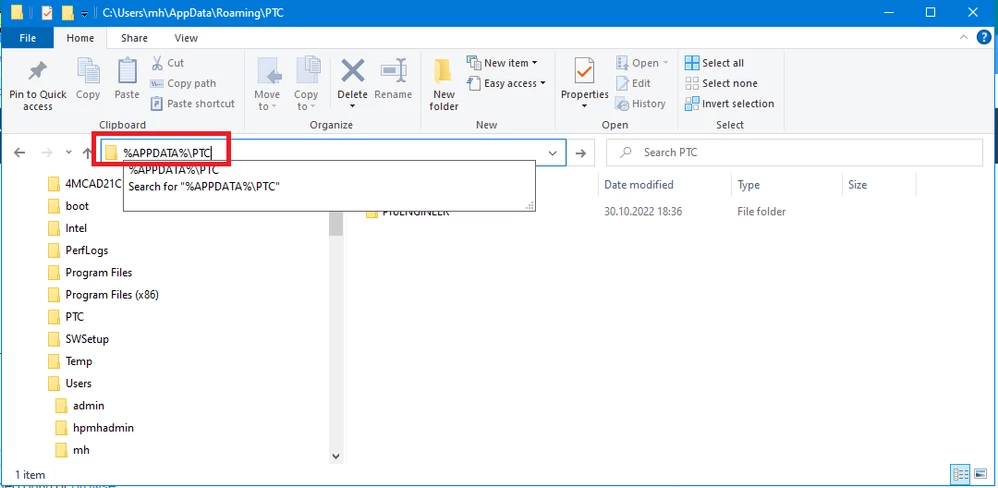
MartinHanak_0-1668534480040.png

Under my login %APPDATA%\PTC is translated to C:\Users\mh\AppData\Roaming\PTC.

You can rename PTC subdirectory. Next Creo start will recreate the directory.

 

2 replies

24-Ruby III
November 14, 2022

@MC_10443629 wrote:

I've installed multiple versions of Creo 3, 6, 9 and on all of them, there is no active part window when opening the program. I'm able to create a new part file but nothing opens on the screen and the only windows that remain open are the startup ones which I can't seem to turn off. Since it's happened on numerous versions, can you recommend some fixes as it's obviously something wrong with my computer? 


It has a NVIDIA 940mx 2GB graphics card running Windows 10 on a Intel i7 chip with 16 GB or ram. Didn't know if I need to install a driver or something? 


Thank you for your thoughts! 


Hi,

please publish screenshot showing what is displayed in the monitor after starting Creo.


1-Visitor
November 14, 2022

Hi Martin, 


Thank you for your assistance! Please see attached an image of the startup page along with another page where we tried to create a new "Part". For the startup, I was able to close the internet windows that pop up and create the new "Part" but then as you can in both images, the middle of the screen is totally blank (indicated with red boxes) and we can't access anything inside of the window. There's no geometry in the window. 


Do you think this is a problem with our computer? Missing a driver or something? 


We tried to install various versions thinking perhaps an older one would work but alas, they all have the same problem. 


Thank you for your continued assistance and we'll await your thoughts! 

24-Ruby III
November 15, 2022

Hi,

area inside red rectangle belongs to integrated browser. You can close this subwindow by clicking cross button in its top right corner.

MartinHanak_0-1668498374729.png


16-Pearl
November 15, 2022

We've seen a similar issue when high DPI monitors are in use.  Try changing the display resolution to 100% (from a default of 125%) or modify the high DPI settings on the executable files.  Reference https://www.ptc.com/en/support/article/cs265134  You can search the KB for "high dpi" to find several articles.


Regards,


Dan N.

1-Visitor
November 15, 2022

Thank you for your thoughts but for our situation, we are using an older laptop that only has a 1080 screen, not high DPI. We imagine this should still work with our older laptop (2017). What do you think? Thank you again!