
1-Visitor
February 9, 2018
Solved

Modifying Sketcher Options

  • February 9, 2018
  • 1 reply
  • 2496 views

Hello,


I am trying to modify my sketcher settings to always show 4 decimal places when I am modeling parts. However, when I change the option below to 4 decimal places and then export the new configuration file, it goes back to 2 decimal places after restarting creo. How can I make it not reset?
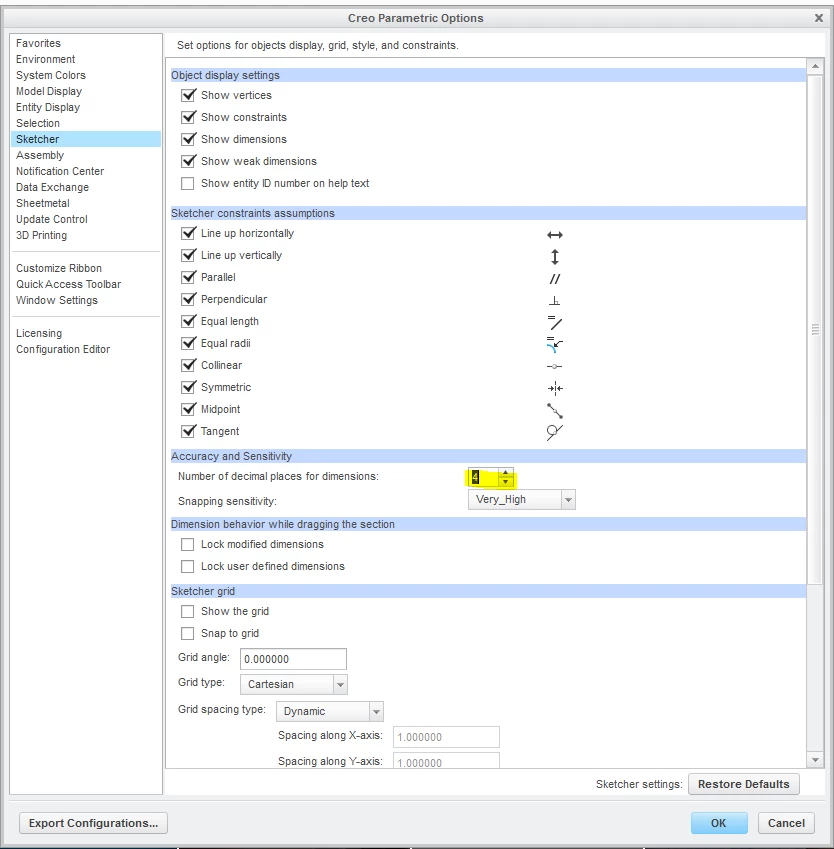
decimal places.PNG

Best answer by dgschaefer

Make sure it's named config.pro, not currentsession.pro or whatever Creo saves it as.


Does your company use a config.sup file?  Look for one in the text folder in the install directory.  By default it's here:


C:\Program Files\PTC\Creo 3.0\M150\Common Files\text


Of course, if you're using Creo 4 it'll be Creo 4 and you might be running a different build.

1 reply

21-Topaz II
February 9, 2018

Where are you saving the configuration file and under what name?


Creo will read files named "config.pro" from the following folders, in order:


  • The text folder of the installation directory
  • The user's "Home" directory, as defined by Windows
  • The folder specified in the "start in" field in the shortcut used to launch Creo.

If not named properly or in one of those folders, it won't load.


Also, if another config.pro file with the option set to 2 decimal places is loaded after, it will take precident.


Lastly, there is a special configuration file named config.sup that must be loaded from the folder of the installation directory.  If it exists and it has the option set to 2 decimal places, it will prevent you from resetting it to 4.

cedroneg1-VisitorAuthor
1-Visitor
February 9, 2018

I am saving the file in the start in field of the creo shortcut

21-Topaz II
February 9, 2018

Make sure it's named config.pro, not currentsession.pro or whatever Creo saves it as.


Does your company use a config.sup file?  Look for one in the text folder in the install directory.  By default it's here:


C:\Program Files\PTC\Creo 3.0\M150\Common Files\text


Of course, if you're using Creo 4 it'll be Creo 4 and you might be running a different build.