
17-Peridot
December 10, 2014
Solved

Norton AV flagged Creo 3.0 M010 as high risk...

  • December 10, 2014
  • 3 replies
  • 10599 views

Heads up, and looking for others that have had this pop up recently...


I download all the releases for Creo to an archive foldere. After a few days of being on my system, Norton antivirus flags the install zip file as a high risk.


I reported this to customer support. I will update with their response. Anyone else get this?
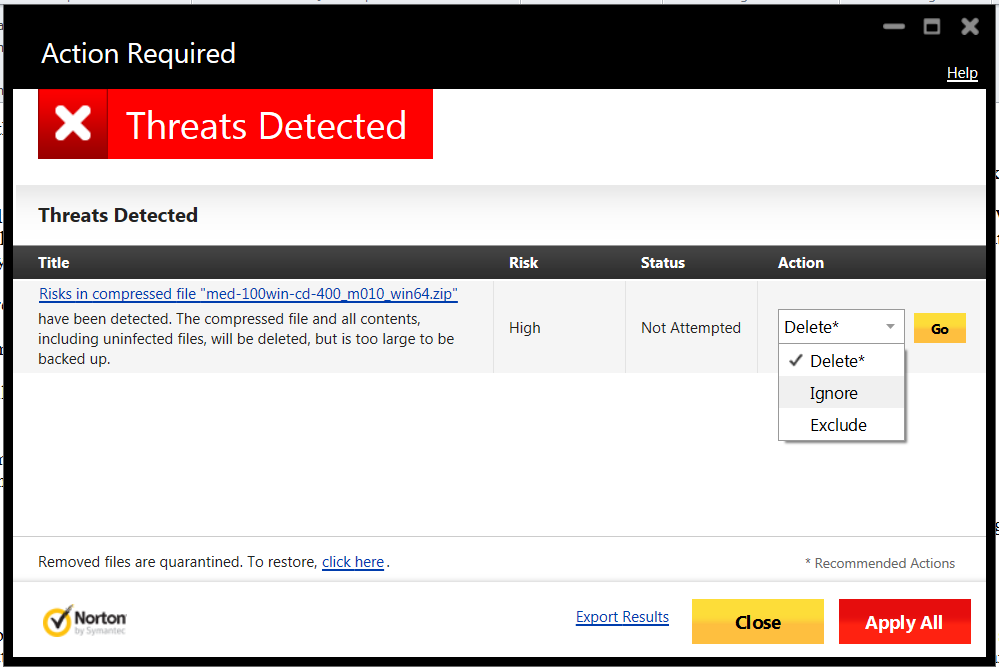
 

Norton_alert_Creo_3_m010.png


This thread is inactive and closed by the PTC Community Management Team. If you would like to provide a reply and re-open this thread, please notify the moderator and reference the thread. You may also use "Start a topic" button to ask a new question. Please be sure to include what version of the PTC product you are using so another community member knowledgeable about your version may be able to assist.
Best answer by RichardJ

I just got this from Symantec:

In relation to submission [3688339].

Upon further analysis and investigation we have verified your submission and, as such, the detection(s) for the following file(s) will be removed from our products:

53E35B99B59E10B3BA69A503A4919AF6 - portmap.exe

The updated detection(s) will be distributed in the next set of virus definitions, available via LiveUpdate or from our website at http://securityresponse.symantec.com/avcenter/defs.download.html

Decisions made by Symantec are subject to change if alterations to the Software are made over time or as classification criteria and/or the policy employed by Symantec changes over time to address the evolving landscape.

If you are a software vendor, why not take part in our whitelisting program?

To participate in this program, please complete the following form: https://submit.symantec.com/whitelist

So it is definitely a false positive. PTC might want to think about that whitelisting program. I assume other AV software companies have similar programs

3 replies

14-Alexandrite
December 15, 2014

delete it!

hehe

17-Peridot
December 15, 2014

I cannot believe I am going round and round on this with CS including an escalation today.

I've excluded the error for now but am not moving forward until PTC has had a conversation with Norton.

I've had nothing but advice on how to avoid getting the warning... but that wasn't the point of reporting this!

I fully trust PTC in their efforts to avoid virus issues with their roll outs but if one could have snuck in there, I would expect them to give this the utmost priority considering the install base.

I don't know enough about Norton to dig deeper... and worse, this is the Comcast provided version which has limited support or options. It just works and that's good enough for me.

19-Tanzanite
December 15, 2014

I don't normally watch the Creo forums at all, and just happened to catch this. I've used Norton for years, and am very familiar with it. Assuming Norton will let you, unzip all the files into a new folder. Simply unzipping the file can't harm you, just don't run anything in the new folder. Then right click on the folder and tell Norton to scan it. Tell me what threat(s) it found.

23-Emerald IV
December 16, 2014

I have a copy of the Creo 3.0 M010 downloads for Help, Win32, and Win64. I located the cabinet files and extracted the files and folders. Only Help and Win64 contained the portmap.exe file. From all appearances both copies seem to be identical. The AntiVirus software we are using (Kaspersky) did not detect any threats with either of them.

6.PNG

8.PNG

10.PNG

23-Emerald IV
December 16, 2014

Just for fun, I submitted it to an online scanning site. It was runthrough 42 different scanners and passed all of them. Interestingly enough, Norton wasn't included. Full results here:

https://www.metascan-online.com/en/scanresult/file/2eade8e11dfd4034a5fa19c1669bf709

12.PNG

19-Tanzanite
December 16, 2014

So it's a false positive. Norton flagged it not because it knew it was a threat, but because it has too many characteristics that make it look like it might be be one.

Yawn!

17-Peridot
December 16, 2014

Thanks for all the insight, people! I have no interest in becoming an AV expert nor to add yet again more software. AV apps have always been the bane of my total computer experience. They seem to get in the way more than they help.

Funny thing is, Comcast use to have McAfee and switched to Norton. It's been pretty quite and reliable so far until this.

I don't know how to give credit for so many helpful replies but I am perfectly acceptable with finding this a false positive. I do hope that PTC will contact Norton and have this unflagged by the "Symantec community". So far I am not excited about PTC's pro-active stance, or lack there of, on an issue such as this.

19-Tanzanite
December 16, 2014

Stop! I'm not sure it is a false positive. Norton found "Suspicious.Cloud.7.F". That is not just a suspicious file by heuristics, it's a known trojan from their database!

Edit: I take it back. That is a heuristic detection, just not one I've seen before. It's one that looks for new versions of old threats with somewhat different signatures. So it's probably a false positive. I'm going to report it to Symantec.

23-Emerald IV
December 16, 2014

Odd that the exact same file didn't trip up any of the other AV software it was fed through...