21-Topaz I
August 26, 2015
Question

Shape Indexing Not Working

  • August 26, 2015
  • 5 replies
  • 4181 views

I set ModelCheck up to create the necessary information for shape indexing.  I created about a dozen models from each other for testing so they are identical.  The search is not returning all the models it should.


I am on PDMLink 10.1 M050 and Creo 2 (M110 and M170).  I created the 5 attributes and assigned them to the CAD Document.


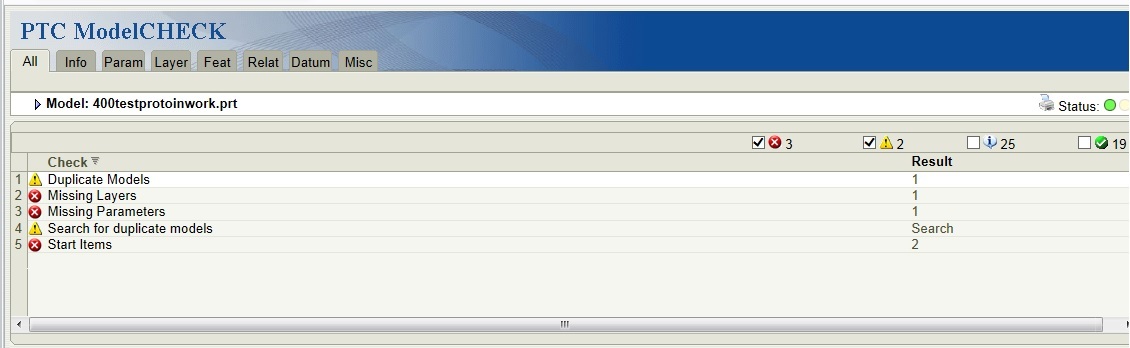
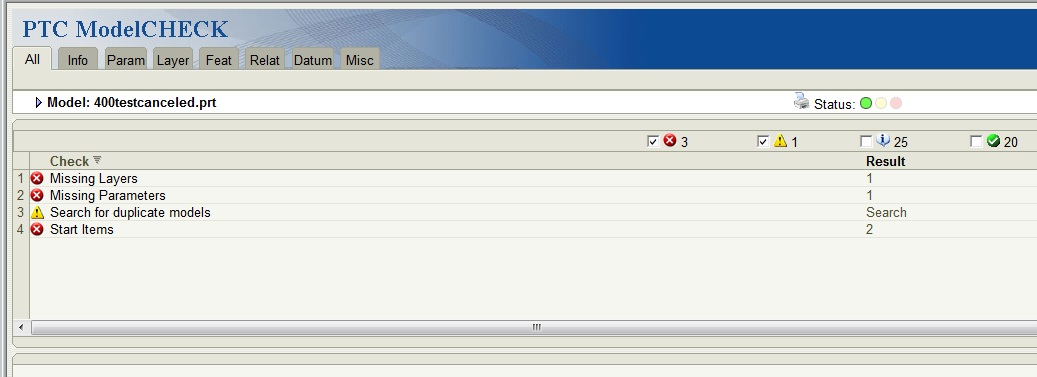
What's really odd though is in M110 I only get the Search for duplicate models check.  In M170 I get both that and the Duplicate Models check.  And I am using the same config files.

M110
MC in M110.jpg

M170

MC in M170.jpg


Has anyone really been able to get this to work correctly?

5 replies

STEVEG21-Topaz IAuthor
21-Topaz I
September 1, 2015

I can't believe nobody uses shape indexing.

STEVEG21-Topaz IAuthor
21-Topaz I
September 16, 2015

I submitted a call to PTC and they confirmed it doesn't work as expected.  They even created an SPR last month.

23-Emerald IV
September 16, 2015

Please keep us up to date on the SPR.  I didn't even know PTC had something like this.  The only shape classification tool I've actually seen is iSEEK.

CADseek shape search part search geometric search plm search

STEVEG21-Topaz IAuthor
21-Topaz I
September 17, 2015

PTC bought ModelCheck from Rand many years ago but they really haven't updated it much.  It's a very useful tool but there are a few things that don't work as expected.

I knew there are other programs that have similar functionality but ModelCheck is included in the package.

The problem was reported to R&D and is currently being evaluated.

STEVEG21-Topaz IAuthor
21-Topaz I
October 1, 2015

I guess nobody uses the Shape Indexing in ModelCheck.

12-Amethyst
February 2, 2017

I'm not a user of modelcheck, but I tried and it seems to work on Creo 3.

10.png

It even creates a preview of duplicated models. It's not dependent of the UCS but it is scale dependent.

12-Amethyst
February 3, 2017

Here are the configs I used.

1 - Extract this file to a network folder/mapped drive (to a multi-user usage)

2 - Add the location to config.pro, something like:

modelcheck_dir t:\MODEL_CHECK_CONFIGURATION

3 - Correct the paths inside the files:

...\MODEL_CHECK_CONFIGURATION\config\config_init.mc

...\MODEL_CHECK_CONFIGURATION\mc_dup_write\Append_data.bat

4 - Open Creo, run ModelCheck on some models, Close Creo

5 - Check folder ...\MODEL_CHECK_CONFIGURATION\mc_dup_write

a new file should appear, something like mc_dupl_user_201702032114.bin,

Modelcheck will create this files when you close Creo and you have to append them manually to the database.

To do that you only have to run the file Append_data.bat

I haven't explored this extensively but this is a good kickstart for who is interested.

Jose.