

Using Assembly Parameters in Part Models for Part Identification (Both Simple and Multi-Body)
I have a problem with Family Table Multi-Body parts.
Our manufacturing group requires the part number of each of our sheet metal parts to be stamped/etched onto the part itself when the part is being punched for part identification purposes. We have a tool on our punch that simply stamps this information onto our parts read off of the Flat State DXF. On simple parts (not multi-body parts), we simply create a parameter within the part itself that extracts the part number and revision information from Windchill, and then we create a cosmetic sketch on the surface of the part and create text that adds the parameter value automatically.
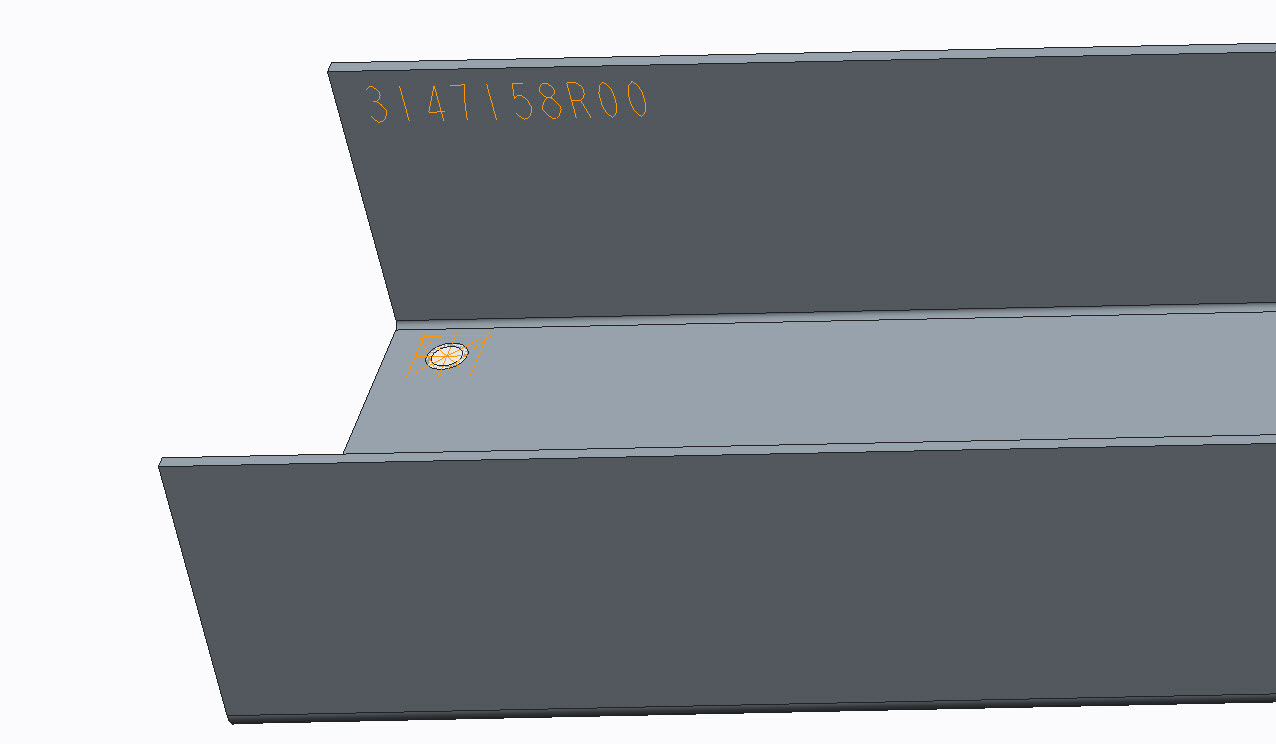
For Multi-Body parts, we have a bit of a situation that we are looking to remedy.
- In the past, our part, assembly (multi-body part with pressed in studs for instance), and drawing all have their corresponding file names match the drawing number, so we would have 1234.prt, 1234.asm, and 1234.drw as an example. This was easy as we could (on a .prt level) just set up that parameter as we had done on simple parts, and know that they would match.
- Recently, we implemented PLM into our organization, and because of this we have opted to move toward generic part numbering where the .prt, .asm, and .drw all have their own unique serial number assigned to them. This presents a problem specifically on our Multi-Body parts as the manufacturing divisions want the .asm (multi-body) part number stamped onto the metal part. Because of this, we need the .asm part number stamped into the .prt's flat state.
I have figured out how to do this on multi-body parts (without a family table) by adding a parameter called PART_NUMBER and having it defined in the relations of the assembly itself to extract the assembly file name and assigning that value. Then, while in the relations of the assembly, I click on Show -> Session ID and determine that ":3" for example is my ID for the assembly. I then go into the relations of the .prt, go into its relations and type in PART_NUMBER_ASSY = PART_NUMBER:3. This then adds the assembly information that I was looking for, and I thought our issues were solved.
Then i started playing around with parts with Family Tables. We often times have trim pieces that are identical in every way other than the overall length. In these cases, we have a .asm file for each length instance that has relations to swap in the corresponding length .prt file. When I do the part swapping in the assembly to call out the correct length part, it defaults to the generic (or specific instance) session ID and assigns the same .asm number to every part. Right now, each .asm's PART_NUMBER value correctly defined, I just cannot determine a way to pass that down to the .prt.
Otherwise, does anyone have a better way of passing Parameters down from an assembly to the part and have it remain intelligent enough to pull that parameter value from the .asm file? I have tried the route of creating a notebook, but that seems to assign values from the notebook down to the parts declared to it. Ideally, this seems like it should be simple, but I cannot seem to find a solution. We could obviously type this in manually, but with saving copies from project to project, that can get overlooked, and we are looking for ways of automating this.
This thread is inactive and closed by the PTC Community Management Team. If you would like to provide a reply and re-open this thread, please notify the moderator and reference the thread. You may also use "Start a topic" button to ask a new question. Please be sure to include what version of the PTC product you are using so another community member knowledgeable about your version may be able to assist.