

3-Newcomer
November 24, 2024
Solved

when I open the program I just see a black screen

  • November 24, 2024
  • 1 reply
  • 2864 views

Hello,


I have installed Creo Parametric 11.0 on my laptop (RTX4060 and  intel i5). now when I open the program I just see a black screen. I have already done an update of my graphic card driver, but that did not help. If anyone knows how to resolve this issue, I would be glad if you could let me know. 

Best answer by MartinHanak

@TT_12193950 wrote:

I have already seen this post, but all of the suggested solutions did not help to solve my issue. 😞


Hi,

please click File > Help > System Information > System Information.

Then scroll window contents until you see Creo Parametric Graphics Type:

It must be set to win32_gdi

In my case it is set to OPENGL (because my graphic card is accepted by Creo)
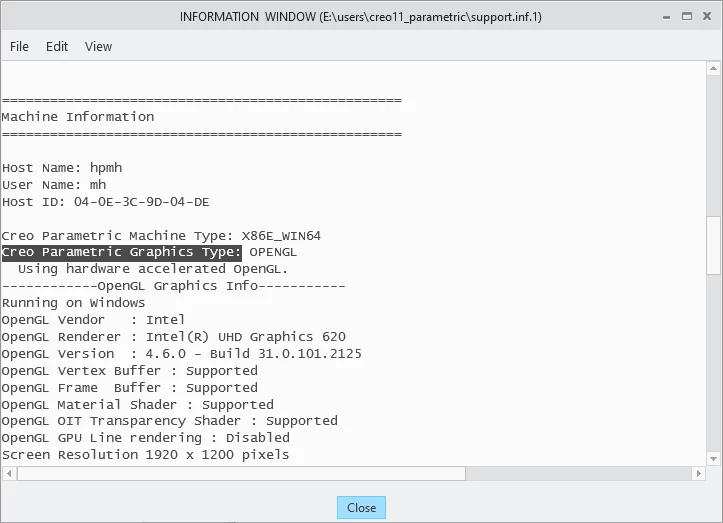
MartinHanak_0-1732531488636.png


1 reply

24-Ruby III
November 25, 2024
3-Newcomer
November 25, 2024

I have already seen this post, but all of the suggested solutions did not help to solve my issue. 😞

24-Ruby III
November 25, 2024

@TT_12193950 wrote:

I have already seen this post, but all of the suggested solutions did not help to solve my issue. 😞


Hi,

please click File > Help > System Information > System Information.

Then scroll window contents until you see Creo Parametric Graphics Type:

It must be set to win32_gdi

In my case it is set to OPENGL (because my graphic card is accepted by Creo)

MartinHanak_0-1732531488636.png