1-Visitor
January 26, 2015
Solved

How do I change the editor/viewer?

  • January 26, 2015
  • 1 reply
  • 6034 views

When I double-clock to view/edit a source file (ex: .cs) in PTC Integrity, it launches notepad.

Notepad does not show line numbers; so, I would like to change this,

I have not been able to find wher to change this.

Thanks,

Mark

    Best answer by LLawton

    In my experience, setting up an actual editor preference in Integrity is not a viable solution because then it becomes the editor for all file types. Try opening a MS Office document with that!

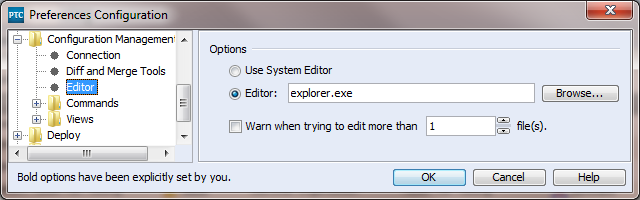
    But I've found a trick to ensure that the Integrity client uses the same associations as Windows 7's double-click: For Integrity Preferences, do not use "Use System Editor". This would be the logical choice but doesn't work because of the confusion between Open and Edit in Windows 7.

    Instead, specify an "Editor" but use "explorer.exe" for the program name. Now Integrity will launch Windows Explorer which will use its association the way you expect.

    Untitled.png

    1 reply

    21-Topaz I
    January 26, 2015

    Hello Mark,

    This setting is controlled by Windows - the file opens in whatever program you have associated with its extension. See Article 159278 for instructions to change this.

    1-Visitor
    January 26, 2015

    Your web account does not hold the following required privileges to access this application:

    • Customer Service Access
    16-Pearl
    January 28, 2015

    Hi Mark,

    To close the loop on this for future reference: In most environments*, a user should be able to obtain their SCN by going to their server's home page and looking for their contract number, in the left column just above the copyright notice.

    *In some environments, administrators have disabled the home page. We generally recommend against doing that, because there is useful information there for various particular non-usage situations.
