13-Aquamarine
February 26, 2024
Solved

2D drawing view issue with swept trajpar wire bundle

  • February 26, 2024
  • 4 replies
  • 5814 views

I am using Creo6 - version: 6.0.6.0

swept wire bundle using trajpar does not show hidden lines correctly in drawing view.

I've tried changing display settings, part accuracy settings; nothing seems to fix the issue; any ideas ?
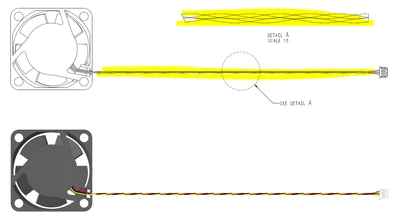
 

rburk_0-1708974319779.png


thanks

Rich

Best answer by aputman

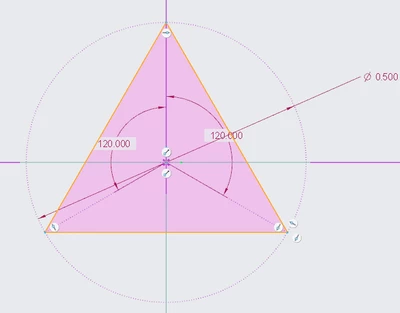
I was able to get something that works.  For the trajpar feature, remove the circles representing the wires and instead, draw a line connecting the center of each of the circles, creating a triangle.  Sweep this feature and then use the edges of that sweep as the trajectory for the wires.  I don't know why it works but it does for me. 

aputman_0-1709052565807.png


4 replies

23-Emerald III
February 26, 2024

I am not familiar with wiring but with any solid, if you have interferences, that will cause hidden line issues on drawing/models but typically doesn't affect shaded models/drawings.

rburk13-AquamarineAuthor
13-Aquamarine
February 26, 2024

even when I confirm "no interference" still shows incorrectly in drawing views

rburk_0-1708976951163.png


23-Emerald III
February 26, 2024

Two thoughts:

1 Are the wires solid?, in the model, when you go to wireframe, do they show as surfaces (my color scheme shows them as magenta)

OR

2 how about interference on either end? It looks just like the typical hidden line issue for interference

StephenW_0-1708977626148.png


13-Aquamarine
February 26, 2024

I have also had issues with this when there are surfaces intersecting one another.  In your case, (assuming the sketch below is correct) each wire has a shared edge (red circles) with both of its neighbors and  Creo can't interpret where the shared edge belongs and likely doesn't even know the proper orientation of the surface.  If you add a gap between the wires, I'm fairly confident this HLR issue will go away. 

aputman_0-1708977447013.png


rburk13-AquamarineAuthor
13-Aquamarine
February 26, 2024

I confirmed sweep sketch has "gaps" 

rburk_0-1708977992431.png


tbraxton
22-Sapphire II
22-Sapphire II
February 26, 2024

If the wires are tangent, that could be the problem. If they are tangent in the sweep section, then put a small gap in and see if that affects what is seen in the drawing.

rburk13-AquamarineAuthor
13-Aquamarine
February 26, 2024

here's just the wire bundle only (no tangency) & settings  - still not showing correctly in drawing

rburk_0-1708984600114.png


24-Ruby III
February 27, 2024

Hi,

please upload your model + drawing packed in zip file.

rburk13-AquamarineAuthor
13-Aquamarine
February 27, 2024

Hey Martin

I uploaded the wire bundle and drawing issue.

13-Aquamarine
February 27, 2024

If you turn on "fasthlr_drawing", the wire bundle displays correctly.  I don't know the full implication of turning on that parameter.