10-Marble
May 7, 2025
Solved

Disable Refit After Sketch Command

  • May 7, 2025
  • 2 replies
  • 693 views

Hello,

I know the config option sketcher_refit_after_dim_modify to modify dimension without refitting the screen. But I need different option. I would like to start sketching without refitting. When I hit sketch button, whole part/assembly is fit to the screen, but I would like to not do so and stay exactly the same position where I started. Is this possible?  Is there an option or config to disable refit at the start of sketching?

Thank you so much and have a nice day.

Best answer by StephenW

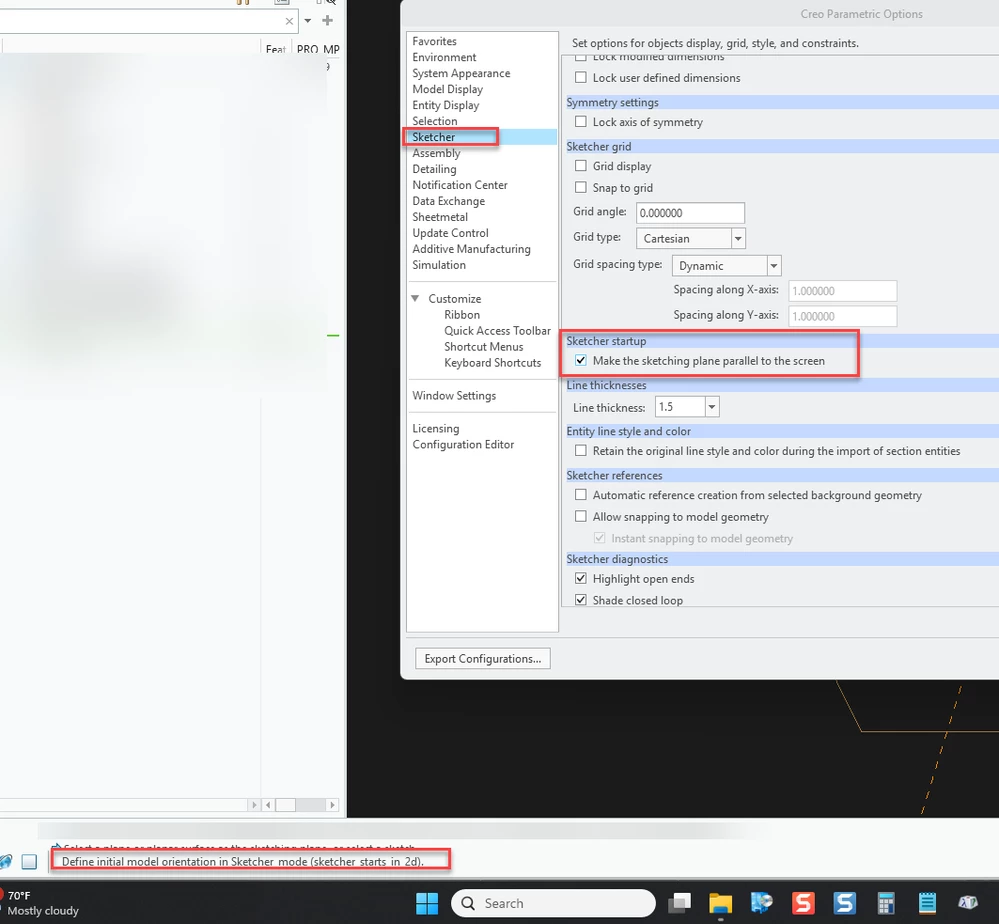
I think what you want is this: Uncheck the box "make the sketching plane parallel to the screen"

Snag_3f9f5e6.png

2 replies

StephenW23-Emerald IIIAnswer
23-Emerald III
May 7, 2025

I think what you want is this: Uncheck the box "make the sketching plane parallel to the screen"

Snag_3f9f5e6.png

LBoddah10-MarbleAuthor
10-Marble
May 15, 2025

It is almost perfect. Now I need to hit view normal button after sketch command but now it does not fit whole part into my screen that is what i needed. Thank you so much.

Community Moderator
May 14, 2025

Hello @OO_9805252


It looks like you have a response from our community champion. If it helped you solve your question please mark the reply as the Accepted Solution. 
Of course, if you have more to share on your issue, please let the Community know so other community members can continue to help you.

Thanks,
Vivek N.
Community Moderation Team.