
4-Participant
June 1, 2024
Solved

Files only are visible when the workspace is inactive, and disappear when workspace is active

  • June 1, 2024
  • 2 replies
  • 3337 views

Hello, I've recently had a problem where I would add files to my workspace, but when I open my workspace in Creo, they will only show up if the workspace is inactive. The moment I activate the workspace to open the files in Creo, the files disappear, only to show back up again when I deactivate the workspace. As a result, I am unable to open the files in Creo. Has anyone else had this issue? I've tried making new workspaces, reinstalling and uninstalling, etc. I am on Creo 8 and 9.
Best answer by StephenW

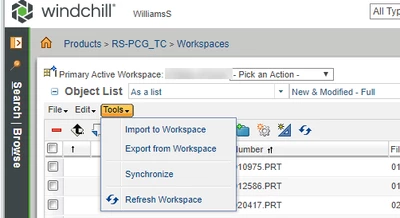
In your Windchill workspace browser, use tool synchronize.

StephenW_0-1717410099516.png


2 replies

23-Emerald III
June 1, 2024

Possibly your local cache is corrupted.

Try deleting the .wf folder  ***WARNING***, IF you have modified objects in any workspace that are NOT uploaded to the server side cache, you will lose those modified objects!

4-Participant
June 2, 2024

Thank you so much for your response! Unfortunately, the files are still not showing up after deleting the cache folder, though I'm not sure if I deleted the right one. I deleted the folder that shows up when you do Creo -> File -> Manage Session -> Server Management -> Cache.

23-Emerald III
June 3, 2024

Use that path in a file manager and delete the .wf folder.

StephenW_1-1717410481855.png


Community Moderator
June 11, 2024

Hello @KY_11091866,


It looks like you have some responses from some community members. If any of these replies helped you solve your question please mark the appropriate reply as the Accepted Solution. 

Of course, if you have more to share on your issue, please let the Community know so other community members can continue to help you.

Thanks,
Community Moderation Team.