6-Contributor
July 12, 2024
Solved

Hole table through datum points need help on how to sort feature name column in re. order (Creo 10).

  • July 12, 2024
  • 3 replies
  • 1675 views

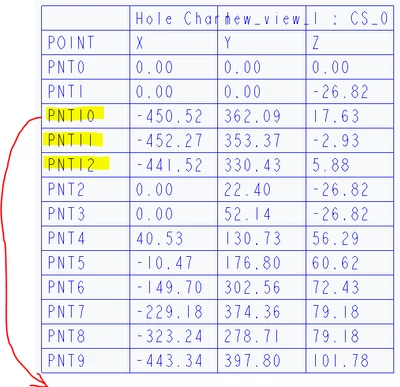
I am creating a hole table through datum points like feature name "POINT" & its "X,Y,Z" measurement through cs_o but when datum points go beyond 9  for e.g. "PNT9" then it sort by again first digit means it will go like 1 then 10,11,2,3,4 likewise (refer snap for more details).

I have tried to increase decimal point from 1 but it won't get sort out.

Need help to how to sort this double digit figures in ascending order & Is there any way to make this hole table parametric if point location is updating it will directly show on table without adding it again.
 

Capture.PNG

Hoping for the solution from PTC! ðŸ¤ž

Application :- Creo 10 Paramertic 

Best answer by pausob

1) workaround is to rename your points to have a leading 0:

PNT00

PNT01

PNT02

...

PNT10

PNT11

...


in part modelling mode, go to the menu: File -> Prepare -> Model Properties -> change Names:

pausob_0-1720815918270.png


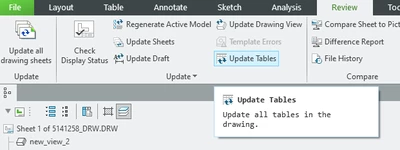
2) update your hole tables in drawing mode with the "Update Tables" function:

pausob_1-1720815740603.png


3 replies

pausob19-TanzaniteAnswer
19-Tanzanite
July 12, 2024

1) workaround is to rename your points to have a leading 0:

PNT00

PNT01

PNT02

...

PNT10

PNT11

...


in part modelling mode, go to the menu: File -> Prepare -> Model Properties -> change Names:

pausob_0-1720815918270.png


2) update your hole tables in drawing mode with the "Update Tables" function:

pausob_1-1720815740603.png


23-Emerald III
July 15, 2024

The system is functioning correctly! It is sorting all PNT1* values first, then it will do all PNT2* values.

The solution is to use the same number of digits in all of your values, PNT01, PNT02, etc.

Community Manager
July 19, 2024

Hello @SJ_10265581,


It looks like you have some responses from some community members. If any of these replies helped you solve your question please mark the appropriate reply as the Accepted Solution. 

Of course, if you have more to share on your issue, please let the Community know so other community members can continue to help you.

Thanks,
Vivek N.
Community Moderation Team.