

16-Pearl
July 12, 2021
Question

color to holes

  • July 12, 2021
  • 9 replies
  • 12524 views

In many companies, and even in industries, there are some "rules" to apply colors to some features, and specially to holes.

Now I paint holes with mapkeys. But if the pattern adds a new instance, the newly created hole needs to be repainted.
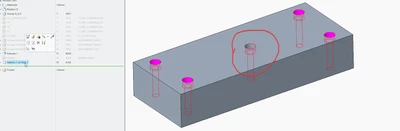
 

T_F_0-1626080032157.png

Any one knows how to replicate the colors of the newly created holes? Any app? Any workflow?

9 replies

21-Topaz II
July 12, 2021

As far as I know when I apply appearances to a specific surface that appearance designation is "attached" to a specific surface ID only. If I want that appearance to apply to more surfaces I have to pick all the individual surfaces added to modify them, too. Regrettably, I can't see any way to apply appearances to a feature, which would be pretty nice.

So it seems your only option is the tedious one. Unless someone else knows a cool trick to do this kind of thing...

T_F16-PearlAuthor
16-Pearl
July 12, 2021

I'm afraid of this... Perhaps anyone as a specific toolkit app! Anyone?


23-Emerald IV
July 12, 2021

Many of us have been asking for something like this for a long time without having to resort to a 3rd party product.  Unfortunately there is still nothing from PTC.  The only solution that I'm currently aware of is SMARTColor by B&W.

T_F16-PearlAuthor
16-Pearl
July 12, 2021

Maybe PTC can add this to CREO like did with other apps, like ifx

19-Tanzanite
July 12, 2021

Yes.


Searching for surfaces by feature(s), then applying your colors to the returned selection set.

Not automatic, but way less tedious than picking-by-clicking...

T_F16-PearlAuthor
16-Pearl
July 12, 2021

True, but if I design in top down assemblies, if I add a hole in this part, the plate that has the threaded holes, will add a hole also. So I need to repaint the holes of this plates, and at the same time the threaded holes of the plate, so double tedious work. And if I forgot the holes of the plate, it will be a mistake made by me. It should be parametric

19-Tanzanite
July 13, 2021

Of course it should be parametric - so publish your gripes on the product idea forums.

This forum is about work-arounds, not about how things should be 🙂


I notice you have the latest version with multi-body functionality.  I wonder if you could get the colors to stay with the body?  I guess I'm thinking of a work-around where the volume of the holes is modelled in a body that is subtracted away from the main body.  Does that operation preserve the surface colors?

Patriot_1776
22-Sapphire II
July 13, 2021

You can apply a color to "surfaces" by "feature" using the search tool.  Depending on things, you can also apply color by "intent surfaces".

T_F16-PearlAuthor
16-Pearl
July 13, 2021

But if the feature add surfaces, the original color will appear on those surfaces

T_F16-PearlAuthor
16-Pearl
July 13, 2021
24-Ruby III
July 13, 2021

Hi,

I assume the following trick is not the solution to your problem ...

  • assign magenta color to part
  • assign grey color to all solid surfaces of the part
  • create a hole ... magenta color appears on hole surfaces

Unfortunatelly any material removal displays newly created surfaces in magenta color.

T_F16-PearlAuthor
16-Pearl
July 13, 2021

That's true!


But I will have a mix a of counterbored holes and pin holes! One is pink another is blue!

T_F16-PearlAuthor
16-Pearl
July 13, 2021

I invite you to vote the idea for this enhancement. Maybe if PTC see a lot of votes, can convert this to an enhancment!


https://community.ptc.com/t5/Creo-Parametric-Ideas/To-paint-threaded-holes-with-some-color/idi-p/575190#M14481


23-Emerald III
July 13, 2021

Is this an industry standard or a company requirement?

What other CAD systems do this automatically?

23-Emerald IV
July 13, 2021

In Catia it's very straight forward to pre-build the negative hole geometry with their appropriate colors and then with one click remove all the material from the downstream parts.  No hole thread information was transferred but with the colors you really didn't need it.  (This was 15 years ago.  Not sure what's changed since then.)

T_F16-PearlAuthor
16-Pearl
July 13, 2021

In CATIA  the information of holes IS transferred! There is an option called Technological results, and all of the information of the holes is transferred between parts. It's very robust and very productive way of working!

T_F16-PearlAuthor
16-Pearl
July 19, 2021

I everyone.

I've been working on this.

I found a workaround to have the holes painted, even the ones added after hole creation.


https://www.youtube.com/watch?v=OHo9Cg1fskc

If you are interested I can share the files.


As I said, it's a workaround, the files become more heavier. @TomU , the idea is similar to what CATIA does with negative copy.

In my opinion, PTC Should deliver color on holes, and the negative copy of hole, and as well, thread transfer between parts. It would be a lot easier to do it! @mneumueller it would be possible to do something in multibody?

Patriot_1776
22-Sapphire II
July 27, 2021

Just looks like they're using the search tool to me, manually, as I mentioned.  I played around with it a little (since it doesn't affect me at all), and also came to the conclusion there's no easy way.  I was HOPING that "Intent Surfaces" would do it, like intent USUALLY works for, say, adding rounds, but it doesn't.


Now that I see it's a thing for you guys, it would make sense for PTC to make this enhancement.  But, we're STILL waiting for the solid-body sweeps that we've been asking for for years, so....