12-Amethyst
December 6, 2024
Solved

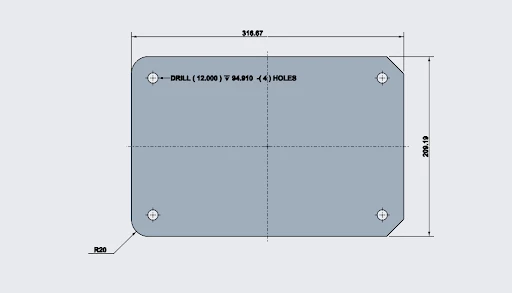
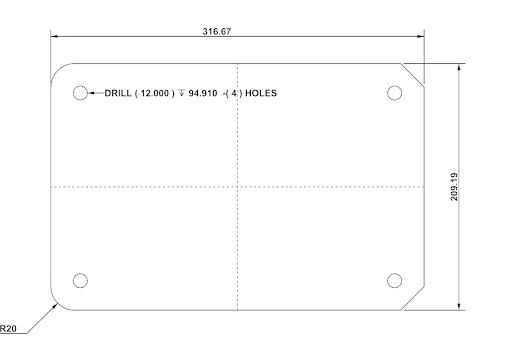
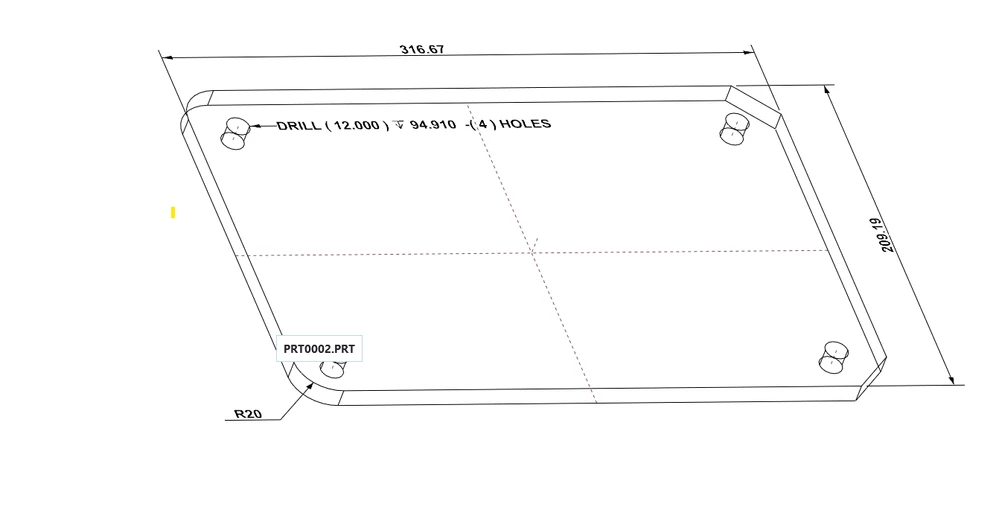
hole center mark not display after pvz export (MBD)
  • December 6, 2024
  • 1 reply
  • 748 views

hole center mark not display after pvz export (MBD)After Export PVZ.pngAfter pvz axis display but Not Center mark.pngBefore PVZ export (MBD).png

Best answer by RushikeshJ

In Creo Parametric, (not only the Hole feature) for any datum axis, when the axis is normal to the screen, user will be able to see it as mark lines (vertical and horizontal).

Unfortunately, those mark lines do not really exist, and it is special visual effect calculated & provided only in Creo Parametric.

In Creo View Client, such calculation & visual effect does not exist yet, and only the datum axis itself will be displayed.

Currently, it is not possible to export center marks for holes in the PVZ format.

1 reply

Community Moderator
December 11, 2024

Hi @RushikeshJ,

Thank you for your question. 

Your post has not yet received any response. I am replying to raise awareness. Hopefully, another community member will be able to help.

Also, feel free to add any additional information you think might be relevant. 


Regards,

Vivek N
Community Moderation Team.

RushikeshJ12-AmethystAuthorAnswer
12-Amethyst
January 8, 2025

In Creo Parametric, (not only the Hole feature) for any datum axis, when the axis is normal to the screen, user will be able to see it as mark lines (vertical and horizontal).

Unfortunately, those mark lines do not really exist, and it is special visual effect calculated & provided only in Creo Parametric.

In Creo View Client, such calculation & visual effect does not exist yet, and only the datum axis itself will be displayed.

Currently, it is not possible to export center marks for holes in the PVZ format.