
10-Marble
November 18, 2022
Solved

rotate text around circle

  • November 18, 2022
  • 3 replies
  • 3956 views

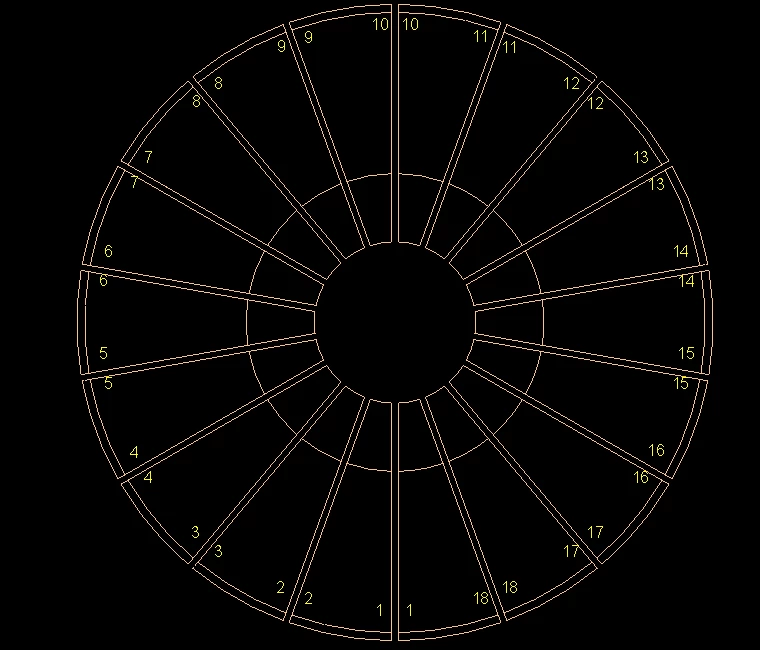
I have a UDF which creates cuts and automatically numbers the cuts around a circular part.  The numbers are in the correct place, but I want them to be rotated so they are readable from the center.  Is there a way to do this? udf.PNG
Best answer by tbraxton

Start here:


https://www.ptc.com/en/support/article/CS254748 


This is a practical example with model to query. It is linear but the approach will be the same.


https://community.ptc.com/t5/3D-Part-Assembly-Design/text-repetition/m-p/697310 

3 replies

23-Emerald III
November 18, 2022
tbraxton
22-Sapphire II
22-Sapphire II
November 18, 2022

If I understand your design intent, then you can place the text along a circle. Create the circle to locate the text first and then use it to locate & orient the text.


tbraxton_1-1668782741507.png


tbraxton
22-Sapphire II
22-Sapphire II
November 19, 2022

This will orient the text as you intend.


tbraxton_0-1668874529716.png


DCG10-MarbleAuthor
10-Marble
November 21, 2022

Thank you all for your responses.  My numbers are not text in a sketch, they are notes.  It is part of a pattern, as the quantity needs to be adjustable.  Each note is placed at the end of a short curve that is in the first instance of the pattern.  

DCG_0-1669037425977.png

I can unplace the note and replace it with orientation, but there is no way to automatically rotate it.  

DCG_1-1669037866833.png


kdirth
21-Topaz I
21-Topaz I
November 18, 2022

Your text appears to be constrained vertical.  I would suggest making it parallel to the cut edges.

There is always more to learn.