

Creo Simulate - Advice on constraining model for mechanical stress calculation
Hi all,
Using Creo 4.0
I would like to ask some advice about how you would constrain this (red brownish) U shaped bracket for the shown load situation.
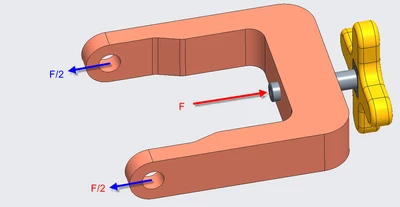
The bracket has 2 holes with a pin in it (so it can rotate). Both holes are loaded with force F/2.
Force F is applied on a bolt that is placed in a screwthreaded hole in the bracket.
I have modeled the bracket like this:
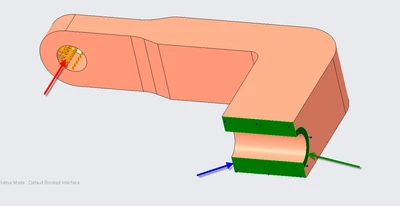
For the pin hole, I use a bearing load with force F/2.
I use a displacement constrain to implement symmetry on the cutting surface:
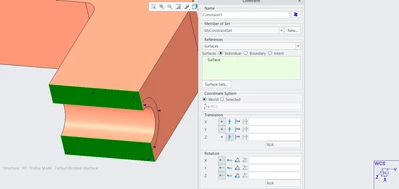
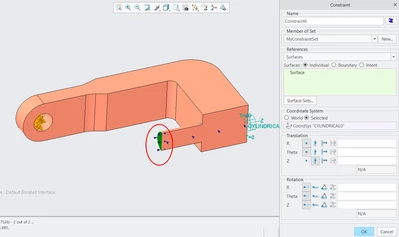
I use a surface region to constrain in the axial direction of the screw hole. (cylindrical CS).
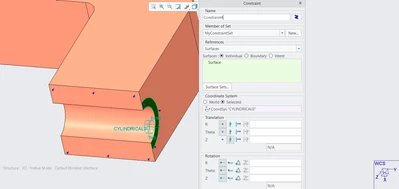
This model calculates fine, but as can be expected, I have a stress peak at the side of the surface region.
Not sure if that is entirely realistic.
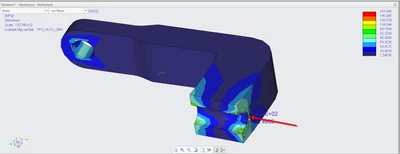
A slightly different approach is to exchange the screw hole by an 'embedded' bolt, and constrain the tip of the 'bolt':
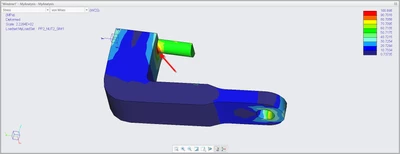
This results in a (lower) stress peak at the indicated spot below. Perhaps a bit more realistic than my first attempt above.
Would you model this in a different way?
PS. Part file attached in case you want to have a go at it.