
1-Visitor
September 22, 2015
Solved

Pattern numbers

  • September 22, 2015
  • 2 replies
  • 20759 views

I am trying to find a way to create a grid of sequential numbers, eg.

1 2 3 4

5 6 7 8


It doesn't matter if its done in a model, assembly, or sketch as long as it counts from 1 to what ever number I choose.

It doesn't matter if its geometry or cosmetic as long as it shows up where it should be located in the drawing. (No linguistic note tricks)


This is for engraving location numbers on a flat plate. Surely someone has run into this before and has work around.

If this is a repeat question please direct me to the answer as I was unable to find it.

Thanks for any help in advance.
Best answer by rcook

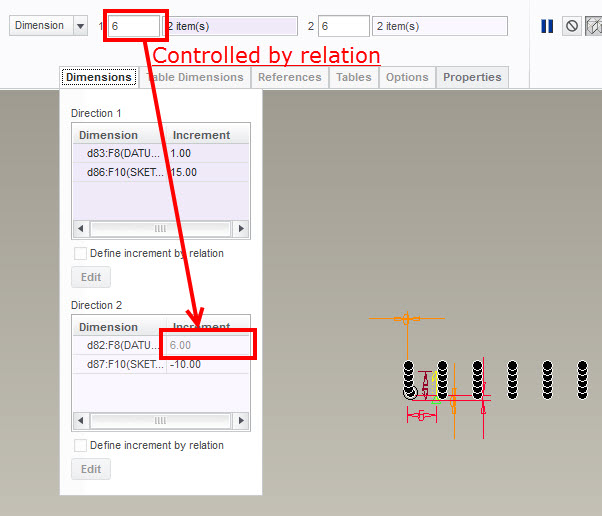
One more small refinement. I added a relation to tie the increment of the rows to the number of columns. As it was, you had to manually match the two. Now all you need to do is change the number of pattern instances to set how many rows/columns you want. Everything else follows (after a regen).

patterns.jpg

2 replies

22-Sapphire I
September 22, 2015

Brian,

Check attached video, I hope that will help you.

24-Ruby III
September 23, 2015

Mahesh,

nice video . I would suggest to create a "group" of 1234 (firstly) and pattern it (secondly).

MH

22-Sapphire I
September 23, 2015

That can also be done. I appreciate your inputs.

bhale1-VisitorAuthor
1-Visitor
September 24, 2015

Here is the video as an attachment for those that need it.

If you cannot read it here is the formula I used as well.

foo=length:FID_1_COUNT + (10*(length:FID_10_COUNT - 1))

1-Visitor
June 21, 2017

I just used your video and it worked like a charm. However, I need to have one pattern as you show it 1-50 and then another pattern 51-100. How do I start the second pattern.

Thanks,

Eric

2017-06-20 - huffmaej 0002.jpg

24-Ruby III
June 21, 2017

Hi,

simply repeat the same procedure once again using following relation

foo=length:FID_1_COUNT + (10*(length:FID_10_COUNT - 1)) + 50

MH