
14-Alexandrite
January 20, 2012
Solved

Custom tabs in Creo Parametric

  • January 20, 2012
  • 3 replies
  • 9433 views

Hi All

It is possible set Custom Tabs on startup of Creo Parametric? - see picture:
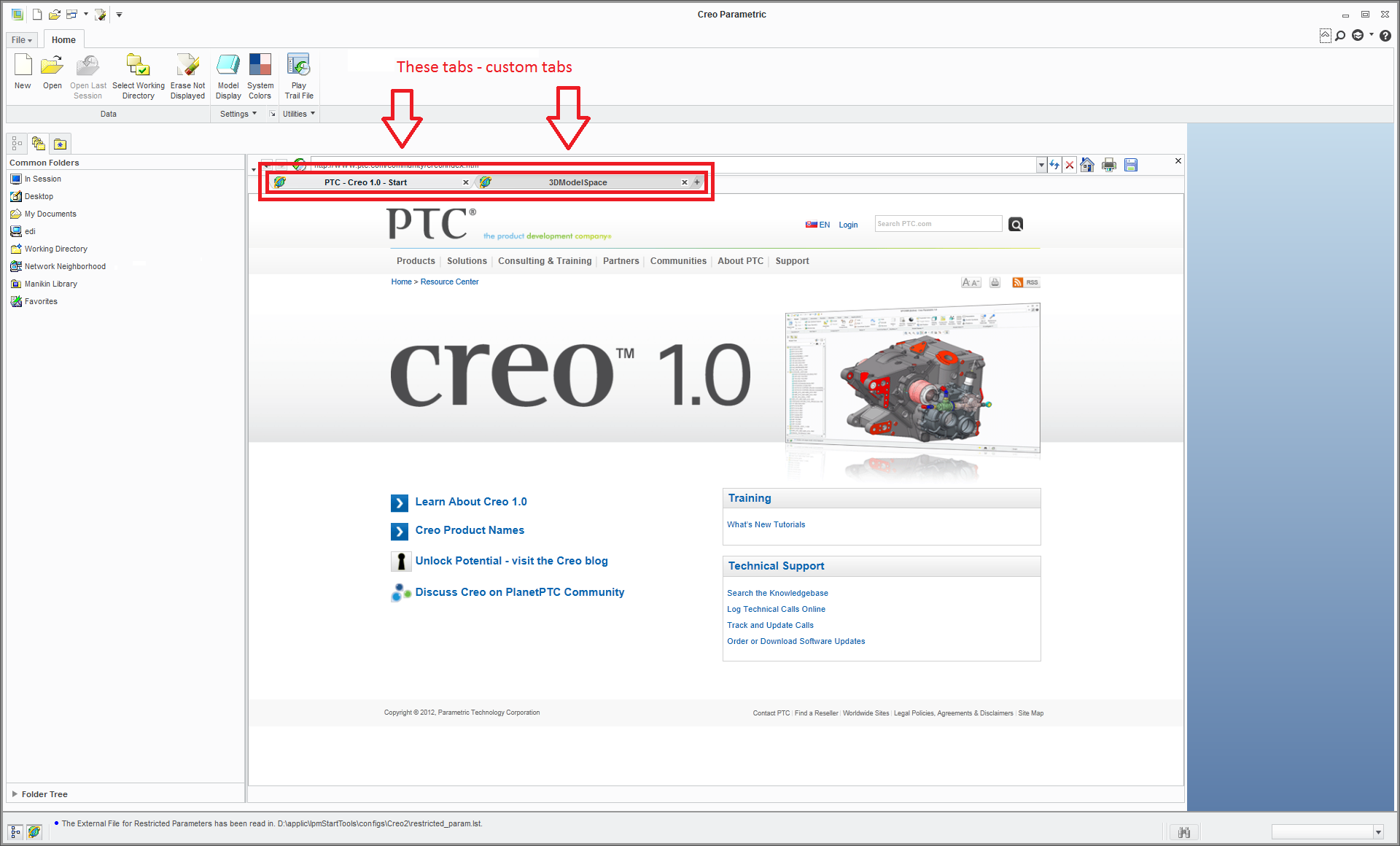
custom tabs.png

Note: configuration option: web_browser_homepage set only one tab (it is possible set more tabs? Can also be permanently turned on.)

Thanks, Vladimir

    Best answer by VladimirPalffy

    Hi all

    This is answer from PTC Technical Support:

    << Currently it is not possible to added new browser tab per default when starting Creo Parametric, as workaround create a Mapkey to make the steps faster.

    Currently it is only possible to disable the second tab "3Dmodelspace" display when starting, to do it set the config.pro option:
    'enable_3dmodelspace_browser_tab' to 'no'. >>

    3 replies

    24-Ruby III
    February 3, 2012

    Hello!

    Vladimir Palffy wrote:

    ...It is possible set Custom Tabs on startup of Creo Parametric?...

    Vladimir, did you find a solutoin?

    14-Alexandrite
    February 3, 2012

    Hello Vladimir

    No, I do not have a positive solution / the answer

    VladimirPalffy14-AlexandriteAuthorAnswer
    14-Alexandrite
    April 20, 2012

    Hi all

    This is answer from PTC Technical Support:

    << Currently it is not possible to added new browser tab per default when starting Creo Parametric, as workaround create a Mapkey to make the steps faster.

    Currently it is only possible to disable the second tab "3Dmodelspace" display when starting, to do it set the config.pro option:
    'enable_3dmodelspace_browser_tab' to 'no'. >>

    13-Aquamarine
    April 24, 2012

    Hi Vladimir...

    You could try the technique I suggested to another user for automatically running a trail file at the start of each Creo session. This could take the place of yoiur mapkey and automatically set the proper tabs upon startup. If this sounds like something you want to try, let me know.

    Here's the link to the other thread... <Click Here>

    As a side note, I've done some other research...usually in Mozilla (Firefox), you can set multiple tabs to open automatically. If you set your windows_browser_type option to mozilla_based_browser, you can gain access to the mozilla browser options from the File->Options->Window Settings->Mozilla Browser Options button. This allows you to set all sorts of multiple tab options... of course none of the settings in this window seem to do much. This makes you wonder why they bothered giving you access to this browser options tool at all.

    There are also options for opening multiple tabs in Internet Explorer. In fact, there are some command line options you can add to both apllications to start with multiple tabs. Inexplicably, all of these have been disabled.

    However, if you go to your browser favorites panel, you can create a custom folder called Startup (or something similar). Create favorites and store them in this folder. Then, right click on the folder name and select Open in Tab Group. Multiple tabs will pop open with your favorites pre-loaded.

    Of course, there's no fancy way to set this as the default. I've tried every trick I can think of to "fool" Creo into doing what I want. The best suggestion is to either make a mapkey... or make an automatically executing trail file and use it to perform the Open in Tab Group function when Creo starts.

    If anyone else has any tricks, please toss 'em up here!

    Thanks!

    -Brian

    14-Alexandrite
    April 24, 2012

    Hi Brian

    Thanks for the tip.

    I use trail file on startup - it is real quick command

    I'll try your tips with browser, thanks.

    Vladimir

    13-Aquamarine
    April 24, 2012

    If we just had default Mozila functionality, multi-tabbed startup wouild be possible. In Mozilla if you specify multiple start pages with the "|" between them, they'll be opened in separate tabs.

    I tried setting the web_browser_homepage to "http://google.com|http://yahoo.com|http://msn.com" which should have opened 3 tabs (one google, one yahoo, and one MSN) but Creo didn't recognize the "|" symbol no matter what I tried.

    Good luck with this!! Sorry there wasn't a better solution!

    Thanks!

    -Brian