
1-Visitor
June 7, 2017
Solved

How can I set the layer status for all drawing views

  • June 7, 2017
  • 3 replies
  • 16948 views

I have a hose routing drawing with 8 pages and round about 40 views and need set the layer status for all acc. to xxx.drw


I started to set them view by view with "Copy status from drawing" but this is really annoying especially when you have to wait 10min for regeneration after every change due to "drawing size".


Is there a possiblity to set the layer status for all views in one step acc. to the defined status for the drawing? (Remove of independency for views)
Best answer by StephenW

You can not set both for any single view. They have to be drawing dependent or view dependent.

To change a view back to drawing dependent once it has been set to view dependent: (creo 3 although I think it's the same for creo 2)

1. change to layer tree.

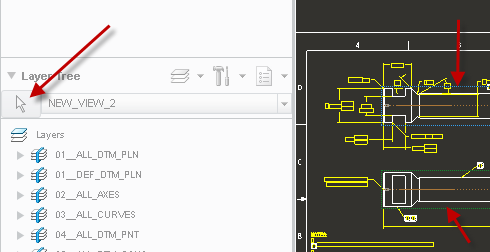
2. push the arrow next to drop down. notice how one view has a green outline and one has a blue outline. (on my color scheme, this may vary if you have a different color scheme). green outline means the view has it's own layer control, blue means its layers are drawing dependent.

3. select the view you want to make drawing dependent (the ones with the green outline). If you pick one with the blue outline, it will change it's layers scheme to view dependent.

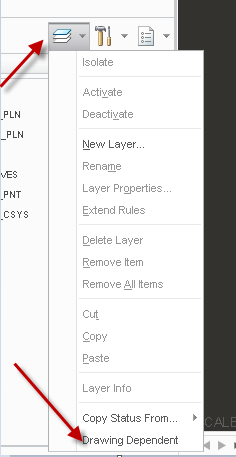
4. select the layer drop down arrow, select the option drawing dependent, select yes (in the popup) to convert to drawing dependent.

5. repeat for all views that have the green outline. Once all views have the blue outline, you will be controlling all views by the drawing layers.

3 replies

12-Amethyst
June 7, 2017

I wonder how all the views came to be layer-independent if this isn't wanted.  But leaving that aside, no, there isn't a way to make multiple views be no layer-independent at once.  However, there is a config option 'auto_regen_views no' which does block/delay regeneration for some actions, which may include telling a view to be drawing dependent.  (I think it does, but I don't know for sure, and don't have the time to test it).  So try that -- set auto_regen_views no, and see if you can skip the 10min regen as you go from view to view, and then Update Sheets at your leisure after.

1-Visitor
June 8, 2017

It's so easy to make a view that is layer-dependent, to be layer-independent - just select it from the view list in the Layers dialog box.

It happens automatically and without undo ability.  I would say it's a nasty bug.

There is a product idea about it: Layer status of view should not change when view layer is selected.

23-Emerald III
June 8, 2017

I agree. I think maybe you meant this idea or at least the part at the end where it gave you a "are you sure?" dialog popup  Easy way to make a layer status of a drawaing view dependent to rest of the drawing

The one you linked to is a little different, more about not resetting all the layers when you do intentionally change to independent view control.

StephenW23-Emerald IIIAnswer
23-Emerald III
June 7, 2017

You can not set both for any single view. They have to be drawing dependent or view dependent.

To change a view back to drawing dependent once it has been set to view dependent: (creo 3 although I think it's the same for creo 2)

1. change to layer tree.

2. push the arrow next to drop down. notice how one view has a green outline and one has a blue outline. (on my color scheme, this may vary if you have a different color scheme). green outline means the view has it's own layer control, blue means its layers are drawing dependent.

3. select the view you want to make drawing dependent (the ones with the green outline). If you pick one with the blue outline, it will change it's layers scheme to view dependent.

4. select the layer drop down arrow, select the option drawing dependent, select yes (in the popup) to convert to drawing dependent.

5. repeat for all views that have the green outline. Once all views have the blue outline, you will be controlling all views by the drawing layers.

1-Visitor
June 7, 2017

If you want to go faster, go to the assembly and move the insert point to the top. This will temporarily suppress everything. Pay no attention to the displacement or disappearance of drawing graphics, such as dimensions and symbols. Then set the layer status on the views. Then go back to the assembly and Cancel the insert. Then go back to the drawing. Do this just before lunch. When you get back it should all be as you wish.

23-Emerald III
June 7, 2017

Yes, only one big view regen...likely a big time saver.

1-Visitor
June 8, 2017

At least this way it's not a babysitting job that interrupts things 40 times. At 10 minutes a shot and 40 views that would be almost 7 hours, so maybe it's a really long lunch.