

10-Marble
September 17, 2024
Solved

Circuit ODE set up and solution - symmetrical faults

  • September 17, 2024
  • 1 reply
  • 6877 views

I have the step by step hand calculations for this type of problem but I really would like to learn the ptc Mathcad analysis for it and somehow the ODE Mass Spring problem doesn't help me make the connection. Could someone please help get me started with this?

Best answer by Werner_E

Older versions of Prime would not have allowed to evaluate a solve block with "Find" symbolically, but Prime 9 does.

But you can't symbolically evaluate a solve block with "odesolve". "odesolve" relies on numerical algorithms and will never return a symbolic result.

If you need a symbolic solution for an ODE, you can't use a solve block with "odesolve" but rather a symbolic evaluation with "solve" as shown in the help here: Solving ODEs Symbolically

Keep in mind that this feature is new and a work in progress. Don't expect it to provide solutions for more complicated ODEs. Nonetheless its worth to give it a try.

But then, are you sure that you really need a symbolic solution?

If you just want to play around and compare the results with different input values you could also use a parametrized solve block.

For example the example from the help: Solving ODEs

Lets make the coefficients of x'' and x and also the first initial value x(0) a variable. As you can see we can turn the solve block into a function x(...).
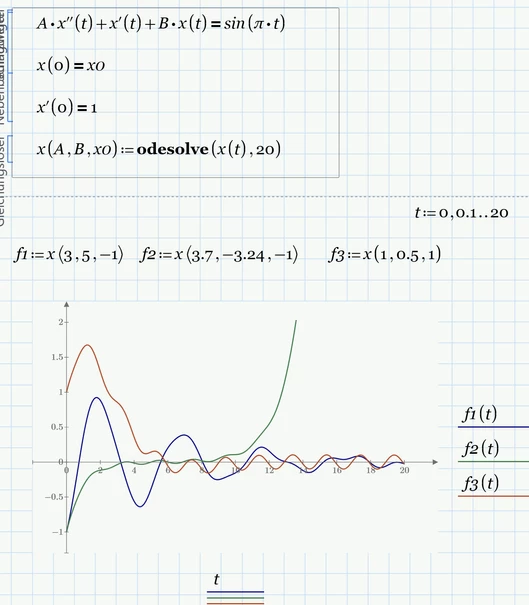
Werner_E_0-1726704757522.png

f1 is the function as given in the help, the other two stem from the same ODE but with different coefficients and initial condition.


1 reply

23-Emerald IV
September 18, 2024

You should state that you're using Prime 9...

Looks like homework, so YOU have to do it.


Look up the help information ( "?" in the top right corner of the Prime window ) on solving ODE's:

- using a solve block ( Solve blocks => Solving ODE ).

- symbolically ( Symbolics => Symbolic evaluation => Solving ODE's symbolically ).

If you experience problems, come back here with at least an attempt to your solution.


Success!
Luc

cadtelsim10-MarbleAuthor
10-Marble
September 18, 2024

Hi Luc,


Thank you for your response. I should clarify that I am indeed using Mathcad Prime 9 for my analysis, and was not previously aware that this version might lack some functionalities, such as support for solve blocks. Could you please advise on how I might access a version of Mathcad that retains full functionality? 


I appreciate your concern regarding the nature of my query as homework-related. To clarify and ensure that my request for assistance is only due to my interest in effectively applying Mathcad to these types of problems, I attach my complete solution for your viewing. 


I have reviewed your solution to the similar problem you directed me to, but I am still struggling to make the connection, particularly in understanding the equations you used for your matrix setup. Any guidance or starting points you could provide would be greatly appreciated.


Thank you for your time and help.


Best regards,


25-Diamond I
September 28, 2024

@cadtelsim wrote:

Hi, Could you please see why this plot doesn't show up. I'm using Prime 10 and I've checked all the units. Thank you. 

It pulls up with Python, but I can't get it in Mathcad


?????

The sheet you posted just showed an error because of "Column_B" being an undefined variable, but I cannot spot any attempt to make a plot!!!


Basically you have two option to make a plot. Either provide a vector of values for the x- and y-axis each, or you define a function which you then plot, probably by defining a range for the x-values.

Here is an approach using the first variant by creating vectors for both axis:

Werner_E_0-1727564173039.png


BTW, this thread is getting a bit confusing. I think it would be more appropriate to open a new one for further questions. This also has the advantage for you that a new thread is usually given more attention.

Prime 10 sheet attached


EDIT: Added grid lines

Werner_E_1-1727565462688.png