6-Contributor
Jun 9, 2025 8:13 AM UTC
Solved

Copy paste in combo box

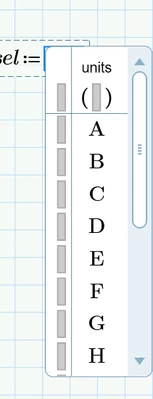
How do I copy paste large data in first column of combo box? Rest columns I am able to copy paste the data but first column how to do that?

BT_10780541_0-1749456726940.png


Werner_E
Werner_EAnswer
25-Diamond I
Jun 11, 2025 7:20 PM UTC

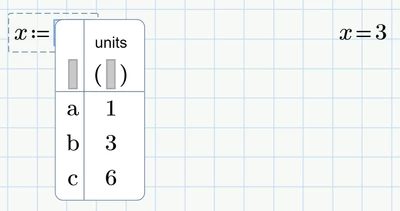
The expressions in the very first column are used for display when a user selects an item from the combo box. The second column is the first data column.

If the very first column is empty, the values in the first data column are used for display. Often this suffices.


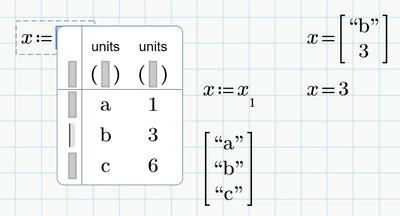
If it doesn't because you want text to be displayed and numerical values returned, you may misuse the first data column for the text labels and the second data column for the actual data returned. Because the combo box would return now a vector of values, you will have to select the actual data value from that vector.

Here an example.

Instead of
Werner_E_0-1749669226215.png

you may use

Werner_E_2-1749669282069.png

The index 1 used is only valid if ORIGIN is at its default value 0. You may use "ORIGIN+1" instead of "1" to be on the safe side.

The first data column (a,b,c) was created using copy& paste with the vector of strings you see in the picture.


I have no idea why copy & paste is not allowed for the very first column of labels, but then copy & paste is broken in other ways, too in Prime.


You might also consider using a scripted listbox instead of the combobox


3 replies

6-Contributor
Jun 10, 2025 1:21 PM UTC

Hello,


Is this doable in Mathcad Prime? Any comments would be helpful

Translate
Community Moderator
Jun 13, 2025 8:29 AM UTC

Hello @BT_10780541, 


It looks like you have a response from our community champion. If it helped you solve your question, please mark the reply as the Accepted Solution. 

Of course, if you have more to share on your issue, please let the Community know so other community members can continue to help you.

Thanks,
Vivek N.
Community Moderation Team.

Translate
Werner_E
Werner_E25-Diamond IAnswer
25-Diamond I
Jun 11, 2025 7:20 PM UTC

The expressions in the very first column are used for display when a user selects an item from the combo box. The second column is the first data column.

If the very first column is empty, the values in the first data column are used for display. Often this suffices.


If it doesn't because you want text to be displayed and numerical values returned, you may misuse the first data column for the text labels and the second data column for the actual data returned. Because the combo box would return now a vector of values, you will have to select the actual data value from that vector.

Here an example.

Instead of

Werner_E_0-1749669226215.png

you may use

Werner_E_2-1749669282069.png

The index 1 used is only valid if ORIGIN is at its default value 0. You may use "ORIGIN+1" instead of "1" to be on the safe side.

The first data column (a,b,c) was created using copy& paste with the vector of strings you see in the picture.


I have no idea why copy & paste is not allowed for the very first column of labels, but then copy & paste is broken in other ways, too in Prime.


You might also consider using a scripted listbox instead of the combobox


Translate