
1-Visitor
April 4, 2025
Solved

Creating Table in Mathcad Prime 8

  • April 4, 2025
  • 2 replies
  • 900 views

Good Morning, Community,

Would anybody be kind enough to help me on how to create a table in Mathcad Prime 8. Please see below.

Thank You,


Boyer

Best answer by Werner_E

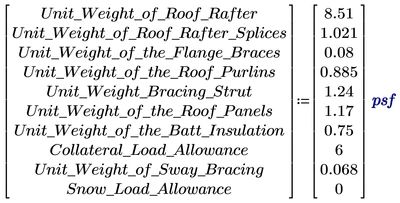
You have to define the variables you are using !!

E.g..:
Werner_E_0-1743788417462.png

Then you can use the variable names in the Prime table you created. But you won't see the values in the table itself but the variable Unit_Wt will contain the correct values.
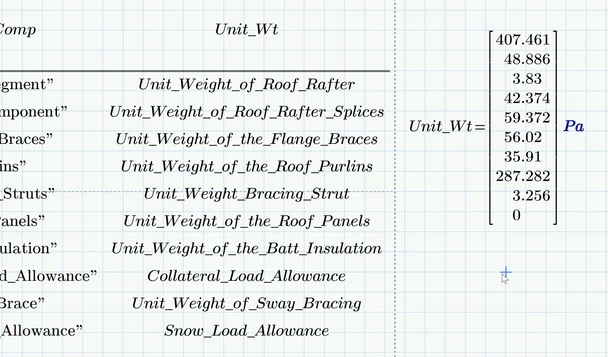
Werner_E_1-1743788526160.png

Keep in mind that a table in Prime is only for manual input of variables, not for displaying results.


If you need to display results in a comparable manner you may create a Prime matrix.
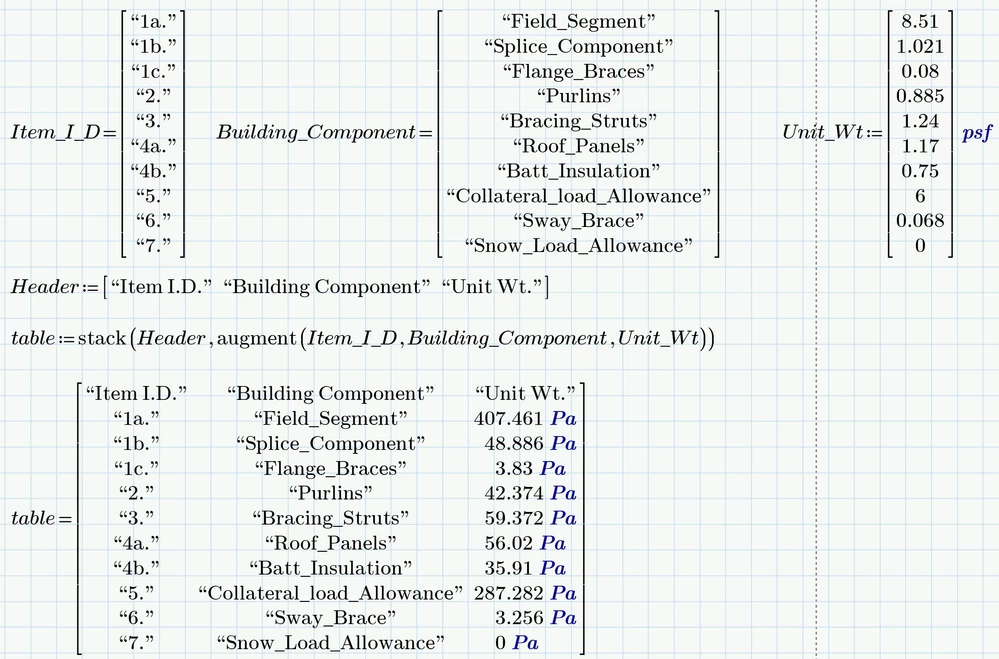
Werner_E_2-1743788882273.png

There is no way to format the table any nicer, you even can't control or change the unit inside of the matrix.

To cope with the latter you may do like this
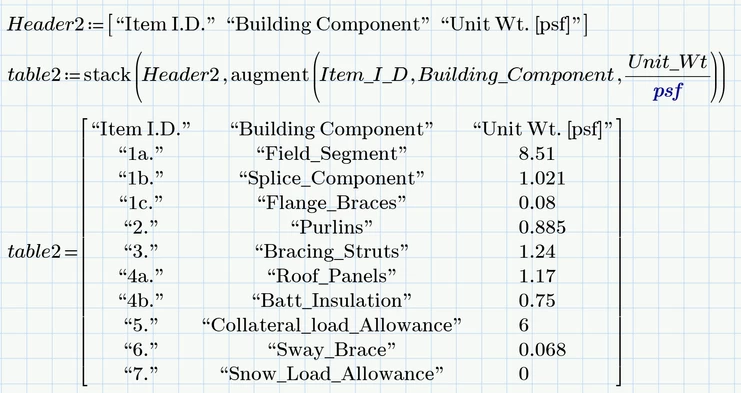
Werner_E_3-1743788983614.png


If you need a nicer looking display you may consider inserting an Excel component and display the results there. You have all cell formatting capabilities of Excel at hand because you actually are using Excel (and so of course you must have Excel installed on your machine).


Don't have Prime 8 so I can't attach a worksheet you can read.

Attached worksheet is in P9 format


2 replies

Werner_E25-Diamond IAnswer
25-Diamond I
April 4, 2025

You have to define the variables you are using !!

E.g..:

Werner_E_0-1743788417462.png

Then you can use the variable names in the Prime table you created. But you won't see the values in the table itself but the variable Unit_Wt will contain the correct values.

Werner_E_1-1743788526160.png

Keep in mind that a table in Prime is only for manual input of variables, not for displaying results.


If you need to display results in a comparable manner you may create a Prime matrix.

Werner_E_2-1743788882273.png

There is no way to format the table any nicer, you even can't control or change the unit inside of the matrix.

To cope with the latter you may do like this

Werner_E_3-1743788983614.png


If you need a nicer looking display you may consider inserting an Excel component and display the results there. You have all cell formatting capabilities of Excel at hand because you actually are using Excel (and so of course you must have Excel installed on your machine).


Don't have Prime 8 so I can't attach a worksheet you can read.

Attached worksheet is in P9 format


1-Visitor
April 4, 2025

My Special Thanks as always Werner.


Thank You,


Boyer