
4-Participant
August 23, 2018
Solved

MathCAD Prime Data export to excel

  • August 23, 2018
  • 1 reply
  • 15327 views

Ultimately, I am trying to compare a plot developed on MathCAD to some experimental results that have been processed in MATLAB.

Since I could not find a way to transfer data between the two, I thought to export both sets of data to Excel and plot them on top of each other there.  I had no issue exporting the data from MATLAB.  MathCAD Prime 4.0 however, is proving more difficult.

The plot was created using a range and expressions that refer to that range.  I uploaded a sample code that demonstrates the issue.

It appears that I cannot use the excel component to write an expression based on a range, though I can write the range itself.  Is there a way to transfer the values of my expression to a vector so that I can export to excel, without re-writing the previous expressions that lead up to my final expression?

Thanks
Best answer by Werner_E

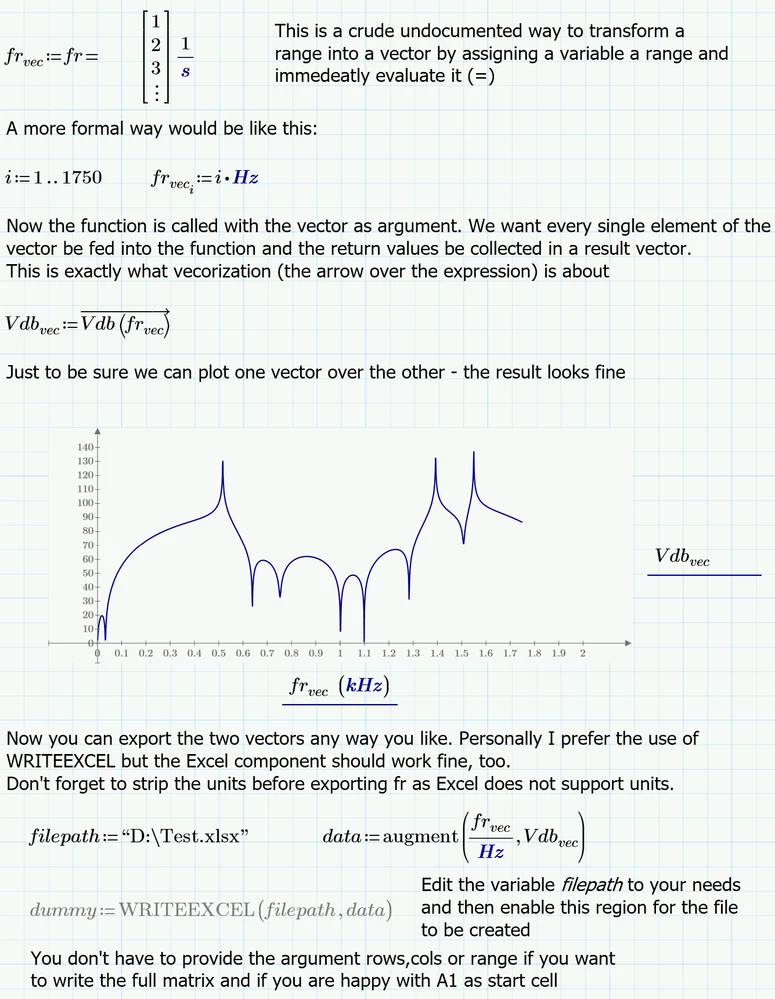
Here is one possible way

B.png

1 reply

24-Ruby IV
August 24, 2018

Use please not a range variable but a vector!

See please the attach

cgenger4-ParticipantAuthor
4-Participant
August 24, 2018

Thanks, but this is not the solution I was looking for.  I asked:

Is there a way to transfer the values of my expression to a vector so that I can export to excel, without re-writing the previous expressions that lead up to my final expression?

The vector approach doesn't work for my calculations for a separate reason.  If there is no way to achieve what I'm looking for here, then perhaps we can get into how to do matrix multiplication with elements that are built from vectors instead of ranges...


25-Diamond I
August 24, 2018

What your sheet suffers from is misuse of ranges.

Ranges should be used just for

1) define a range for plotting

2) index elements of vectors and matrices

3) for a for-loop in a program


In ALL other cases you have to use vectors, not range variables.

You may have already noticed that the results you get with your range fr are just for viewing. They are not valid Mathcad results and so you cannot even assign them to a variable.

As you can see in valery's sheet, the approach with fr as vector works fine and the results can be used for whatever you may like.

Why do you think that you cannot use a vector approach? Maybe you don't know about vectorization?

What exactly do you mean by "how to do matrix multiplication with elements that are built from vectors instead of ranges" ?