8-Gravel
June 28, 2024
Solved

Solving the Cubic equation

  • June 28, 2024
  • 3 replies
  • 6514 views

Hi,

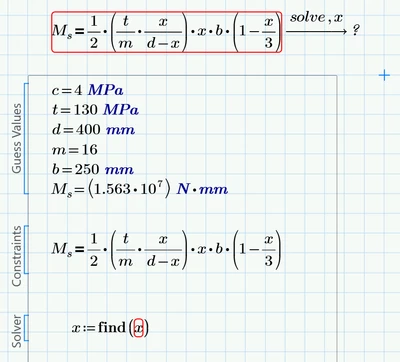
I am trying to solve a cubic equation, but I am unsure where I am going wrong. Please guide me. I manually calculated the values as follows:
x1= 1231.629mm, x2=121.978mm, x3=-153.60mm

The Mathcad file is attached : Mathcad Prime09

I tried two different method but not sure where I'm doing mistake

Ravii_0-1719563474630.png


Best answer by Werner_E

@Ravii wrote:

Will you share me the Files, I also tried this but got the error


Was done in P10 and already deleted.

Better send your failing file.

Your picture does not show which error message is thrown.

Maybe you have assigned variable x a value somewhere above. If thats the case Prime will refuse to solve for x and you would have to write clear(x) somewhere above the symbolic evaluation.


EDIT: Reopened your initial file in P9 and edited it

It includes the solution using a solve block (also with symbolic eval), using the root function and also the symbolic "solve".
All done with units.

See attached

Nonetheless it would be better if you send the failing sheet as this would enable us to help finding the reason for the erroryou experience and inform you so that you can avoid it in the future.

3 replies

21-Topaz II
June 28, 2024

Hi,

In terms of the solve block you need first a guess value for x.

Cheers

Terry

Ravii8-GravelAuthor
8-Gravel
June 28, 2024

After adding the guessed value of x, the result I'm getting seems to be incorrect. Please correct me if I am making a mistake; the value should be as I mentioned above in the post.

Ravii_0-1719566520754.png


19-Tanzanite
June 28, 2024

Check your units.  Presumably x is a length, which makes x/3 a length, but 1 is dimensionless, so (1 - x/3) doesn't compute!


If you remove all units, as in your second post, make sure they are consistent (e.g. t in MPa is not consistent with d in mm:  MPa is 10^6N/m, whereas 400 mm is 0.4 m)


Alan

25-Diamond I
June 28, 2024

Why don't you attach your worksheet and state, which version of Prime you are using!

It would help a lot lot to see what you actually are doing, if you have checked "Units(constants in symbolics" and to see what the error message is.


From the pictures no failure can be seen, apart from the missing guess value which Terry already pointed you to and apart from the wrong values in the unit-less version, which also was mentioned by Alan.

Keep in mind that a solve block never returns all three solutions, just one, depending on the guess value you provide.


BTW, you define a variable c which never is used. Thats not a failure per se, though.


Alan also pointed you to the unit mismatch in your formula and you did not show how you fixed this.

You defined d=400 mm,

I see the expression d-x in the denominator and this means that x must be a length, too.

But the last factor is 1-x/3 and because 1 is dimensionless, x must be dimensionless, too.

x can't be a length AND dimensionless at the same time.

One possible fix is (1 meter - x/3) but you have to decide if thats applicable and makes sense at all.


Ravii8-GravelAuthor
8-Gravel
June 28, 2024

Thanks, now I have added the file

25-Diamond I
June 28, 2024

@Ravii wrote:

Thanks, now I have added the file


OK, but it stills seems that your equation is not correct (when used with units; see answer above).

I guess the unit-less value for M should be 15.625*10^3, not 10^6.

Otherwise you aren't doing anything wrong.


If the results are not what you expect, you sure have to check and correct your equation!!


The "root" function or a solve block with "find" will always just return one of the three possible solutions. Which one depends on the guess value you provide.

But in newer versions of Prime you may also evaluate a solve block symbolically (a guess would not be necessary) and this will give you all three solutions.

And of course you also could use the symbolic "solve"

Werner_E_0-1719571532447.png

Clearing x is necessary because "solve" won't solve for variables which are already defined,


You may also use units, but first you would have to correct the error in your formula. In the following picture i did it the bold way by replacing the "1" with "1 m" 😉

The red error stems from Prime refusing to display large results. The result gets that large because the symbolics does not know anything about units. It does not know that MPa=10^6 Pa or that MPa*mm^3=N*mm, etc. So it treats the various units as unknown variables and can't simplify the expressions.

But you can assign the result to a variable and evaluate this variable numerically.

As you can see we get tiny imaginary parts in some of the solutions which we can get rid by just using the real parts.

Werner_E_2-1719572658875.png


You should also check this option (recalc the sheet after doing so). Primes symbolics still can't deal with units but at least the labels for the units are chosen correctly (most of the times) so we can evaluate the result numerically without getting an error.

Werner_E_3-1719572871961.png


24-Ruby III
June 28, 2024

Hi,

just question: why do you use 2 different b values in your original Cubic Equation.mcdx file ?

page no.1 ... b:=0.250

page no.2 ... b:=250


If you set the same value on both sheets then you will get the same results.


Question: Does it matter that the function is not continuous at the point 0.4 ?


25-Diamond I
June 28, 2024

@MartinHanak wrote:

Hi,

just question: why do you use 2 different b values in your original Cubic Equation.mcdx file ?

page no.1 ... b:=0.250

page no.2 ... b:=250


It obviously was an attempt to try a solution without units. It was b:=250mm

The first simply removed the units (b:=250) and the second correctly considered the base unit meter (b:=0.250).