
21-Topaz II
December 29, 2021
Solved

Why rotatemesh is in red?

  • December 29, 2021
  • 2 replies
  • 3850 views

Hello everyone,
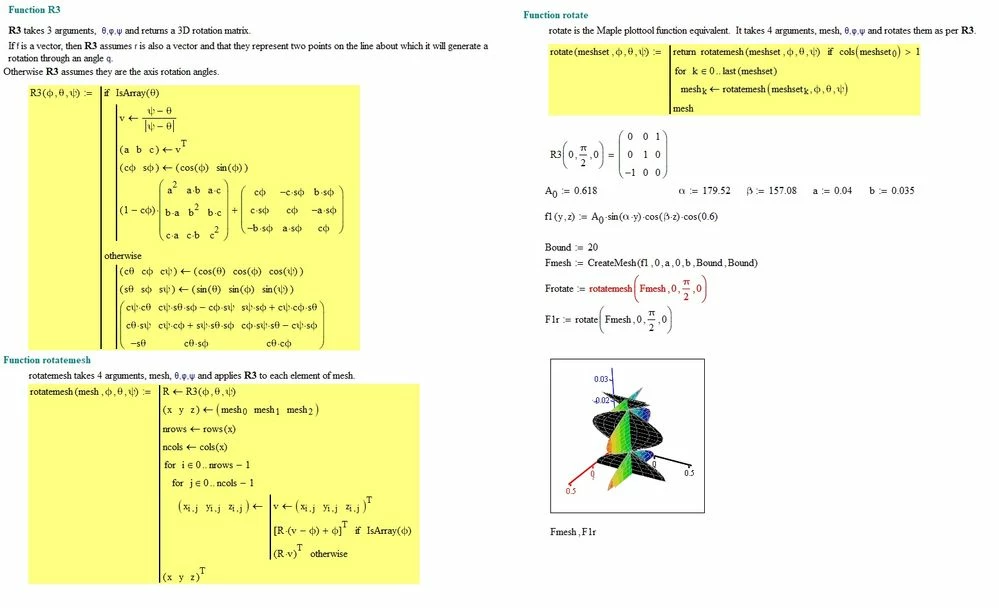
I'm trying to use the "rotate" function obtained from the "plottool" collection downloaded from this community some time ago. I would like to know why the "rotatemesh" function is marked in red as it is evident from the following figure, while the function "rotate" which utilizes it, doesn't give error?:
rotate.jpg

Best answer by StuartBruff

@-MFra- wrote:

Hello everyone,
I'm trying to use the "rotate" function obtained from the "plottool" collection downloaded from this community some time ago. I would like to know why the "rotatemesh" function is marked in red as it is evident from the following figure, while the function "rotate" which utilizes it, doesn't give error?:


Because rotate operates upon the whole 3D mesh (3x(BoundxBound)) whereas rotatemesh only operates upon an individual mesh (eg, x-y or z-x (BoundxBound)).  Try vectorizing the rotatemesh expression in Frotate.


Stuart 

2 replies

24-Ruby III
December 29, 2021

 Hi,


Please upload your worksheet.

23-Emerald V
December 29, 2021

@-MFra- wrote:

Hello everyone,
I'm trying to use the "rotate" function obtained from the "plottool" collection downloaded from this community some time ago. I would like to know why the "rotatemesh" function is marked in red as it is evident from the following figure, while the function "rotate" which utilizes it, doesn't give error?:


Because rotate operates upon the whole 3D mesh (3x(BoundxBound)) whereas rotatemesh only operates upon an individual mesh (eg, x-y or z-x (BoundxBound)).  Try vectorizing the rotatemesh expression in Frotate.


Stuart 

23-Emerald V
December 29, 2021

@StuartBruff wrote:

@-MFra- wrote:

Hello everyone,
I'm trying to use the "rotate" function obtained from the "plottool" collection downloaded from this community some time ago. I would like to know why the "rotatemesh" function is marked in red as it is evident from the following figure, while the function "rotate" which utilizes it, doesn't give error?:


Because rotate operates upon the whole 3D mesh (3x(BoundxBound)) whereas rotatemesh only operates upon an individual mesh (eg, x-y or z-x (BoundxBound)).  Try vectorizing the rotatemesh expression in Frotate.


Stuart 


Arrgggh!  Ignore the above.  That's not what's happening. 


A 3D-mesh is a 3x{mxn} nested array.  rotatemesh is designed to rotate a 3D-mesh.


Createmesh returns a nested 3D-mesh. In your instance, Createmesh returns a 1x1 array containing a 3D-mesh.   To handle nested 3D-meshes, you should use rotate, which is designed to rotate a set of 3D-meshes.   rotate will also handle a 3D-mesh and should, therefore, be used in preference to rotatemesh.


The reason vectorize works on rotatemesh(Fmesh, ...) is because the sole element of Fmesh is a 3D-mesh.   If you'd written rotatemesh(Fmesh,...) that would have worked as well.


2021 12 29 a.png


Apologies for the confusion.  I'm going to blame my responding just after I'd woken up and not having had a cup of tea. Either that or I'm just an idiot ... ☹️ 


Stuart

23-Emerald V
December 30, 2021

Yes, but, unfortunately, Prime's no longer capable of treating a set of related meshes as one object ... and I don't feel enamoured of the idea of typing in each and every one of the meshes to display several such objects.


I can't do the below in Prime.  I have to scale & translate outside of the plot then manually input each mesh into the 3D Plot.  Or, at least, AFAIA.


2021 12 30 a.png


Unless, ... just a minute ...


Doesn't solve all the problems, but ...


2021 12 30 b.png


where 

2021 12 30 c.png


Stuart