12-Amethyst
February 3, 2021
Solved

Interpolation between points in Mathcad Prime 3.0

  • February 3, 2021
  • 6 replies
  • 13786 views

Hello all,


I have datapoints, expressed in a x-vector and a y-vector.


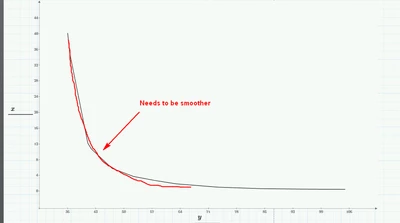
Just by plotting x and y the points are already pretty smooth. The gradient between the first x-points is very big, so I would like to smooth the curve even more. How do I do it the best way? Interpolation between points is the answer, but how to I do it in mathcad? 


I attached a mathcad prime 3.0 sheet where I try to do some tests, but without success so far.


The graph in the screenshot is already pretty accurate, but thats because I have enough datapoints.


In a worst case, where I cannot obtain enough datapoints, I would need some kind of interpolation...
 

DM123_0-1612378460493.png


The optimum would be even to reconstruct a function out datapoints. Is this possible?

I could do further analysis by having a function f(x)


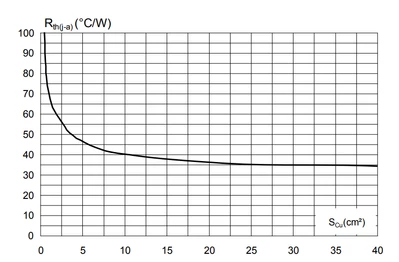
The datapoints were obtained from this graph for thermal resistance over a copper area:
 

DM123_1-1612378801689.png


Best regards!

Best answer by Werner_E

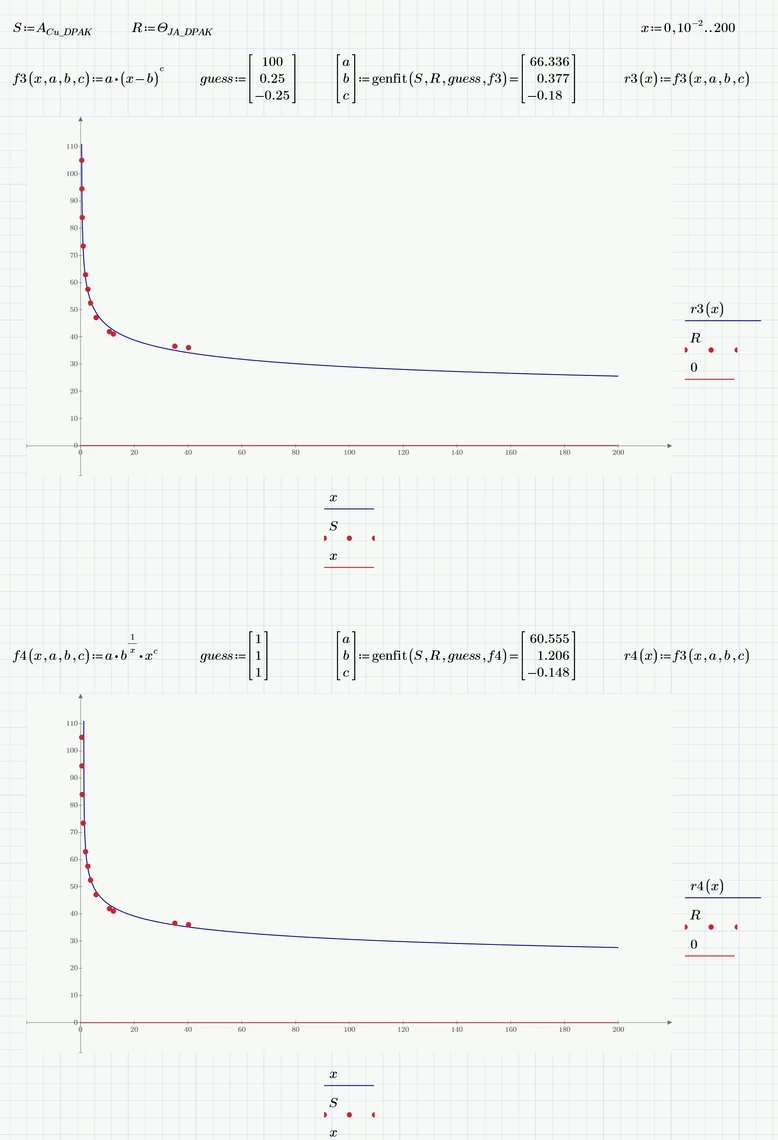
Here are two other models.

Both have the x-axis as horizontal asymptote and use just three parameters.

Werner_E_0-1612472672265.png


For playing around with different models I suggest you download the trial/evaluation version of "CurveExpert Professional". You can testdrive it (for I think 30 days) in full mode and then it falls back to a very useful mode with limited functionality which is always good enough for trying different fits for a given data set. CurveExpert will try to fit about a hundred predefined function models to your data and you may also define your own models. It sorts them for best fit and most of the times finds good guess values to come to a fitting result itself. In Prime you have to play around with the guesses yourself to get genfit do its job. Needless to say - the models above were found using CurveExpert Pro.


6 replies

25-Diamond I
February 3, 2021

The sheet you attached does not have much value without the data!

I guess that what you are looking for is not interpolation but rather some kind of regression.

Maybe some type of hyperbola or a more elaborate rational function type.

You may try "genfit" after you have settled for a specific type of regression function type.

Of course it would help if you know the type of function you can expect.


Here is a quick try using some few data optically sampled from the picture you provided.

For my convenience, I implemented it in MC 15, but it should work the same way in Prime.

Werner_E_0-1612383213793.png


23-Emerald IV
February 3, 2021

Here is my 10 ct:

LucMeekes_1-1612383505800.png

(I grabbed the data from the two vectors on the first page of your file, and assigned that to x and y, exported them using WRITEPRN and then imported it into Mathcad 11)


Success!
Luc

23-Emerald I
February 3, 2021

Ok, I had to redigitize the graph since (as Werner pointed out) you didn't send your data.


Attached is a Prime Express file and a pdf of it.  


I would expect that a log/log plot would present a straight line; it doesn't (perhaps an artifact of digitization.)  At any rate, a second order polynomial fit of the log of X and Y provides a reasonable curve.

Fred_Kohlhepp_0-1612383958541.png


  (The method of getting there is due to having only Express, so polyfit needs to be invented.)


xyz12312-AmethystAuthor
12-Amethyst
February 4, 2021

Dear Luc, Werner and Fred,


very impressive overall ðŸ˜®


I tried your solutions and attached the sheet here.

Also I included a screenshot from the original Data, but its the same as my both x- and y-arrays...


The Solution from Luc and Werner may have an issue in prime 3.0, or maybe I did something wrong? Please check. I would like to make your solutions work for me!


The solution from Fred works good within some conditions. The x-axis represents the copper area (for thermal cooling) and values bigger than 30-40 (cm^2) are practial. So within this this x-intervall the function is very good!

I played a little bit and increased the maximum x-axis until the function began to rise again (gradient rises again) and thats wrong. Anyway, for practical values its super fine 🙂


Best regards


25-Diamond I
February 4, 2021

You will have to provide the data if you want us to examine your file.

As there seems to be only 12 x- and y-values, you should better simply include them in the sheet rather than providing the Excel table:

Open your sheet and somewhere at the top after importing the data from Excel evaluate the two variables containing the data, copy the result matrix (Ctrl-C) and assign it the very same variable.


If for example the vector of x-values is called JADPAK, you would type JADPAK= and will see a matrix to the right of the equal sign. Mark it and copy it using Ctrl-C. Then Type JADPAK:= and press Ctrl-V to insert the matrix.

Now your data is embedded in the sheet and we don't need the Excel file.

16-Pearl
February 4, 2021

B splines are often useful.  While they can get you into trouble, they're often a quick way to take a lot of data and get a quick interpolation function (provided you stay within mathcad, can't really export it).  See the ptc help example here:


https://help.ptc.com/mathcad/en/#page/PTC_Mathcad_Help%2Fexample_least_square_spline.html%23wwID0EYCIS


4.0 and pdf attached

xyz12312-AmethystAuthor
12-Amethyst
February 5, 2021

Thank you DJF, 


this also works !


Best regards

xyz12312-AmethystAuthor
12-Amethyst
June 17, 2021

Hello all,


could you please help again to interpolate smoothly the following datapoints?


X-Axis   Y-Axis

10 0,76
11 0,66875
12 0,60625
13 0,56
14 0,519
15 0,4875
16 0,456
17 0,42
18 0,39
19 0,36875
20 0,348
21 0,328
22 0,312
23 0,29375
24 0,28125
25 0,263
30 0,2125
35 0,1815
40 0,15625
44 0,1375


Best regards

25-Diamond I
June 17, 2021

@xyz123 wrote:

Hello all,


could you please help again to interpolate smoothly the following datapoints?

That depends on how you would define "smooth interpolation" and what you would need the interpolation function for. For many cases a simple linear interpolation like the one shown in the next picture would suffice and be as good and suitable as any spline interpolation.

Werner_E_0-1623949999621.png

Werner_E_1-1623950109550.png


It may also be that you are looking for a regression function. If thats the case it would help to know more about the data, what process it stems from and what kind of function its assumed to be underlying.

Here are two different examples for a regression and you always may fit your own function type to the data using Mathcads genfit function as shown in the last example.

Werner_E_0-1623949867060.png

Werner_E_1-1623949885479.png