
5-Regular Member
October 19, 2017
Solved

Multivariable Regression, Curve Fitting & Surface Plots

  • October 19, 2017
  • 7 replies
  • 12961 views

Hello,


I'm looking to reduce a dataset of 25 points to a surface curve fit.  An older program (and required to be used) generated the points in question.  Rather than spending many more hours on input the values, I was hoping to get a curve fit to the equations.  Two variables of distance (x) and elevation (y) provide and output of heatflux (Q).  I'm looking to essentially extrapolate the data into a large portion of points that will undergo more transformations pending the target geometry.


However, I'm unsure how to appropriately reduce the data.  There isn't any issue with generating a x^3 curve for more than 3 points of data (as I've done before), but I'm seeming to be inputing something incorrect into MathCAD for trying to reduce the data to an appropriate approximation.


In addition, if somebody knows a way to accomplish this task in excel, that would also be benificial (though I question if excel has that power built into it).


Best answer by terryhendicott

Hi,


You mention 'extrapolation'.  For this you are best to get the equation of the surface.

This is an entirely different approach to the problem I have used professionally to determine the underlying mathematics on a surface in heating and cooling mills in plants. 


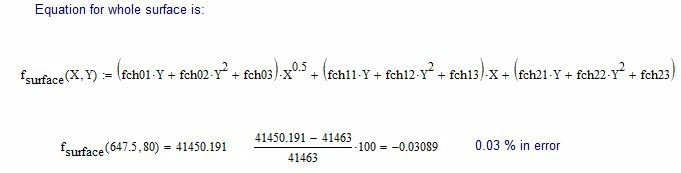
It involves determining the equation that matches the surface in one direction say the X direction.  Same equation but different coefficients at each  Y position.  Usually can be done with three coefficients in the equation.


Next you find an equations for the variation of these coefficients in terms of the Y direction.  Again only three coeffficients are necessary for each coefficient.


See mathcad sheet for how it is done.


Capture.JPG

7 replies

jroth5-Regular MemberAuthor
5-Regular Member
October 19, 2017

P.S., if anybody knows how to get multiple files uploaded that would also be great.  I keep getting a file 'type' being incorrect.  (Guess it doesn't like mcdx and xmcd files?) 

24-Ruby IV
October 19, 2017

May be this will be any help forvyou

1-1[1].png

24-Ruby IV
October 20, 2017
23-Emerald I
October 19, 2017
1-Visitor
October 20, 2017

Multidimensional fitting in Mathcad 15:

multidfit.png 

21-Topaz II
October 20, 2017

Hi,

to be complete need to answer if Excel can do it.

It can do linear interpolation in two directions.


http://www.engineerexcel.com/bilinear-interpolation-excel/


Cheers

Terry

21-Topaz II
October 20, 2017

Hi,


You mention 'extrapolation'.  For this you are best to get the equation of the surface.

This is an entirely different approach to the problem I have used professionally to determine the underlying mathematics on a surface in heating and cooling mills in plants. 


It involves determining the equation that matches the surface in one direction say the X direction.  Same equation but different coefficients at each  Y position.  Usually can be done with three coefficients in the equation.


Next you find an equations for the variation of these coefficients in terms of the Y direction.  Again only three coeffficients are necessary for each coefficient.


See mathcad sheet for how it is done.


Capture.JPG

jroth5-Regular MemberAuthor
5-Regular Member
October 23, 2017

Thank you very much to everybody for the answers.  It makes sense and I'll be able to expand on the MathCAD documents and implement in excel (as needed) for value outputs.


I did alter the numbers I used to a format of:  Q = (a + b*x + c*x^2) + (d + e*x + f*x^2)*y + (g + h*x + i*x^2)*y^2  

The equation fits the original data with less than a 0.05% error, which is pretty good.

21-Topaz II
October 22, 2017

Hi,

one more approach.  In the original Excel sheet written at the bottom is a function for Y in terms of

seven coefficients c,a1,a2,a3,b1,b2,b3. in terms of x1 and  x2.

Y = c + a1*x1 + a2*x1^2 + a3^x1^3 + b1*x2 + b2*x2^2 + b3*x2^3.

It is possible to create seven equation to determine the seven coefficients.

The resulting surface is not as close as the previous post where the form of the equation is guessed as a fit to the data.


Regards

Terry

21-Topaz II
October 22, 2017

Hi,

Obtain a good fitting equation in both directions for the surface given to 0.02% or closer is enclosed.


Capture.JPG

21-Topaz II
October 22, 2017

Hi,


Here is the calculation of the surface in Excel using the formula found in MathCad