

Prime 6 Find and Replace
It seems the Replace functionality was improved in Prime 6 to allow you to individually replace in the main text of a variable vs the subscript. That's great...I guess. However, it seems in the process they changed the functionality of Find. Let's say I have a variable like this:
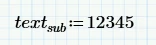
In Prime 5 I was able to find this whole variable by entering the following into the Find box.

In Prime 6 that same search finds nothing.
I can individually find "text" OR "sub" but I can't find the whole word. Find doesn't seem to want to cross the boundary between main text and a subscript. This becomes a huge pain when I want to search for a variable like this:
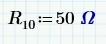
I can search for "R" OR I can search for "10" both of which are likely used countless places in my sheet.
Is there a trick that I don't know to do a Find that includes both the main text and the subscript?
Thanks,
Jon